Version compatibility: PowerSync requires Postgres version 11 or greater.
Configuring your Postgres database for PowerSync generally involves three tasks:
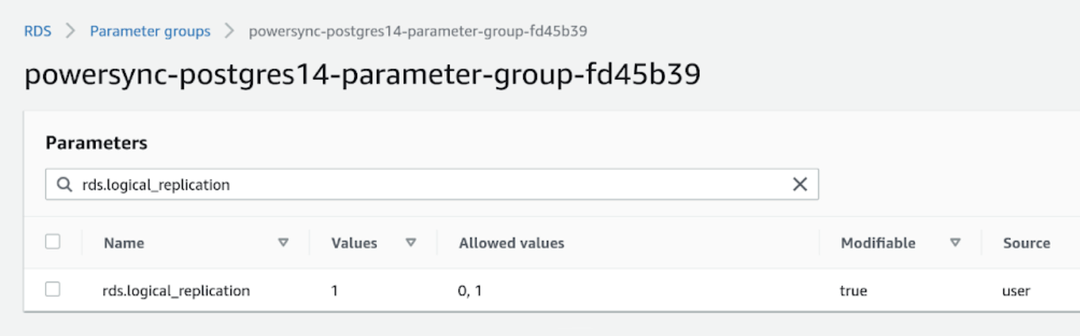
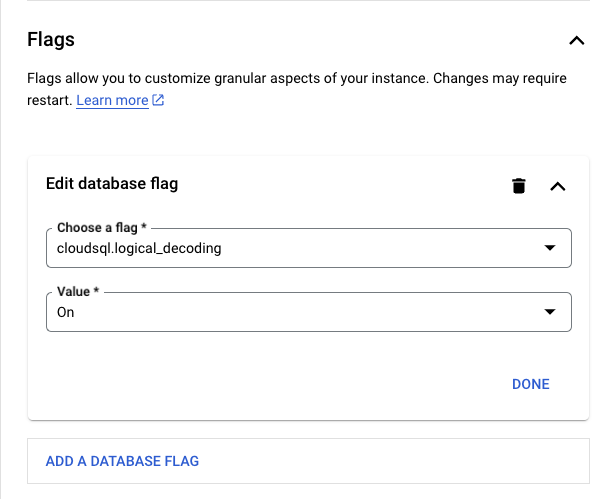
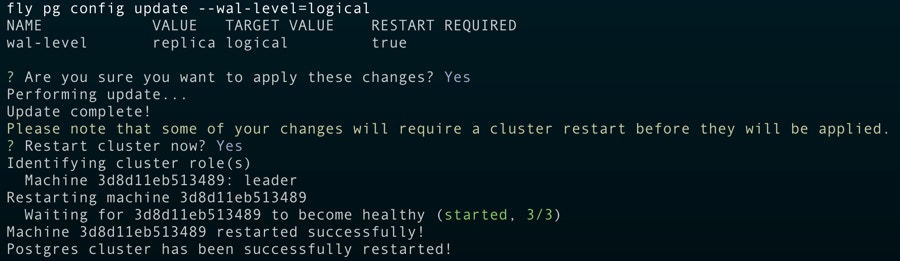
Ensure logical replication is enabled
Create a PowerSync database user
Create powersync logical replication publication
We have documented steps for some specific hosting providers:
Supabase
Try our new guided Supabase setup in the PowerSync Dashboard. It configures your Supabase project and PowerSync Cloud instance for you.Look for the Set Up with Supabase button in your instance’s Health or Database Connection view, then follow the on-screen steps.
The Set Up with Supabase button in the PowerSync Dashboard
To set up Supabase manually instead, follow the steps below.
-- Create a role/user with replication privileges for PowerSyncCREATE ROLE powersync_role WITH REPLICATION BYPASSRLS LOGIN PASSWORD 'myhighlyrandompassword';-- Set up permissions for the newly created role-- Read-only (SELECT) access is requiredGRANT SELECT ON ALL TABLES IN SCHEMA public TO powersync_role; -- Optionally, grant SELECT on all future tables (to cater for schema additions)ALTER DEFAULT PRIVILEGES IN SCHEMA public GRANT SELECT ON TABLES TO powersync_role;
To restrict read access to specific tables, explicitly list allowed tables for both the SELECT privilege, and for the publication mentioned in the next step (as well as for any other publications that may exist).
-- Create a publication to replicate tables. The publication must be named "powersync"CREATE PUBLICATION powersync FOR ALL TABLES;
Note that the PowerSync Service has to read all updates present in the publication, regardless of whether the table is referenced in your Sync Streams. This can cause large spikes in memory usage or introduce replication delays, so if you’re dealing with large data volumes, you’ll want to specify a comma-separated subset of tables to replicate instead of FOR ALL TABLES.
The snippet above replicates all tables and is the simplest way to get started in a dev environment.
-- SQL to create powersync userCREATE ROLE powersync_role WITH BYPASSRLS LOGIN PASSWORD 'myhighlyrandompassword';-- Allow the role to perform replication tasksGRANT rds_replication TO powersync_role;-- Set up permissions for the newly created role-- Read-only (SELECT) access is requiredGRANT SELECT ON ALL TABLES IN SCHEMA public TO powersync_role;-- Optionally, grant SELECT on all future tables (to cater for schema additions)ALTER DEFAULT PRIVILEGES IN SCHEMA public GRANT SELECT ON TABLES TO powersync_role;
To restrict read access to specific tables, explicitly list allowed tables for both the SELECT privilege, and for the publication (as well as for any other publications that may exist).
-- Create a publication to replicate tables. The publication must be named "powersync"CREATE PUBLICATION powersync FOR ALL TABLES;
Note that the PowerSync Service has to read all updates present in the publication, regardless of whether the table is referenced in your Sync Streams. This can cause large spikes in memory usage or introduce replication delays, so if you’re dealing with large data volumes, you’ll want to specify a comma-separated subset of tables to replicate instead of FOR ALL TABLES.
The snippet above replicates all tables and is the simplest way to get started in a dev environment.
Azure Postgres
PowerSync supports both Azure Database for PostgreSQL and Azure Database for PostgreSQL Flexible Server.
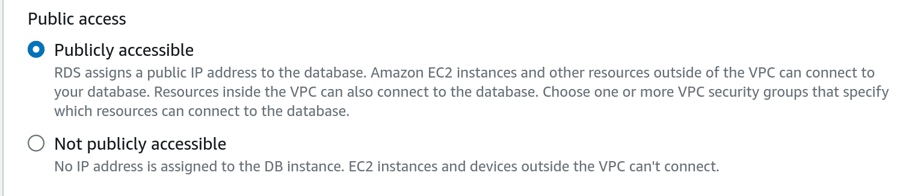
The database must be accessible on the public internet. Once you have created your database, navigate to Settings → Networking and enable Public access.
-- Create a role/user with replication privileges for PowerSyncCREATE ROLE powersync_role WITH REPLICATION BYPASSRLS LOGIN PASSWORD 'myhighlyrandompassword';-- Set up permissions for the newly created role-- Read-only (SELECT) access is requiredGRANT SELECT ON ALL TABLES IN SCHEMA public TO powersync_role; -- Optionally, grant SELECT on all future tables (to cater for schema additions)ALTER DEFAULT PRIVILEGES IN SCHEMA public GRANT SELECT ON TABLES TO powersync_role;
To restrict read access to specific tables, explicitly list allowed tables for both the SELECT privilege, and for the publication mentioned in the next step (as well as for any other publications that may exist).
-- Create a publication to replicate tables. The publication must be named "powersync"CREATE PUBLICATION powersync FOR ALL TABLES;
Note that the PowerSync Service has to read all updates present in the publication, regardless of whether the table is referenced in your Sync Streams. This can cause large spikes in memory usage or introduce replication delays, so if you’re dealing with large data volumes, you’ll want to specify a comma-separated subset of tables to replicate instead of FOR ALL TABLES.
The snippet above replicates all tables and is the simplest way to get started in a dev environment.
-- Create a role/user with replication privileges for PowerSyncCREATE ROLE powersync_role WITH REPLICATION BYPASSRLS LOGIN PASSWORD 'myhighlyrandompassword';-- Set up permissions for the newly created role-- Read-only (SELECT) access is requiredGRANT SELECT ON ALL TABLES IN SCHEMA public TO powersync_role; -- Optionally, grant SELECT on all future tables (to cater for schema additions)ALTER DEFAULT PRIVILEGES IN SCHEMA public GRANT SELECT ON TABLES TO powersync_role;
To restrict read access to specific tables, explicitly list allowed tables for both the SELECT privilege, and for the publication mentioned in the next step (as well as for any other publications that may exist).
-- Create a publication to replicate tables. The publication must be named "powersync"CREATE PUBLICATION powersync FOR ALL TABLES;
Note that the PowerSync Service has to read all updates present in the publication, regardless of whether the table is referenced in your Sync Streams. This can cause large spikes in memory usage or introduce replication delays, so if you’re dealing with large data volumes, you’ll want to specify a comma-separated subset of tables to replicate instead of FOR ALL TABLES.
The snippet above replicates all tables and is the simplest way to get started in a dev environment.
While PowerSync is connected, its replication connection keeps your Neon compute active, so the compute doesn’t scale to zero. This uses compute hours continuously, which counts toward your Neon plan’s limits.
-- Create a role/user with replication privileges for PowerSyncCREATE ROLE powersync_role WITH REPLICATION BYPASSRLS LOGIN PASSWORD 'myhighlyrandompassword';-- Set up permissions for the newly created role-- Read-only (SELECT) access is requiredGRANT SELECT ON ALL TABLES IN SCHEMA public TO powersync_role; -- Optionally, grant SELECT on all future tables (to cater for schema additions)ALTER DEFAULT PRIVILEGES IN SCHEMA public GRANT SELECT ON TABLES TO powersync_role;
To restrict read access to specific tables, explicitly list allowed tables for both the SELECT privilege, and for the publication mentioned in the next step (as well as for any other publications that may exist).
-- Create a publication to replicate tables. The publication must be named "powersync"CREATE PUBLICATION powersync FOR ALL TABLES;
Note that the PowerSync Service has to read all updates present in the publication, regardless of whether the table is referenced in your Sync Streams. This can cause large spikes in memory usage or introduce replication delays, so if you’re dealing with large data volumes, you’ll want to specify a comma-separated subset of tables to replicate instead of FOR ALL TABLES.
The snippet above replicates all tables and is the simplest way to get started in a dev environment.
-- Create a role/user with replication privileges for PowerSyncCREATE ROLE powersync_role WITH REPLICATION BYPASSRLS LOGIN PASSWORD 'myhighlyrandompassword';-- Set up permissions for the newly created role-- Read-only (SELECT) access is requiredGRANT SELECT ON ALL TABLES IN SCHEMA public TO powersync_role; -- Optionally, grant SELECT on all future tables (to cater for schema additions)ALTER DEFAULT PRIVILEGES IN SCHEMA public GRANT SELECT ON TABLES TO powersync_role;
To restrict read access to specific tables, explicitly list allowed tables for both the SELECT privilege, and for the publication mentioned in the next step (as well as for any other publications that may exist).
-- Create a publication to replicate tables. The publication must be named "powersync"CREATE PUBLICATION powersync FOR ALL TABLES;
Note that the PowerSync Service has to read all updates present in the publication, regardless of whether the table is referenced in your Sync Streams. This can cause large spikes in memory usage or introduce replication delays, so if you’re dealing with large data volumes, you’ll want to specify a comma-separated subset of tables to replicate instead of FOR ALL TABLES.
The snippet above replicates all tables and is the simplest way to get started in a dev environment.
-- Create a role/user with replication privileges for PowerSyncCREATE ROLE powersync_role WITH REPLICATION BYPASSRLS LOGIN PASSWORD 'myhighlyrandompassword';-- Set up permissions for the newly created role-- Read-only (SELECT) access is requiredGRANT SELECT ON ALL TABLES IN SCHEMA public TO powersync_role; -- Optionally, grant SELECT on all future tables (to cater for schema additions)ALTER DEFAULT PRIVILEGES IN SCHEMA public GRANT SELECT ON TABLES TO powersync_role;
To restrict read access to specific tables, explicitly list allowed tables for both the SELECT privilege, and for the publication mentioned in the next step (as well as for any other publications that may exist).
  -- Create a publication to replicate tables.
  -- PlanetScale does not support ON ALL TABLES so
  -- Specify each table you want to sync
  -- The publication must be named "powersync"
  CREATE PUBLICATION powersync
  FOR TABLE public.lists, public.todos;
Render Postgres
Logical replication can be enabled for Render Postgres but you need to contact their support team. Here are some prerequisites before contacting them:
The disk size must be at least 10 GB.
You must be on a Professional workspace or higher.
The Render support team will ask you the following:
Database user for replication (you can use the default or create a new user yourself)
Schema(s)
Publication name (only if you want them to set FOR ALL TABLES; otherwise, you’ll be able to create publications per table yourself later)
If you want to create the publication FOR ALL TABLES, you must let their support team know that you want the publication name to be powersync.Additional notes they’ll share with you:
We will reserve approximately 1/8 of your storage for wal_keep_size. This will not be available for your normal operations and will always be reserved no matter what. We will also schedule maintenance for the database to pick up the changes. It will be initially scheduled for 14 days out with a deadline of 30 days out. Once the maintenance is added, you can reschedule to any time between immediately and the deadline. If you do nothing, it will run automatically at the initially scheduled time of 14 days out.
-- Create a role/user with replication privileges for PowerSyncCREATE ROLE powersync_role WITH REPLICATION BYPASSRLS LOGIN PASSWORD 'myhighlyrandompassword';-- Set up permissions for the newly created role-- Read-only (SELECT) access is requiredGRANT SELECT ON ALL TABLES IN SCHEMA public TO powersync_role; -- Optionally, grant SELECT on all future tables (to cater for schema additions)ALTER DEFAULT PRIVILEGES IN SCHEMA public GRANT SELECT ON TABLES TO powersync_role;
To restrict read access to specific tables, explicitly list allowed tables for both the SELECT privilege, and for the publication mentioned in the next step (as well as for any other publications that may exist).
-- Create a publication to replicate tables. The publication must be named "powersync"CREATE PUBLICATION powersync FOR ALL TABLES;
Note that the PowerSync Service has to read all updates present in the publication, regardless of whether the table is referenced in your Sync Streams. This can cause large spikes in memory usage or introduce replication delays, so if you’re dealing with large data volumes, you’ll want to specify a comma-separated subset of tables to replicate instead of FOR ALL TABLES.
The snippet above replicates all tables and is the simplest way to get started in a dev environment.
See Xata’s documentation for more information on setting up logical replication with Xata.
For other providers and self-hosted databases:
Other / Self-hosted
Need help? Simply contact us on Discord and we’ll help you get set up.
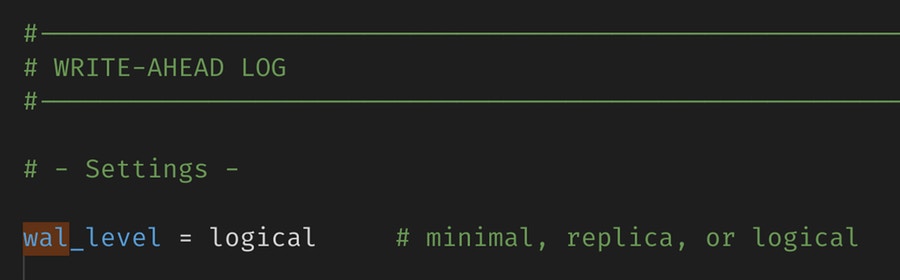
PowerSync reads the Postgres WAL using logical replication in order to create buckets in accordance with your Sync Streams.If you are managing Postgres yourself, set wal_level = logical in your config file:
Alternatively, you can use the below SQL commands to check and ensure logical replication is enabled:
-- Check the replication typeSHOW wal_level;-- Ensure logical replication is enabledALTER SYSTEM SET wal_level = logical;
Note that Postgres must be restarted after changing this config.If you’re using a managed Postgres service, there may be a setting for this in the relevant section of the service’s admin console.
-- Create a role/user with replication privileges for PowerSyncCREATE ROLE powersync_role WITH REPLICATION BYPASSRLS LOGIN PASSWORD 'myhighlyrandompassword';-- Set up permissions for the newly created role-- Read-only (SELECT) access is requiredGRANT SELECT ON ALL TABLES IN SCHEMA public TO powersync_role; -- Optionally, grant SELECT on all future tables (to cater for schema additions)ALTER DEFAULT PRIVILEGES IN SCHEMA public GRANT SELECT ON TABLES TO powersync_role;
To restrict read access to specific tables, explicitly list allowed tables for both the SELECT privilege, and for the publication mentioned in the next step (as well as for any other publications that may exist).
-- Create a publication to replicate tables. The publication must be named "powersync"CREATE PUBLICATION powersync FOR ALL TABLES;
Note that the PowerSync Service has to read all updates present in the publication, regardless of whether the table is referenced in your Sync Streams. This can cause large spikes in memory usage or introduce replication delays, so if you’re dealing with large data volumes, you’ll want to specify a comma-separated subset of tables to replicate instead of FOR ALL TABLES.
The snippet above replicates all tables and is the simplest way to get started in a dev environment.
Due to the logical replication requirement, not all Postgres hosting providers are supported. Notably, some “serverless Postgres” providers do not support logical replication, and are therefore not supported by PowerSync yet.
Version compatibility: PowerSync requires MongoDB version 6.0 or greater.
For more information on migrating from MongoDB Atlas Device Sync to PowerSync, see our migration guide.
PowerSync also supports Azure DocumentDB (formerly Azure Cosmos DB for MongoDB vCore) through this same MongoDB connector, as an alpha feature. See Azure DocumentDB below for supported variants and limitations.
To allow PowerSync to automatically enable changeStreamPreAndPostImages on replicated collections (i.e. the Post Images setting for the MongoDB connection on your PowerSync instance is set to Auto-Configure, which is the default for new PowerSync instances), additionally add the dbAdmin permission:
For self-hosted MongoDB, or for creating custom roles on MongoDB Atlas, PowerSync requires the following privileges/granted actions:
listCollections: This privilege must be granted on the database being replicated.
find: This privilege must be granted either at the database level or on specific collections.
changeStream: This privilege must be granted at the database level (not on individual collections). In MongoDB Atlas, set collection: "" or check Apply to any collection in MongoDB Atlas if you want to apply this privilege on any collection.
If replicating from multiple databases, this must apply to the entire cluster. Specify db: "" or check Apply to any database in MongoDB Atlas.
For the _powersync_checkpoints collection add the following privileges: createCollection, dropCollection, find, changeStream, insert, update, and remove
To allow PowerSync to automatically enable changeStreamPreAndPostImages on replicated collections (i.e. the Post Images setting for the MongoDB connection on your PowerSync instance is set to Auto-Configure, which is the default for new PowerSync instances), additionally add the collMod permission on the database and all collections being replicated.
To replicate data from MongoDB to PowerSync in a consistent manner, PowerSync uses Change Streams with post-images to get the complete document after each change. This requires the changeStreamPreAndPostImages option to be enabled on replicated collections.PowerSync supports three configuration options for post-images:
Off: (post_images: off): Uses fullDocument: 'updateLookup' for backwards compatibility. This was the default for older instances. However, this may lead to consistency issues, so we strongly recommend enabling post-images instead.
Auto-Configure: (post_images: auto_configure) The default for new instances: Automatically enables the changeStreamPreAndPostImages option on collections as needed. Requires the permissions/privileges mentioned above. If a collection is removed from Sync Streams, you need to manually disable changeStreamPreAndPostImages on that collection.
Read-only: (post_images: read_only): Uses fullDocument: 'required' and requires changeStreamPreAndPostImages: { enabled: true } to be set on every collection referenced in your Sync Streams. Replication will error if this is not configured. This option is ideal when permissions are restricted.
To manually configure collections for read_only mode, run this command on each collection:
Post-images can be configured for PowerSync instances as follows:
PowerSync Cloud:
Configure the Post Images setting in the database connection configuration in the PowerSync Dashboard. Select your project and instance and go to Database Connection to edit the connection settings.
Azure DocumentDB support is in alpha. It is subject to breaking changes and not yet covered by SLAs. See Feature Status for what this means for production readiness and support.
PowerSync replicates from Azure DocumentDB (formerly Azure Cosmos DB for MongoDB vCore) through this same MongoDB connector. There is no separate connector or configuration: keep type: mongodb, point it at your connection string, and PowerSync detects DocumentDB automatically. Setup, permissions, and connection steps are the same as MongoDB above, except for the Post Images setting noted below.
There are several related Microsoft products that are not interchangeable for replication. PowerSync supports only Azure DocumentDB, formerly known as Azure Cosmos DB for MongoDB vCore:
The RU-based model is a different engine with a different change-stream implementation. To use it with PowerSync, migrate it to Azure DocumentDB first. A source that does not report as DocumentDB is treated as standard MongoDB (Atlas, self-hosted, or replica set) and is unaffected.
DocumentDB is not fully MongoDB-compatible. The following behaviors differ from a standard MongoDB source. For full details, see the DocumentDB limitations notes in the powersync-service repository.
Source database only. DocumentDB is supported as a source database, not as PowerSync’s storage database (especially relevant if you are self-hosting PowerSync). We don’t currently plan to support it for storage.
Post-images are not supported. Set Post Images to Off (post_images: off, the default); the auto_configure and read_only modes fail. This does not reduce correctness: DocumentDB always includes the full current document on update events, so updates and deletes still replicate correctly.
Collection drop and rename are not replicated. Already-synced rows remain in PowerSync storage under the old name. To recover, redeploy your Sync Streams to trigger a resync. Regular inserts, updates, and deletes are unaffected.
Large initial snapshots may not complete on legacy storage. DocumentDB keeps source changes for a limited time. On storage versions 1 and 2, PowerSync waits for the initial scan to finish before reading those changes. On a large or busy source, the earliest required changes can expire before the scan finishes, forcing PowerSync to start over. Use storage version 4, which processes new source changes while the initial snapshot runs.
Rows of 15 MiB or larger are not synced. Such rows are dropped with a logged error. This is a general PowerSync limit, not DocumentDB-specific, but it is more reachable on DocumentDB because the source permits documents up to 16 MiB and every change event carries the full document.
Large documents replicate very slowly. DocumentDB delivers large change events much more slowly than standard MongoDB. The document still replicates correctly, but latency spikes around large documents (including updates that change only a small field), and a single large event delays every change behind it. If your workload includes large documents, validate replication latency against your cluster.
Streaming updates can be delayed by up to roughly 1 second after an idle period. DocumentDB does not currently support reliable long-polling on its change stream, so PowerSync adds a short, capped delay between polls when the stream is idle. This is a temporary workaround and is expected to be resolved in an upcoming Azure DocumentDB release.
Do not modify the internal checkpoints collection. PowerSync maintains a _powersync_checkpoints collection in the source database for replication bookkeeping. Dropping it or deleting its documents disrupts replication.
For implementation and design details, including how PowerSync handles checkpoints and log sequence numbers (LSNs) on DocumentDB, see the DocumentDB LSN and sentinel checkpoints notes.
Version compatibility: PowerSync requires MySQL version 5.7 or greater.
PowerSync reads from the MySQL binary log (binlog) to replicate changes. We use a modified version of the Zongji MySQL binlog listener to achieve this.
To ensure that PowerSync can read the binary log, you need to configure your MySQL server to enable binary logging and configure it with the following server command options:
server_id: Uniquely identifies the MySQL server instance in the replication topology. Default value is 1.
log_bin: ON. Enables binary logging. Default is ON for MySQL 8.0 and later, but OFF for MySQL 5.7.
gtid_mode: ON. Enables GTID based logging. Default is OFF.
binlog_format: ROW. Sets the binary log format to row-based replication. This is required for PowerSync to correctly replicate changes. Default is ROW.
binlog_row_image: FULL. Captures the complete row data for each change. This is required for PowerSync to correctly replicate changes. Default is FULL. The MINIMAL/NOBLOB options will be supported in a future release.
PowerSync also requires a MySQL user with REPLICATION and SELECT privileges on the source databases. These can be added by running the following SQL commands:
-- Create a user with necessary privilegesCREATE USER 'repl_user'@'%' IDENTIFIED BY '<password>';-- Grant replication client privilegeGRANT REPLICATION SLAVE, REPLICATION CLIENT ON *.* TO 'repl_user'@'%';-- Grant select access to the specific databaseGRANT SELECT ON <source_database>.* TO 'repl_user'@'%';-- Apply changesFLUSH PRIVILEGES;
It is possible to constrain the MySQL user further and limit access to specific tables. Care should be taken to ensure that all the tables in your Sync Streams are included in the grants.
-- Grant select to the users and the invoices tables in the source databaseGRANT SELECT ON <source_database>.users TO 'repl_user'@'%';GRANT SELECT ON <source_database>.invoices TO 'repl_user'@'%';-- Apply changesFLUSH PRIVILEGES;
The binlog can be configured to limit logging to specific databases. By default, events for tables in all the databases on the MySQL server will be logged.
binlog-do-db: Only updates for tables in the specified database will be logged.
binlog-ignore-db: No updates for tables in the specified database will be logged.
Examples:
# Only row events for tables in the user_db and invoices_db databases will appear in the binlog.binlog-do-db=user_dbbinlog-do-db=invoices_db
# Row events for tables in the user_db will be ignored. Events for any other database will be logged.binlog-ignore-db=user_db
SQL Server support is currently in a Beta release.
Version compatibility:
PowerSync requires SQL Server 2019+ or Azure SQL Database.
SQL Server support was introduced in version 1.18.1 of the PowerSync Service.
PowerSync can replicate data from a change data capture (CDC) enabled SQL Server. The CDC process builds up change tables based on changes to tracked tables, by scanning the SQL Server transaction log on a fixed interval. PowerSync then polls these change tables using built-in stored procedures and applies the changes to the PowerSync bucket storage.For more information about CDC, see:
Schema changes are not adopted automatically. Adopting a schema change requires deploying an updated Sync Config. See SQL Server Specifics for the recommended workflows.
There is an inherent latency in replicating data from SQL Server to PowerSync. See Latency for more details.
Spatial data types are returned as JSON objects as supplied by the Tedious node-mssql client. See the notes here.
Wildcard table names (%) are not supported. Every replicated table must be listed by name in your Sync Streams.
Change Data Capture (CDC) needs to be enabled on the database:
-- Enable CDC on the database if not already enabledUSE <YOUR_DATABASE_NAME>; -- Only for SQL Server. To switch databases on Azure SQL, you have to connect to the specific database.IF (SELECT is_cdc_enabled FROM sys.databases WHERE name = '<YOUR_DATABASE_NAME>') = 0BEGIN EXEC sys.sp_cdc_enable_db;END
Create a database user for PowerSync with the following permissions:Required permissions:
Read/Write permissions on the _powersync_checkpoints table
Read permissions on the replicated tables
cdc_reader role (grants access to CDC changetables and functions)
SELECT permission on the CDC schema (grants access to CDC metadata tables)
VIEW DATABASE PERFORMANCE STATE (SQL Server and Azure SQL)
VIEW SERVER PERFORMANCE STATE (SQL Server only)
Create the login for the user first. This is done on the server / master database level:
-- Create a SQL login for the powersync_user if missing. Note SQL Logins are created at the server level.USE [master]; -- Use only works on SQL Server. For Azure SQL you have to connect to the master database to run these commands.IF NOT EXISTS (SELECT 1 FROM sys.server_principals WHERE name = 'powersync_user')BEGIN CREATE LOGIN [powersync_user] WITH PASSWORD = 'YOUR_DB_USER_PASSWORD', CHECK_POLICY = ON;END
Create the database user next. This is done on the specific database level:
-- Create the powersync_user database user if missing. Note DB users are created at the database level.USE [<YOUR_DATABASE_NAME>]; -- Use only works on SQL Server. For Azure SQL you have to connect to the specific database to run these commands.IF NOT EXISTS (SELECT 1 FROM sys.database_principals WHERE name = 'powersync_user')BEGIN CREATE USER [powersync_user] FOR LOGIN [powersync_user];END
Grant the necessary permissions for the user:
-- Grant SELECT on the specific replicated tablesGRANT SELECT ON dbo.<YOUR_TABLE_NAME> TO [powersync_user];-- Grant access to CDC tables and functions using the cdc_reader roleIF IS_ROLEMEMBER('cdc_reader', 'powersync_user') = 0BEGIN ALTER ROLE cdc_reader ADD MEMBER powersync_user;END-- Grant select on the CDC schemaGRANT SELECT ON SCHEMA::cdc TO [powersync_user];-- Grant the necessary permissions to the user to access the performance state views-- Note: For Azure SQL, only VIEW DATABASE PERFORMANCE STATE is required. Granted at the database level.-- PowerSync uses this to access the sys.dm_db_log_stats DMV and the sys.dm_db_partition_stats DMVGRANT VIEW DATABASE PERFORMANCE STATE TO [powersync_user];-- VIEW SERVER PERFORMANCE STATE is only necessary on SQL Server (not Azure SQL). Granted at the server/master database level.-- PowerSync requires this permission to access the sys.dm_db_log_stats DMV on SQL Server.USE [master];BEGIN GRANT VIEW SERVER PERFORMANCE STATE TO [powersync_user];END
For Azure SQL Database, the VIEW SERVER PERFORMANCE STATE permission is not available and not required. Only VIEW DATABASE PERFORMANCE STATE is needed.
PowerSync requires a _powersync_checkpoints table to generate regular checkpoints. CDC must be enabled for this table:
-- Create the PowerSync checkpoints table in your schemaIF OBJECT_ID('dbo._powersync_checkpoints', 'U') IS NULLBEGINCREATE TABLE dbo._powersync_checkpoints ( id INT IDENTITY PRIMARY KEY, last_updated DATETIME NOT NULL DEFAULT GETUTCDATE());END-- Enable CDC for the powersync checkpoints table if not already enabled-- Note: the cdc_reader role created the first time CDC is enabled on a tableIF NOT EXISTS (SELECT 1 FROM cdc.change_tables WHERE source_object_id = OBJECT_ID(N'dbo._powersync_checkpoints'))BEGIN EXEC sys.sp_cdc_enable_table @source_schema = N'dbo', @source_name = N'_powersync_checkpoints', @role_name = N'cdc_reader', @supports_net_changes = 0;END
Grant read/write access to the table for the powersync_user:
GRANT SELECT, INSERT, UPDATE ON dbo._powersync_checkpoints TO [powersync_user];
CDC must be enabled for all tables that need to be replicated:
-- Enable CDC for specific tables in your schema if not already enabledIF NOT EXISTS (SELECT 1 FROM cdc.change_tables WHERE source_object_id = OBJECT_ID(N'dbo.<YOUR_TABLE_NAME>'))BEGIN EXEC sys.sp_cdc_enable_table @source_schema = N'dbo', @source_name = N'<YOUR_TABLE_NAME>', @role_name = N'cdc_reader', @supports_net_changes = 0;END
Repeat this for each table you want to replicate. Note that PowerSync does not currently use the net changes functionality so @supports_net_changes can be set to 0.Every table referenced in your Sync Streams must exist and have CDC enabled before replication can start.
Management and performance tuning of CDC is left to the developer and is primarily done by modifying the change capture jobs. See Change Data Capture Jobs (SQL Server) for more details.Capture Job settings of interest to PowerSync:
Polling Interval: The frequency at which the capture job reads changes from the transaction log. Default is every 5 seconds. Can be set to 0 so that there is zero downtime between scans, but this will impact database performance.
Max Trans: The maximum number of transactions that are processed per scan. Default is 500.
Max Scans: The maximum number of scans that are performed per capture job scan cycle. Default is 10.
Cleanup Job settings of interest to PowerSync:
Retention: The retention period before data is expired from the CDC tables. Default is 3 days. If your PowerSync instance is offline for longer than this period, data will need to be fully re-synced. Specified in minutes.
Recommended Capture Job settings:
Parameter
Recommended Value
maxtrans
5000
maxscans
10
pollinginterval
1 second
For Azure SQL Database, the CDC capture and cleanup jobs are managed automatically. Manual configuration is greatly limited. See Azure CDC Customization Limitations. The main limitation is that the capture job polling interval cannot be modified and is fixed at 20 seconds. It is, however, still possible to manually trigger the capture job on demand.
Due to the fundamental differences in how CDC works compared to logical replication (Postgres) or binlog reading (MySQL), there is an inherent latency in replicating data from SQL Server to PowerSync. The latency is determined by two factors:
Transaction Log Scan Interval: The frequency at which the CDC capture job scans the transaction log for changes. The default value of 5 seconds can be changed by modifying the capture job settings on SQL Server. The recommended value is 1 second, but this can also be set to 0 based on the database load. For Azure SQL Database, the default value is 20 seconds and cannot be changed. See Azure CDC Customization Limitations for more details.
Polling Interval: The frequency at which PowerSync polls the CDC change tables for changes. The default value is once every 1000ms. This can be changed by setting the pollingIntervalMs parameter in the PowerSync configuration.
During each polling cycle, PowerSync will read a limited number of transactions from the CDC change tables. The default value of 10 transactions can be changed by setting the pollingBatchSize parameter in the PowerSync configuration. Increasing this will increase throughput at the cost of increased memory usage. If the volume of transactions being replicated is high, and memory is available, it is recommended to increase this value.
Connection configuration parameters for the PowerSync SQL Server Adapter like pollingIntervalMs and pollingBatchSize can currently only be set when self-hosting PowerSync. See SQL Server Additional Configuration for more details. We are planning to expose these settings for SQL Server source database connections in the PowerSync Dashboard for PowerSync Cloud instances.
The Convex replicator is currently released as an experimental feature. APIs and behavior may change, and the developer experience isn’t yet on par with our other backend database connectors. We also can’t yet guarantee continued support or long-term stability. This release is intended for early testing and to invite feedback. Your feedback will directly influence whether, and how, this integration evolves.
PowerSync reads Convex data using the Convex Streaming Export API. Initial replication pins a single Convex snapshot cursor and snapshots each selected table at that cursor. Streaming replication then reads the global document_deltas stream and filters rows according to your Sync Streams.Convex does not support user-defined database schemas or namespaces in the same way as SQL databases. You do not need to qualify Convex table names in Sync Streams. If you do choose to qualify them, use the default convex schema.
PowerSync can replicate from Convex Cloud or self-hosted Convex deployments. It requires:
A Convex deployment URL.
A Convex deploy key. In the Convex Dashboard, go to Settings → General and generate a deploy key for the deployment PowerSync should replicate. Create the key with Custom permissions and include deployment:data:view; the Deploy only option does not work for PowerSync replication.
The powersync_checkpoints table and createCheckpoint mutation described below.
Use a deploy key for the correct environment, grant only the permissions PowerSync needs, store it as a secret, and rotate it if it is exposed.
PowerSync uses a small Convex table to generate write checkpoint markers. Convex table names cannot start with _, so the table is named powersync_checkpoints.Add the table to your Convex schema:
convex/schema.ts
import { defineSchema, defineTable } from 'convex/server';import { v } from 'convex/values';export default defineSchema({ // ... your other tables powersync_checkpoints: defineTable({ last_updated: v.float64() })});
Deploy a Convex mutation named powersync_checkpoints:createCheckpoint. PowerSync calls this mutation after recording a write checkpoint so the Convex delta stream advances even when the app is otherwise idle.
PowerSync excludes powersync_checkpoints from replicated source tables. The table exists only to advance the replication cursor for write checkpoint acknowledgements.
PowerSync polls the Convex document_deltas endpoint for changes. This means there is an inherent latency between a write being committed in Convex and that change being replicated into PowerSync.The polling interval defaults to once every 1000ms. When self-hosting PowerSync, you can configure this with the polling_interval_ms connection parameter.Convex API requests time out after 60000ms by default. When self-hosting PowerSync, you can configure this with the optional request_timeout_ms connection parameter:
Lowering polling_interval_ms can reduce replication latency, but it increases the number of requests made to Convex and the work performed by the PowerSync Service. For more on monitoring and reducing replication lag, see Replication Lag.
Convex generates its own document IDs and exposes them as _id. PowerSync clients need a stable local ID before a write is uploaded, so plan your Convex schema around a client-generated UUID rather than the Convex _id.
Clients cannot create Convex IDs before inserting documents into Convex. Use a client-generated UUID column as the synced id and keep _id as the Convex server-generated document ID. This is similar to the pattern described in Sequential ID Mapping.
The client creates a UUID in its local id column before the write is uploaded. Your Convex mutation should store that value in a separate uuid field on the Convex document. PowerSync then syncs uuid AS id back to the client, so the client keeps the same stable local ID while Convex keeps its own server-generated _id.For a complete Sync Streams configuration that applies this mapping, see Convex with ID Mapping. For how Convex data types map to SQLite columns, see Convex Type Mapping.
Apply queued client-side writes to Convex by calling Convex mutations from your backend connector. See Writing Client Changes for the upload path and authentication details.
{"docsConfig":{"theme":"almond","$schema":"https://mintlify.com/docs.json","name":"PowerSync","description":"PowerSync keeps a client-side SQLite database in sync with your backend database. Changes appear across users and devices in real time, user interactions feel instant, and your app continues to work even when offline.","colors":{"primary":"#4e89ff","light":"#4e89ff","dark":"#4e89ff"},"logo":{"light":"https://mintcdn.com/powersync/GTJdSKFSfUc2Sxtc/logo/light.svg?fit=max\u0026auto=format\u0026n=GTJdSKFSfUc2Sxtc\u0026q=85\u0026s=031755afb1ccb9d103407a97dbba0f77","dark":"https://mintcdn.com/powersync/GTJdSKFSfUc2Sxtc/logo/dark.svg?fit=max\u0026auto=format\u0026n=GTJdSKFSfUc2Sxtc\u0026q=85\u0026s=badf66d7ec3d69f747082c7d1090c613","href":"https://www.powersync.com/"},"favicon":"https://mintcdn.com/powersync/lquPOu2QW4XM9BQW/favicon.png?fit=max\u0026auto=format\u0026n=lquPOu2QW4XM9BQW\u0026q=85\u0026s=5e9a946a297885a946b02d1e401c9053","appearance":{"default":"system"},"navbar":{"links":[{"href":"https://dashboard.powersync.com/","label":"Dashboard"}],"primary":{"type":"button","label":"Get Started","href":"https://accounts.powersync.com/portal/powersync-signup?s=docs"}},"footer":{"socials":{"github":"https://github.com/powersync-ja","discord":"https://discord.com/invite/powersync","bluesky":"https://bsky.app/profile/powersync.com","x":"https://x.com/powersync_","youtube":"https://www.youtube.com/@powersync_","linkedin":"https://www.linkedin.com/showcase/journeyapps-powersync"},"links":[{"header":"Resources","items":[{"label":"Release Notes","href":"https://releases.powersync.com"},{"label":"System Status","href":"https://status.powersync.com/"},{"label":"Roadmap","href":"https://roadmap.powersync.com"},{"label":"Blog","href":"https://www.powersync.com/blog"}]}]},"seo":{"metatags":{"canonical":"https://docs.powersync.com","og:locale":"en_US","twitter:site":"@powersync_"},"organization":{"id":"https://www.powersync.com/#organization","name":"PowerSync","url":"https://www.powersync.com","logo":"https://docs.powersync.com/images/logo.png","sameAs":["https://github.com/powersync-ja","https://x.com/powersync_","https://www.linkedin.com/showcase/journeyapps-powersync/","https://bsky.app/profile/powersync.com"]}},"contextual":{"options":["copy","view","chatgpt","claude","mcp","cursor","vscode"],"display":"header"},"interaction":{"drilldown":true},"styling":{"latex":false},"navigation":{"global":{"anchors":[{"anchor":"GitHub","icon":"github","href":"https://github.com/powersync-ja"},{"anchor":"Community Discord","icon":"discord","href":"https://discord.com/invite/powersync"},{"anchor":"PowerSync Website","icon":"browser","href":"https://www.powersync.com/"}]},"pages":[]}},"deployment":{"deploymentMetadataValue":{"subdomain":"powersync","hasAudioNarration":false,"actualSubdomain":"powersync","customDomains":["docs.powersync.com"],"gitSource":{"type":"github","owner":"powersync-ja","repo":"powersync-docs","deployBranch":"main","contentDirectory":"","isPrivate":false,"mountPath":"","label":""},"chroma":{"liveDeploymentHistoryId":"6adf7edc1e2843fbec4a46e4","collectionId":"b414e4eb-2aa2-482c-8f8a-f842ff7cfe35","schemaVersion":"v3","latestBuiltDeploymentHistoryId":"6adf7edc1e2843fbec4a46e4"},"feedback":{"thumbs":false,"issues":true,"edits":true},"entitlements":{"AI_CHAT":{"status":"ENABLED"},"WEB_MCP":{"status":"ENABLED"},"NARRATION":{"status":"ENABLED"}},"buildId":"6ae059dc91073c344a3d039a","clientVersion":"0.0.3971","searchFilterCounts":[{"language":"default","tag":"Client SDKs","count":63},{"language":"default","tag":"Sync Streams","count":38},{"language":"default","tag":"Advanced","count":33},{"language":"default","tag":"Maintenance \u0026 Ops","count":24},{"language":"default","tag":"JavaScript","count":20},{"language":"default","tag":"Configuration Details","count":18},{"language":"default","tag":"Sync Rules (Legacy)","count":15},{"language":"default","tag":"Self-Hosting","count":14},{"language":"default","tag":"Resources","count":14},{"language":"default","tag":"Tools","count":13}]},"assistantConfig":{},"basePath":"","hasChatPermissions":false,"hasWebMcpPermissions":true,"toggles":[{"name":"kill-isr","enabled":true,"variant":{"name":"disabled","enabled":false,"feature_enabled":true},"impressionData":false},{"name":"agent-mintlify-slack","enabled":true,"variant":{"name":"disabled","enabled":false,"feature_enabled":true},"impressionData":false},{"name":"editor-v7-file-tree","enabled":true,"variant":{"name":"disabled","enabled":false,"feature_enabled":true},"impressionData":false},{"name":"agent-integrations-settings","enabled":true,"variant":{"name":"disabled","enabled":false,"feature_enabled":true},"impressionData":false},{"name":"automations-pr-grouping","enabled":true,"variant":{"name":"disabled","enabled":false,"feature_enabled":true},"impressionData":false},{"name":"custom-prefix","enabled":true,"variant":{"name":"disabled","enabled":false,"feature_enabled":true},"impressionData":false},{"name":"analytics-v7","enabled":true,"variant":{"name":"disabled","enabled":false,"feature_enabled":true},"impressionData":false},{"name":"user-flows-analytics","enabled":true,"variant":{"name":"disabled","enabled":false,"feature_enabled":true},"impressionData":false},{"name":"no-publish-flow","enabled":true,"variant":{"name":"disabled","enabled":false,"feature_enabled":true},"impressionData":false},{"name":"workos-onboarding","enabled":true,"variant":{"name":"disabled","enabled":false,"feature_enabled":true},"impressionData":false},{"name":"llms-txt-v2","enabled":true,"variant":{"name":"disabled","enabled":false,"feature_enabled":true},"impressionData":false},{"name":"pause-universal-search-reconcile","enabled":true,"variant":{"name":"disabled","enabled":false,"feature_enabled":true},"impressionData":false},{"name":"snapshot-serving-live","enabled":true,"variant":{"name":"disabled","enabled":false,"feature_enabled":true},"impressionData":false},{"name":"stripTemperatureMiddleware","enabled":true,"variant":{"name":"disabled","enabled":false,"feature_enabled":true},"impressionData":false},{"name":"per-site-search-delta","enabled":true,"variant":{"name":"disabled","enabled":false,"feature_enabled":true},"impressionData":false},{"name":"support-platform-pylon-zendesk","enabled":true,"variant":{"name":"disabled","enabled":false,"feature_enabled":true},"impressionData":false},{"name":"snapshot-serving","enabled":true,"variant":{"name":"disabled","enabled":false,"feature_enabled":true},"impressionData":false},{"name":"instant-rollback","enabled":true,"variant":{"name":"disabled","enabled":false,"feature_enabled":true},"impressionData":false},{"name":"granular-notifications-server","enabled":true,"variant":{"name":"disabled","enabled":false,"feature_enabled":true},"impressionData":false},{"name":"granular-notifications","enabled":true,"variant":{"name":"disabled","enabled":false,"feature_enabled":true},"impressionData":false},{"name":"editor-private-page-search","enabled":true,"variant":{"name":"disabled","enabled":false,"feature_enabled":true},"impressionData":false},{"name":"automations-fable","enabled":true,"variant":{"name":"disabled","enabled":false,"feature_enabled":true},"impressionData":false},{"name":"fixed-ai-action-pricing","enabled":true,"variant":{"name":"disabled","enabled":false,"feature_enabled":true},"impressionData":false},{"name":"automation-resolve-merge-conflict","enabled":true,"variant":{"name":"disabled","enabled":false,"feature_enabled":true},"impressionData":false},{"name":"scoped-publishing","enabled":true,"variant":{"name":"disabled","enabled":false,"feature_enabled":true},"impressionData":false},{"name":"mintql","enabled":true,"variant":{"name":"disabled","enabled":false,"feature_enabled":true},"impressionData":false},{"name":"page-level-analytics","enabled":true,"variant":{"name":"disabled","enabled":false,"feature_enabled":true},"impressionData":false},{"name":"editor-version-history-v2","enabled":true,"variant":{"name":"disabled","enabled":false,"feature_enabled":true},"impressionData":false},{"name":"editor-nav-generations","enabled":true,"variant":{"name":"disabled","enabled":false,"feature_enabled":true},"impressionData":false},{"name":"billing-page-v2","enabled":true,"variant":{"name":"disabled","enabled":false,"feature_enabled":true},"impressionData":false},{"name":"workspace-projects","enabled":true,"variant":{"name":"disabled","enabled":false,"feature_enabled":true},"impressionData":false},{"name":"assistant-v5","enabled":true,"variant":{"name":"disabled","enabled":false,"feature_enabled":true},"impressionData":false},{"name":"byok-sep-25","enabled":true,"variant":{"name":"disabled","enabled":false,"feature_enabled":true},"impressionData":false},{"name":"fork-pr-previews","enabled":true,"variant":{"name":"disabled","enabled":false,"feature_enabled":true},"impressionData":false},{"name":"revalidation-jwt","enabled":true,"variant":{"name":"disabled","enabled":false,"feature_enabled":true},"impressionData":false},{"name":"vite-origin","enabled":true,"variant":{"name":"disabled","enabled":false,"feature_enabled":true},"impressionData":false},{"name":"editor-agent-model-picker","enabled":true,"variant":{"name":"disabled","enabled":false,"feature_enabled":true},"impressionData":false},{"name":"billing-updated-9-15","enabled":true,"variant":{"name":"disabled","enabled":false,"feature_enabled":true},"impressionData":false},{"name":"workos-sso-scim","enabled":true,"variant":{"name":"disabled","enabled":false,"feature_enabled":true},"impressionData":false},{"name":"hobby-abuse-scan","enabled":true,"variant":{"name":"disabled","enabled":false,"feature_enabled":true},"impressionData":false},{"name":"dashboard-inbox","enabled":true,"variant":{"name":"disabled","enabled":false,"feature_enabled":true},"impressionData":false},{"name":"workos-signup","enabled":true,"variant":{"name":"disabled","enabled":false,"feature_enabled":true},"impressionData":false},{"name":"workos-enabled","enabled":true,"variant":{"name":"disabled","enabled":false,"feature_enabled":true},"impressionData":false}],"isAtlas":false,"googleFontsInlined":true},"customCss":[{"filePath":"styles.css","content":"@import url(https://fonts.googleapis.com/css2?Inter:ital,opsz,wght@0,14..32,100..900;1,14..32,100..900\u0026display=swap);body,h1,h2,h3,h4,h5,h6{font-family:'Inter',sans-serif}@media (min-width:1600px){.max-w-xl{max-width:50rem!important}}"}],"page":{"pagePath":"configuration/source-db/setup","slug":"/configuration/source-db/setup","pageMetadata":{"title":"Source Database Setup","description":"Prepare your Postgres, MongoDB, MySQL, SQL Server or Convex database for PowerSync replication.","href":"/configuration/source-db/setup"},"description":{"compiledSource":"\"use strict\";\nconst {jsx: _jsx} = arguments[0];\nconst {useMDXComponents: _provideComponents} = arguments[0];\nfunction _createMdxContent(props) {\n const _components = {\n p: \"p\",\n ..._provideComponents(),\n ...props.components\n };\n return _jsx(_components.p, {\n children: \"Prepare your Postgres, MongoDB, MySQL, SQL Server or Convex database for PowerSync replication.\"\n });\n}\nfunction MDXContent(props = {}) {\n const {wrapper: MDXLayout} = {\n ..._provideComponents(),\n ...props.components\n };\n return MDXLayout ? _jsx(MDXLayout, {\n ...props,\n children: _jsx(_createMdxContent, {\n ...props\n })\n }) : _createMdxContent(props);\n}\nreturn {\n default: MDXContent\n};\n","frontmatter":{},"scope":{}},"pageType":"default","mdx":{"mdxSource":{"compiledSource":"\"use strict\";const{Fragment:_Fragment,jsx:_jsx,jsxs:_jsxs}=arguments[0];const{useMDXComponents:_provideComponents}=arguments[0];function _createMdxContent(props){const _components={a:`a`,blockquote:`blockquote`,code:`code`,li:`li`,ol:`ol`,p:`p`,pre:`pre`,span:`span`,strong:`strong`,tbody:`tbody`,td:`td`,th:`th`,thead:`thead`,tr:`tr`,ul:`ul`,..._provideComponents(),...props.components},{Accordion,AccordionGroup,Card,CardGroup,Check,CodeBlock,Frame,Heading,Icon,Info,Note,OptimizedImage,Tab,Table,Tabs,Tip,Warning}=_components;if(!Accordion)_missingMdxReference(`Accordion`,true);if(!AccordionGroup)_missingMdxReference(`AccordionGroup`,true);if(!Card)_missingMdxReference(`Card`,true);if(!CardGroup)_missingMdxReference(`CardGroup`,true);if(!Check)_missingMdxReference(`Check`,true);if(!CodeBlock)_missingMdxReference(`CodeBlock`,true);if(!Frame)_missingMdxReference(`Frame`,true);if(!Heading)_missingMdxReference(`Heading`,true);if(!Icon)_missingMdxReference(`Icon`,true);if(!Info)_missingMdxReference(`Info`,true);if(!Note)_missingMdxReference(`Note`,true);if(!OptimizedImage)_missingMdxReference(`OptimizedImage`,true);if(!Tab)_missingMdxReference(`Tab`,true);if(!Table)_missingMdxReference(`Table`,true);if(!Tabs)_missingMdxReference(`Tabs`,true);if(!Tip)_missingMdxReference(`Tip`,true);if(!Warning)_missingMdxReference(`Warning`,true);return _jsxs(_Fragment,{children:[_jsxs(_components.p,{children:[`Jump to: `,_jsx(_components.a,{href:`#postgres`,children:`Postgres`}),` | `,_jsx(_components.a,{href:`#mongodb`,children:`MongoDB`}),` | `,_jsx(_components.a,{href:`#azure-documentdb`,children:`Azure DocumentDB`}),` | `,_jsx(_components.a,{href:`#mysql`,children:`MySQL`}),` | `,_jsx(_components.a,{href:`#sql-server`,children:`SQL Server`}),` | `,_jsx(_components.a,{href:`#convex`,children:`Convex`})]}),`\n`,_jsxs(Heading,{level:`2`,id:`postgres`,children:[_jsx(Icon,{icon:`elephant`,iconType:`solid`,size:32}),` Postgres`]}),`\n`,_jsx(Check,{children:_jsxs(_components.p,{children:[_jsx(_components.strong,{children:`Version compatibility`}),`: PowerSync requires Postgres version 11 or greater.`]})}),`\n`,_jsx(_components.p,{children:`Configuring your Postgres database for PowerSync generally involves three tasks:`}),`\n`,_jsxs(_components.ol,{children:[`\n`,_jsx(_components.li,{children:`Ensure logical replication is enabled`}),`\n`,_jsx(_components.li,{children:`Create a PowerSync database user`}),`\n`,_jsxs(_components.li,{children:[`Create `,_jsx(_components.code,{children:`powersync`}),` logical replication publication`]}),`\n`]}),`\n`,_jsx(_components.p,{children:`We have documented steps for some specific hosting providers:`}),`\n`,_jsxs(AccordionGroup,{children:[_jsxs(Accordion,{title:`Supabase`,id:`supabase`,children:[_jsxs(Tip,{children:[_jsxs(_components.p,{children:[_jsx(_components.strong,{children:`Try our new guided Supabase setup in the PowerSync Dashboard.`}),` It configures your Supabase project and PowerSync Cloud instance for you.`]}),_jsxs(_components.p,{children:[`Look for the `,_jsx(_components.strong,{children:`Set Up with Supabase`}),` button in your instance’s `,_jsx(_components.strong,{children:`Health`}),` or `,_jsx(_components.strong,{children:`Database Connection`}),` view, then follow the on-screen steps.`]}),_jsx(Frame,{caption:`The Set Up with Supabase button in the PowerSync Dashboard`,children:_jsx(OptimizedImage,{src:`https://mintlify.s3.us-west-1.amazonaws.com/powersync/images/installation/dashboard-set-up-with-supabase.png`,alt:`Using Supabase? banner with a Set Up with Supabase button.`})}),_jsx(_components.p,{children:`To set up Supabase manually instead, follow the steps below.`})]}),_jsx(Heading,{level:`3`,id:`1-ensure-logical-replication-is-enabled`,children:`1. Ensure logical replication is enabled`}),_jsx(_components.p,{children:`No action required: Supabase has logical replication enabled by default.`}),_jsx(Heading,{level:`3`,id:`2-create-a-powersync-database-user`,children:`2. Create a PowerSync database user`}),_jsx(CodeBlock,{filename:``,numberOfLines:`8`,language:`sql`,children:_jsx(_components.pre,{className:`shiki shiki-themes github-light-default dark-plus`,style:{backgroundColor:`#ffffff`,\"--shiki-dark-bg\":`#0B0C0E`,color:`#1f2328`,\"--shiki-dark\":`#D4D4D4`},language:`sql`,children:_jsxs(_components.code,{language:`sql`,numberOfLines:`8`,children:[_jsx(_components.span,{className:`line`,children:_jsx(_components.span,{style:{color:`#6E7781`,\"--shiki-dark\":`#6A9955`},children:`-- Create a role/user with replication privileges for PowerSync`})}),`\n`,_jsxs(_components.span,{className:`line`,children:[_jsx(_components.span,{style:{color:`#CF222E`,\"--shiki-dark\":`#569CD6`},children:`CREATE`}),_jsx(_components.span,{style:{color:`#CF222E`,\"--shiki-dark\":`#569CD6`},children:` ROLE`}),_jsx(_components.span,{style:{color:`#1F2328`,\"--shiki-dark\":`#D4D4D4`},children:` powersync_role `}),_jsx(_components.span,{style:{color:`#CF222E`,\"--shiki-dark\":`#569CD6`},children:`WITH`}),_jsx(_components.span,{style:{color:`#1F2328`,\"--shiki-dark\":`#D4D4D4`},children:` REPLICATION BYPASSRLS `}),_jsx(_components.span,{style:{color:`#CF222E`,\"--shiki-dark\":`#569CD6`},children:`LOGIN`}),_jsx(_components.span,{style:{color:`#CF222E`,\"--shiki-dark\":`#569CD6`},children:` PASSWORD`}),_jsx(_components.span,{style:{color:`#0A3069`,\"--shiki-dark\":`#CE9178`},children:` 'myhighlyrandompassword'`}),_jsx(_components.span,{style:{color:`#1F2328`,\"--shiki-dark\":`#D4D4D4`},children:`;`})]}),`\n`,_jsx(_components.span,{className:`line`,children:_jsx(_components.span,{style:{color:`#6E7781`,\"--shiki-dark\":`#6A9955`},children:`-- Set up permissions for the newly created role`})}),`\n`,_jsx(_components.span,{className:`line`,children:_jsx(_components.span,{style:{color:`#6E7781`,\"--shiki-dark\":`#6A9955`},children:`-- Read-only (SELECT) access is required`})}),`\n`,_jsxs(_components.span,{className:`line`,children:[_jsx(_components.span,{style:{color:`#CF222E`,\"--shiki-dark\":`#569CD6`},children:`GRANT`}),_jsx(_components.span,{style:{color:`#CF222E`,\"--shiki-dark\":`#569CD6`},children:` SELECT`}),_jsx(_components.span,{style:{color:`#CF222E`,\"--shiki-dark\":`#569CD6`},children:` ON`}),_jsx(_components.span,{style:{color:`#1F2328`,\"--shiki-dark\":`#D4D4D4`},children:` ALL TABLES `}),_jsx(_components.span,{style:{color:`#CF222E`,\"--shiki-dark\":`#569CD6`},children:`IN`}),_jsx(_components.span,{style:{color:`#CF222E`,\"--shiki-dark\":`#569CD6`},children:` SCHEMA`}),_jsx(_components.span,{style:{color:`#1F2328`,\"--shiki-dark\":`#D4D4D4`},children:` public `}),_jsx(_components.span,{style:{color:`#CF222E`,\"--shiki-dark\":`#569CD6`},children:`TO`}),_jsx(_components.span,{style:{color:`#1F2328`,\"--shiki-dark\":`#D4D4D4`},children:` powersync_role; `})]}),`\n`,_jsx(_components.span,{className:`line`}),`\n`,_jsx(_components.span,{className:`line`,children:_jsx(_components.span,{style:{color:`#6E7781`,\"--shiki-dark\":`#6A9955`},children:`-- Optionally, grant SELECT on all future tables (to cater for schema additions)`})}),`\n`,_jsxs(_components.span,{className:`line`,children:[_jsx(_components.span,{style:{color:`#CF222E`,\"--shiki-dark\":`#569CD6`},children:`ALTER`}),_jsx(_components.span,{style:{color:`#CF222E`,\"--shiki-dark\":`#569CD6`},children:` DEFAULT`}),_jsx(_components.span,{style:{color:`#1F2328`,\"--shiki-dark\":`#D4D4D4`},children:` PRIVILEGES `}),_jsx(_components.span,{style:{color:`#CF222E`,\"--shiki-dark\":`#569CD6`},children:`IN`}),_jsx(_components.span,{style:{color:`#CF222E`,\"--shiki-dark\":`#569CD6`},children:` SCHEMA`}),_jsx(_components.span,{style:{color:`#1F2328`,\"--shiki-dark\":`#D4D4D4`},children:` public `}),_jsx(_components.span,{style:{color:`#CF222E`,\"--shiki-dark\":`#569CD6`},children:`GRANT`}),_jsx(_components.span,{style:{color:`#CF222E`,\"--shiki-dark\":`#569CD6`},children:` SELECT`}),_jsx(_components.span,{style:{color:`#CF222E`,\"--shiki-dark\":`#569CD6`},children:` ON`}),_jsx(_components.span,{style:{color:`#1F2328`,\"--shiki-dark\":`#D4D4D4`},children:` TABLES `}),_jsx(_components.span,{style:{color:`#CF222E`,\"--shiki-dark\":`#569CD6`},children:`TO`}),_jsx(_components.span,{style:{color:`#1F2328`,\"--shiki-dark\":`#D4D4D4`},children:` powersync_role; `})]}),`\n`]})})}),_jsxs(_components.p,{children:[`To restrict read access to specific tables, explicitly list allowed tables for both the `,_jsx(_components.code,{children:`SELECT`}),` privilege, and for the publication mentioned in the next step (as well as for any other publications that may exist).`]}),_jsxs(Heading,{level:`3`,id:`3-create-powersync-publication`,children:[`3. Create `,_jsx(_components.code,{children:`powersync`}),` publication`]}),_jsx(CodeBlock,{filename:``,numberOfLines:`2`,language:`sql`,children:_jsx(_components.pre,{className:`shiki shiki-themes github-light-default dark-plus`,style:{backgroundColor:`#ffffff`,\"--shiki-dark-bg\":`#0B0C0E`,color:`#1f2328`,\"--shiki-dark\":`#D4D4D4`},language:`sql`,children:_jsxs(_components.code,{language:`sql`,numberOfLines:`2`,children:[_jsx(_components.span,{className:`line`,children:_jsx(_components.span,{style:{color:`#6E7781`,\"--shiki-dark\":`#6A9955`},children:`-- Create a publication to replicate tables. The publication must be named \"powersync\"`})}),`\n`,_jsxs(_components.span,{className:`line`,children:[_jsx(_components.span,{style:{color:`#CF222E`,\"--shiki-dark\":`#569CD6`},children:`CREATE`}),_jsx(_components.span,{style:{color:`#1F2328`,\"--shiki-dark\":`#D4D4D4`},children:` PUBLICATION powersync `}),_jsx(_components.span,{style:{color:`#CF222E`,\"--shiki-dark\":`#569CD6`},children:`FOR`}),_jsx(_components.span,{style:{color:`#1F2328`,\"--shiki-dark\":`#D4D4D4`},children:` ALL TABLES;`})]}),`\n`]})})}),_jsx(Warning,{children:_jsxs(_components.p,{children:[`Note that the PowerSync Service has to read all updates present in the publication, regardless of whether the table is referenced in your Sync Streams. This can cause large spikes in memory usage or introduce replication delays, so if you’re dealing with large data volumes, you’ll want to specify a comma-separated subset of tables to replicate instead of `,_jsx(_components.code,{children:`FOR ALL TABLES`}),`.`]})}),_jsx(Warning,{children:_jsx(_components.p,{children:`The snippet above replicates all tables and is the simplest way to get started in a dev environment.`})}),_jsx(Note,{children:_jsxs(_components.p,{children:[`Also see our `,_jsx(_components.a,{href:`/integrations/supabase`,children:`Supabase integration guide`}),`.`]})})]}),_jsxs(Accordion,{title:`AWS RDS`,id:`aws-rds`,children:[_jsx(Heading,{level:`3`,id:`prerequisites`,children:`Prerequisites`}),_jsx(_components.p,{children:`The instance must be publicly accessible using an IPv4 address.`}),_jsx(Frame,{children:_jsx(OptimizedImage,{src:`https://mintcdn.com/powersync/uZoggfn0-9bg2k3I/images/setup-1.avif?fit=max\u0026auto=format\u0026n=uZoggfn0-9bg2k3I\u0026q=85\u0026s=cf37ab6c6f9a09c7b2221cef820ab4ed`,alt:``,\"data-og-width\":`900`,width:`900`,\"data-og-height\":`196`,height:`196`,\"data-path\":`images/setup-1.avif`,\"data-optimize\":`true`,\"data-opv\":`3`,srcset:`https://mintcdn.com/powersync/uZoggfn0-9bg2k3I/images/setup-1.avif?w=280\u0026fit=max\u0026auto=format\u0026n=uZoggfn0-9bg2k3I\u0026q=85\u0026s=db23360042db5bfb201257628e9b7406 280w, https://mintcdn.com/powersync/uZoggfn0-9bg2k3I/images/setup-1.avif?w=560\u0026fit=max\u0026auto=format\u0026n=uZoggfn0-9bg2k3I\u0026q=85\u0026s=41e1ebe6b40c1d812b518ffe35e1a672 560w, https://mintcdn.com/powersync/uZoggfn0-9bg2k3I/images/setup-1.avif?w=840\u0026fit=max\u0026auto=format\u0026n=uZoggfn0-9bg2k3I\u0026q=85\u0026s=48131c857f0904c9b03a33a0a7b4bf43 840w, https://mintcdn.com/powersync/uZoggfn0-9bg2k3I/images/setup-1.avif?w=1100\u0026fit=max\u0026auto=format\u0026n=uZoggfn0-9bg2k3I\u0026q=85\u0026s=a5bfb72e345062ac95a77eb3b5c85c1c 1100w, https://mintcdn.com/powersync/uZoggfn0-9bg2k3I/images/setup-1.avif?w=1650\u0026fit=max\u0026auto=format\u0026n=uZoggfn0-9bg2k3I\u0026q=85\u0026s=1f967e455d53cd988485ab7102d7f699 1650w, https://mintcdn.com/powersync/uZoggfn0-9bg2k3I/images/setup-1.avif?w=2500\u0026fit=max\u0026auto=format\u0026n=uZoggfn0-9bg2k3I\u0026q=85\u0026s=91a9eaf885f2dc082676f9a575504aa1 2500w`})}),_jsxs(_components.p,{children:[`Access may be restricted to specific IPs if required — see `,_jsx(_components.a,{href:`/configuration/source-db/security-and-ip-filtering`,children:`IP Filtering`}),`.`]}),_jsx(Heading,{level:`3`,id:`1-ensure-logical-replication-is-enabled-2`,children:`1. Ensure logical replication is enabled`}),_jsxs(_components.p,{children:[`Set the `,_jsx(_components.code,{children:`rds.logical_replication`}),` parameter to `,_jsx(_components.code,{children:`1`}),` in the parameter group for the instance:`]}),_jsx(Frame,{children:_jsx(OptimizedImage,{src:`https://mintcdn.com/powersync/uZoggfn0-9bg2k3I/images/setup-2.png?fit=max\u0026auto=format\u0026n=uZoggfn0-9bg2k3I\u0026q=85\u0026s=cc84a2643cda612d7f05466bcedf07f1`,alt:``,\"data-og-width\":`1080`,width:`1080`,\"data-og-height\":`336`,height:`336`,\"data-path\":`images/setup-2.png`,\"data-optimize\":`true`,\"data-opv\":`3`,srcset:`https://mintcdn.com/powersync/uZoggfn0-9bg2k3I/images/setup-2.png?w=280\u0026fit=max\u0026auto=format\u0026n=uZoggfn0-9bg2k3I\u0026q=85\u0026s=e7c10840cc1a1f507886304a4df2f1c2 280w, https://mintcdn.com/powersync/uZoggfn0-9bg2k3I/images/setup-2.png?w=560\u0026fit=max\u0026auto=format\u0026n=uZoggfn0-9bg2k3I\u0026q=85\u0026s=4511a69f290aaf406d1c15221b2b9353 560w, https://mintcdn.com/powersync/uZoggfn0-9bg2k3I/images/setup-2.png?w=840\u0026fit=max\u0026auto=format\u0026n=uZoggfn0-9bg2k3I\u0026q=85\u0026s=fb2ef4e678dc912770dd302ecf0f88a2 840w, https://mintcdn.com/powersync/uZoggfn0-9bg2k3I/images/setup-2.png?w=1100\u0026fit=max\u0026auto=format\u0026n=uZoggfn0-9bg2k3I\u0026q=85\u0026s=71b9e84c6537fc0e18024efdc87cc71a 1100w, https://mintcdn.com/powersync/uZoggfn0-9bg2k3I/images/setup-2.png?w=1650\u0026fit=max\u0026auto=format\u0026n=uZoggfn0-9bg2k3I\u0026q=85\u0026s=b4b0ddb0f6bda5d5b79ccc9c5a2e83fc 1650w, https://mintcdn.com/powersync/uZoggfn0-9bg2k3I/images/setup-2.png?w=2500\u0026fit=max\u0026auto=format\u0026n=uZoggfn0-9bg2k3I\u0026q=85\u0026s=4157619dded58b399b680a7cb6a8be86 2500w`})}),_jsx(Heading,{level:`3`,id:`2-create-a-powersync-database-user-2`,children:`2. Create a PowerSync database user`}),_jsx(_components.p,{children:`Create a PowerSync user on Postgres:`}),_jsx(CodeBlock,{filename:``,numberOfLines:`12`,language:`sql`,children:_jsx(_components.pre,{className:`shiki shiki-themes github-light-default dark-plus`,style:{backgroundColor:`#ffffff`,\"--shiki-dark-bg\":`#0B0C0E`,color:`#1f2328`,\"--shiki-dark\":`#D4D4D4`},language:`sql`,children:_jsxs(_components.code,{language:`sql`,numberOfLines:`12`,children:[_jsx(_components.span,{className:`line`,children:_jsx(_components.span,{style:{color:`#6E7781`,\"--shiki-dark\":`#6A9955`},children:`-- SQL to create powersync user`})}),`\n`,_jsxs(_components.span,{className:`line`,children:[_jsx(_components.span,{style:{color:`#CF222E`,\"--shiki-dark\":`#569CD6`},children:`CREATE`}),_jsx(_components.span,{style:{color:`#CF222E`,\"--shiki-dark\":`#569CD6`},children:` ROLE`}),_jsx(_components.span,{style:{color:`#1F2328`,\"--shiki-dark\":`#D4D4D4`},children:` powersync_role `}),_jsx(_components.span,{style:{color:`#CF222E`,\"--shiki-dark\":`#569CD6`},children:`WITH`}),_jsx(_components.span,{style:{color:`#1F2328`,\"--shiki-dark\":`#D4D4D4`},children:` BYPASSRLS `}),_jsx(_components.span,{style:{color:`#CF222E`,\"--shiki-dark\":`#569CD6`},children:`LOGIN`}),_jsx(_components.span,{style:{color:`#CF222E`,\"--shiki-dark\":`#569CD6`},children:` PASSWORD`}),_jsx(_components.span,{style:{color:`#0A3069`,\"--shiki-dark\":`#CE9178`},children:` 'myhighlyrandompassword'`}),_jsx(_components.span,{style:{color:`#1F2328`,\"--shiki-dark\":`#D4D4D4`},children:`;`})]}),`\n`,_jsx(_components.span,{className:`line`}),`\n`,_jsx(_components.span,{className:`line`,children:_jsx(_components.span,{style:{color:`#6E7781`,\"--shiki-dark\":`#6A9955`},children:`-- Allow the role to perform replication tasks`})}),`\n`,_jsxs(_components.span,{className:`line`,children:[_jsx(_components.span,{style:{color:`#CF222E`,\"--shiki-dark\":`#569CD6`},children:`GRANT`}),_jsx(_components.span,{style:{color:`#1F2328`,\"--shiki-dark\":`#D4D4D4`},children:` rds_replication `}),_jsx(_components.span,{style:{color:`#CF222E`,\"--shiki-dark\":`#569CD6`},children:`TO`}),_jsx(_components.span,{style:{color:`#1F2328`,\"--shiki-dark\":`#D4D4D4`},children:` powersync_role;`})]}),`\n`,_jsx(_components.span,{className:`line`}),`\n`,_jsx(_components.span,{className:`line`,children:_jsx(_components.span,{style:{color:`#6E7781`,\"--shiki-dark\":`#6A9955`},children:`-- Set up permissions for the newly created role`})}),`\n`,_jsx(_components.span,{className:`line`,children:_jsx(_components.span,{style:{color:`#6E7781`,\"--shiki-dark\":`#6A9955`},children:`-- Read-only (SELECT) access is required`})}),`\n`,_jsxs(_components.span,{className:`line`,children:[_jsx(_components.span,{style:{color:`#CF222E`,\"--shiki-dark\":`#569CD6`},children:`GRANT`}),_jsx(_components.span,{style:{color:`#CF222E`,\"--shiki-dark\":`#569CD6`},children:` SELECT`}),_jsx(_components.span,{style:{color:`#CF222E`,\"--shiki-dark\":`#569CD6`},children:` ON`}),_jsx(_components.span,{style:{color:`#1F2328`,\"--shiki-dark\":`#D4D4D4`},children:` ALL TABLES `}),_jsx(_components.span,{style:{color:`#CF222E`,\"--shiki-dark\":`#569CD6`},children:`IN`}),_jsx(_components.span,{style:{color:`#CF222E`,\"--shiki-dark\":`#569CD6`},children:` SCHEMA`}),_jsx(_components.span,{style:{color:`#1F2328`,\"--shiki-dark\":`#D4D4D4`},children:` public `}),_jsx(_components.span,{style:{color:`#CF222E`,\"--shiki-dark\":`#569CD6`},children:`TO`}),_jsx(_components.span,{style:{color:`#1F2328`,\"--shiki-dark\":`#D4D4D4`},children:` powersync_role;`})]}),`\n`,_jsx(_components.span,{className:`line`}),`\n`,_jsx(_components.span,{className:`line`,children:_jsx(_components.span,{style:{color:`#6E7781`,\"--shiki-dark\":`#6A9955`},children:`-- Optionally, grant SELECT on all future tables (to cater for schema additions)`})}),`\n`,_jsxs(_components.span,{className:`line`,children:[_jsx(_components.span,{style:{color:`#CF222E`,\"--shiki-dark\":`#569CD6`},children:`ALTER`}),_jsx(_components.span,{style:{color:`#CF222E`,\"--shiki-dark\":`#569CD6`},children:` DEFAULT`}),_jsx(_components.span,{style:{color:`#1F2328`,\"--shiki-dark\":`#D4D4D4`},children:` PRIVILEGES `}),_jsx(_components.span,{style:{color:`#CF222E`,\"--shiki-dark\":`#569CD6`},children:`IN`}),_jsx(_components.span,{style:{color:`#CF222E`,\"--shiki-dark\":`#569CD6`},children:` SCHEMA`}),_jsx(_components.span,{style:{color:`#1F2328`,\"--shiki-dark\":`#D4D4D4`},children:` public `}),_jsx(_components.span,{style:{color:`#CF222E`,\"--shiki-dark\":`#569CD6`},children:`GRANT`}),_jsx(_components.span,{style:{color:`#CF222E`,\"--shiki-dark\":`#569CD6`},children:` SELECT`}),_jsx(_components.span,{style:{color:`#CF222E`,\"--shiki-dark\":`#569CD6`},children:` ON`}),_jsx(_components.span,{style:{color:`#1F2328`,\"--shiki-dark\":`#D4D4D4`},children:` TABLES `}),_jsx(_components.span,{style:{color:`#CF222E`,\"--shiki-dark\":`#569CD6`},children:`TO`}),_jsx(_components.span,{style:{color:`#1F2328`,\"--shiki-dark\":`#D4D4D4`},children:` powersync_role;`})]}),`\n`]})})}),_jsxs(_components.p,{children:[`To restrict read access to specific tables, explicitly list allowed tables for both the `,_jsx(_components.code,{children:`SELECT`}),` privilege, and for the publication (as well as for any other publications that may exist).`]}),_jsxs(Heading,{level:`3`,id:`3-create-powersync-publication-2`,children:[`3. Create `,_jsx(_components.code,{children:`powersync`}),` publication`]}),_jsx(CodeBlock,{filename:``,numberOfLines:`2`,language:`sql`,children:_jsx(_components.pre,{className:`shiki shiki-themes github-light-default dark-plus`,style:{backgroundColor:`#ffffff`,\"--shiki-dark-bg\":`#0B0C0E`,color:`#1f2328`,\"--shiki-dark\":`#D4D4D4`},language:`sql`,children:_jsxs(_components.code,{language:`sql`,numberOfLines:`2`,children:[_jsx(_components.span,{className:`line`,children:_jsx(_components.span,{style:{color:`#6E7781`,\"--shiki-dark\":`#6A9955`},children:`-- Create a publication to replicate tables. The publication must be named \"powersync\"`})}),`\n`,_jsxs(_components.span,{className:`line`,children:[_jsx(_components.span,{style:{color:`#CF222E`,\"--shiki-dark\":`#569CD6`},children:`CREATE`}),_jsx(_components.span,{style:{color:`#1F2328`,\"--shiki-dark\":`#D4D4D4`},children:` PUBLICATION powersync `}),_jsx(_components.span,{style:{color:`#CF222E`,\"--shiki-dark\":`#569CD6`},children:`FOR`}),_jsx(_components.span,{style:{color:`#1F2328`,\"--shiki-dark\":`#D4D4D4`},children:` ALL TABLES;`})]}),`\n`]})})}),_jsx(Warning,{children:_jsxs(_components.p,{children:[`Note that the PowerSync Service has to read all updates present in the publication, regardless of whether the table is referenced in your Sync Streams. This can cause large spikes in memory usage or introduce replication delays, so if you’re dealing with large data volumes, you’ll want to specify a comma-separated subset of tables to replicate instead of `,_jsx(_components.code,{children:`FOR ALL TABLES`}),`.`]})}),_jsx(Warning,{children:_jsx(_components.p,{children:`The snippet above replicates all tables and is the simplest way to get started in a dev environment.`})})]}),_jsxs(Accordion,{title:`Azure Postgres`,id:`azure-postgres`,children:[_jsxs(_components.p,{children:[`PowerSync supports both `,_jsx(_components.strong,{children:`Azure Database for PostgreSQL`}),` and `,_jsx(_components.strong,{children:`Azure Database for PostgreSQL Flexible Server`}),`.`]}),_jsx(Heading,{level:`3`,id:`prerequisites-2`,children:`Prerequisites`}),_jsxs(_components.p,{children:[`The database must be accessible on the public internet. Once you have created your database, navigate to `,_jsx(_components.strong,{children:`Settings`}),` → `,_jsx(_components.strong,{children:`Networking`}),` and enable `,_jsx(_components.strong,{children:`Public access.`})]}),_jsx(Heading,{level:`3`,id:`1-ensure-logical-replication-is-enabled-3`,children:`1. Ensure logical replication is enabled`}),_jsxs(_components.p,{children:[`Follow the steps as noted in `,_jsx(_components.a,{href:`https://learn.microsoft.com/en-us/azure/postgresql/flexible-server/concepts-logical#prerequisites-for-logical-replication-and-logical-decoding`,children:`this Microsoft article`}),` to allow logical replication.`]}),_jsx(Heading,{level:`3`,id:`2-create-a-powersync-database-user-3`,children:`2. Create a PowerSync database user`}),_jsx(CodeBlock,{filename:``,numberOfLines:`8`,language:`sql`,children:_jsx(_components.pre,{className:`shiki shiki-themes github-light-default dark-plus`,style:{backgroundColor:`#ffffff`,\"--shiki-dark-bg\":`#0B0C0E`,color:`#1f2328`,\"--shiki-dark\":`#D4D4D4`},language:`sql`,children:_jsxs(_components.code,{language:`sql`,numberOfLines:`8`,children:[_jsx(_components.span,{className:`line`,children:_jsx(_components.span,{style:{color:`#6E7781`,\"--shiki-dark\":`#6A9955`},children:`-- Create a role/user with replication privileges for PowerSync`})}),`\n`,_jsxs(_components.span,{className:`line`,children:[_jsx(_components.span,{style:{color:`#CF222E`,\"--shiki-dark\":`#569CD6`},children:`CREATE`}),_jsx(_components.span,{style:{color:`#CF222E`,\"--shiki-dark\":`#569CD6`},children:` ROLE`}),_jsx(_components.span,{style:{color:`#1F2328`,\"--shiki-dark\":`#D4D4D4`},children:` powersync_role `}),_jsx(_components.span,{style:{color:`#CF222E`,\"--shiki-dark\":`#569CD6`},children:`WITH`}),_jsx(_components.span,{style:{color:`#1F2328`,\"--shiki-dark\":`#D4D4D4`},children:` REPLICATION BYPASSRLS `}),_jsx(_components.span,{style:{color:`#CF222E`,\"--shiki-dark\":`#569CD6`},children:`LOGIN`}),_jsx(_components.span,{style:{color:`#CF222E`,\"--shiki-dark\":`#569CD6`},children:` PASSWORD`}),_jsx(_components.span,{style:{color:`#0A3069`,\"--shiki-dark\":`#CE9178`},children:` 'myhighlyrandompassword'`}),_jsx(_components.span,{style:{color:`#1F2328`,\"--shiki-dark\":`#D4D4D4`},children:`;`})]}),`\n`,_jsx(_components.span,{className:`line`,children:_jsx(_components.span,{style:{color:`#6E7781`,\"--shiki-dark\":`#6A9955`},children:`-- Set up permissions for the newly created role`})}),`\n`,_jsx(_components.span,{className:`line`,children:_jsx(_components.span,{style:{color:`#6E7781`,\"--shiki-dark\":`#6A9955`},children:`-- Read-only (SELECT) access is required`})}),`\n`,_jsxs(_components.span,{className:`line`,children:[_jsx(_components.span,{style:{color:`#CF222E`,\"--shiki-dark\":`#569CD6`},children:`GRANT`}),_jsx(_components.span,{style:{color:`#CF222E`,\"--shiki-dark\":`#569CD6`},children:` SELECT`}),_jsx(_components.span,{style:{color:`#CF222E`,\"--shiki-dark\":`#569CD6`},children:` ON`}),_jsx(_components.span,{style:{color:`#1F2328`,\"--shiki-dark\":`#D4D4D4`},children:` ALL TABLES `}),_jsx(_components.span,{style:{color:`#CF222E`,\"--shiki-dark\":`#569CD6`},children:`IN`}),_jsx(_components.span,{style:{color:`#CF222E`,\"--shiki-dark\":`#569CD6`},children:` SCHEMA`}),_jsx(_components.span,{style:{color:`#1F2328`,\"--shiki-dark\":`#D4D4D4`},children:` public `}),_jsx(_components.span,{style:{color:`#CF222E`,\"--shiki-dark\":`#569CD6`},children:`TO`}),_jsx(_components.span,{style:{color:`#1F2328`,\"--shiki-dark\":`#D4D4D4`},children:` powersync_role; `})]}),`\n`,_jsx(_components.span,{className:`line`}),`\n`,_jsx(_components.span,{className:`line`,children:_jsx(_components.span,{style:{color:`#6E7781`,\"--shiki-dark\":`#6A9955`},children:`-- Optionally, grant SELECT on all future tables (to cater for schema additions)`})}),`\n`,_jsxs(_components.span,{className:`line`,children:[_jsx(_components.span,{style:{color:`#CF222E`,\"--shiki-dark\":`#569CD6`},children:`ALTER`}),_jsx(_components.span,{style:{color:`#CF222E`,\"--shiki-dark\":`#569CD6`},children:` DEFAULT`}),_jsx(_components.span,{style:{color:`#1F2328`,\"--shiki-dark\":`#D4D4D4`},children:` PRIVILEGES `}),_jsx(_components.span,{style:{color:`#CF222E`,\"--shiki-dark\":`#569CD6`},children:`IN`}),_jsx(_components.span,{style:{color:`#CF222E`,\"--shiki-dark\":`#569CD6`},children:` SCHEMA`}),_jsx(_components.span,{style:{color:`#1F2328`,\"--shiki-dark\":`#D4D4D4`},children:` public `}),_jsx(_components.span,{style:{color:`#CF222E`,\"--shiki-dark\":`#569CD6`},children:`GRANT`}),_jsx(_components.span,{style:{color:`#CF222E`,\"--shiki-dark\":`#569CD6`},children:` SELECT`}),_jsx(_components.span,{style:{color:`#CF222E`,\"--shiki-dark\":`#569CD6`},children:` ON`}),_jsx(_components.span,{style:{color:`#1F2328`,\"--shiki-dark\":`#D4D4D4`},children:` TABLES `}),_jsx(_components.span,{style:{color:`#CF222E`,\"--shiki-dark\":`#569CD6`},children:`TO`}),_jsx(_components.span,{style:{color:`#1F2328`,\"--shiki-dark\":`#D4D4D4`},children:` powersync_role; `})]}),`\n`]})})}),_jsxs(_components.p,{children:[`To restrict read access to specific tables, explicitly list allowed tables for both the `,_jsx(_components.code,{children:`SELECT`}),` privilege, and for the publication mentioned in the next step (as well as for any other publications that may exist).`]}),_jsxs(Heading,{level:`3`,id:`3-create-powersync-publication-3`,children:[`3. Create `,_jsx(_components.code,{children:`powersync`}),` publication`]}),_jsx(CodeBlock,{filename:``,numberOfLines:`2`,language:`sql`,children:_jsx(_components.pre,{className:`shiki shiki-themes github-light-default dark-plus`,style:{backgroundColor:`#ffffff`,\"--shiki-dark-bg\":`#0B0C0E`,color:`#1f2328`,\"--shiki-dark\":`#D4D4D4`},language:`sql`,children:_jsxs(_components.code,{language:`sql`,numberOfLines:`2`,children:[_jsx(_components.span,{className:`line`,children:_jsx(_components.span,{style:{color:`#6E7781`,\"--shiki-dark\":`#6A9955`},children:`-- Create a publication to replicate tables. The publication must be named \"powersync\"`})}),`\n`,_jsxs(_components.span,{className:`line`,children:[_jsx(_components.span,{style:{color:`#CF222E`,\"--shiki-dark\":`#569CD6`},children:`CREATE`}),_jsx(_components.span,{style:{color:`#1F2328`,\"--shiki-dark\":`#D4D4D4`},children:` PUBLICATION powersync `}),_jsx(_components.span,{style:{color:`#CF222E`,\"--shiki-dark\":`#569CD6`},children:`FOR`}),_jsx(_components.span,{style:{color:`#1F2328`,\"--shiki-dark\":`#D4D4D4`},children:` ALL TABLES;`})]}),`\n`]})})}),_jsx(Warning,{children:_jsxs(_components.p,{children:[`Note that the PowerSync Service has to read all updates present in the publication, regardless of whether the table is referenced in your Sync Streams. This can cause large spikes in memory usage or introduce replication delays, so if you’re dealing with large data volumes, you’ll want to specify a comma-separated subset of tables to replicate instead of `,_jsx(_components.code,{children:`FOR ALL TABLES`}),`.`]})}),_jsx(Warning,{children:_jsx(_components.p,{children:`The snippet above replicates all tables and is the simplest way to get started in a dev environment.`})})]}),_jsxs(Accordion,{title:`Google Cloud SQL`,id:`google-cloud-sql`,children:[_jsx(Heading,{level:`3`,id:`1-ensure-logical-replication-is-enabled-4`,children:`1. Ensure logical replication is enabled`}),_jsx(_components.p,{children:`In Google Cloud SQL Postgres, enabling the logical replication is done using flags:`}),_jsx(Frame,{children:_jsx(OptimizedImage,{src:`https://mintcdn.com/powersync/uZoggfn0-9bg2k3I/images/setup-3.png?fit=max\u0026auto=format\u0026n=uZoggfn0-9bg2k3I\u0026q=85\u0026s=47483c3d59106b8046e9103fdef821d0`,alt:``,\"data-og-width\":`602`,width:`602`,\"data-og-height\":`499`,height:`499`,\"data-path\":`images/setup-3.png`,\"data-optimize\":`true`,\"data-opv\":`3`,srcset:`https://mintcdn.com/powersync/uZoggfn0-9bg2k3I/images/setup-3.png?w=280\u0026fit=max\u0026auto=format\u0026n=uZoggfn0-9bg2k3I\u0026q=85\u0026s=08ce46f9a069e239f82d23fda28fae30 280w, https://mintcdn.com/powersync/uZoggfn0-9bg2k3I/images/setup-3.png?w=560\u0026fit=max\u0026auto=format\u0026n=uZoggfn0-9bg2k3I\u0026q=85\u0026s=1d8eeef16d63c5fa9377ae06696849a0 560w, https://mintcdn.com/powersync/uZoggfn0-9bg2k3I/images/setup-3.png?w=840\u0026fit=max\u0026auto=format\u0026n=uZoggfn0-9bg2k3I\u0026q=85\u0026s=134de304c014ef8730d5cd59a32ec8ee 840w, https://mintcdn.com/powersync/uZoggfn0-9bg2k3I/images/setup-3.png?w=1100\u0026fit=max\u0026auto=format\u0026n=uZoggfn0-9bg2k3I\u0026q=85\u0026s=08c19a83fd52ff6d2516ea25da1ae1b8 1100w, https://mintcdn.com/powersync/uZoggfn0-9bg2k3I/images/setup-3.png?w=1650\u0026fit=max\u0026auto=format\u0026n=uZoggfn0-9bg2k3I\u0026q=85\u0026s=449794e1820fef4ca3cf651e705bbec3 1650w, https://mintcdn.com/powersync/uZoggfn0-9bg2k3I/images/setup-3.png?w=2500\u0026fit=max\u0026auto=format\u0026n=uZoggfn0-9bg2k3I\u0026q=85\u0026s=cda0b36fdf1ec1455b76e59e9fe6399e 2500w`})}),_jsx(Heading,{level:`3`,id:`2-create-a-powersync-database-user-4`,children:`2. Create a PowerSync database user`}),_jsx(CodeBlock,{filename:``,numberOfLines:`8`,language:`sql`,children:_jsx(_components.pre,{className:`shiki shiki-themes github-light-default dark-plus`,style:{backgroundColor:`#ffffff`,\"--shiki-dark-bg\":`#0B0C0E`,color:`#1f2328`,\"--shiki-dark\":`#D4D4D4`},language:`sql`,children:_jsxs(_components.code,{language:`sql`,numberOfLines:`8`,children:[_jsx(_components.span,{className:`line`,children:_jsx(_components.span,{style:{color:`#6E7781`,\"--shiki-dark\":`#6A9955`},children:`-- Create a role/user with replication privileges for PowerSync`})}),`\n`,_jsxs(_components.span,{className:`line`,children:[_jsx(_components.span,{style:{color:`#CF222E`,\"--shiki-dark\":`#569CD6`},children:`CREATE`}),_jsx(_components.span,{style:{color:`#CF222E`,\"--shiki-dark\":`#569CD6`},children:` ROLE`}),_jsx(_components.span,{style:{color:`#1F2328`,\"--shiki-dark\":`#D4D4D4`},children:` powersync_role `}),_jsx(_components.span,{style:{color:`#CF222E`,\"--shiki-dark\":`#569CD6`},children:`WITH`}),_jsx(_components.span,{style:{color:`#1F2328`,\"--shiki-dark\":`#D4D4D4`},children:` REPLICATION BYPASSRLS `}),_jsx(_components.span,{style:{color:`#CF222E`,\"--shiki-dark\":`#569CD6`},children:`LOGIN`}),_jsx(_components.span,{style:{color:`#CF222E`,\"--shiki-dark\":`#569CD6`},children:` PASSWORD`}),_jsx(_components.span,{style:{color:`#0A3069`,\"--shiki-dark\":`#CE9178`},children:` 'myhighlyrandompassword'`}),_jsx(_components.span,{style:{color:`#1F2328`,\"--shiki-dark\":`#D4D4D4`},children:`;`})]}),`\n`,_jsx(_components.span,{className:`line`,children:_jsx(_components.span,{style:{color:`#6E7781`,\"--shiki-dark\":`#6A9955`},children:`-- Set up permissions for the newly created role`})}),`\n`,_jsx(_components.span,{className:`line`,children:_jsx(_components.span,{style:{color:`#6E7781`,\"--shiki-dark\":`#6A9955`},children:`-- Read-only (SELECT) access is required`})}),`\n`,_jsxs(_components.span,{className:`line`,children:[_jsx(_components.span,{style:{color:`#CF222E`,\"--shiki-dark\":`#569CD6`},children:`GRANT`}),_jsx(_components.span,{style:{color:`#CF222E`,\"--shiki-dark\":`#569CD6`},children:` SELECT`}),_jsx(_components.span,{style:{color:`#CF222E`,\"--shiki-dark\":`#569CD6`},children:` ON`}),_jsx(_components.span,{style:{color:`#1F2328`,\"--shiki-dark\":`#D4D4D4`},children:` ALL TABLES `}),_jsx(_components.span,{style:{color:`#CF222E`,\"--shiki-dark\":`#569CD6`},children:`IN`}),_jsx(_components.span,{style:{color:`#CF222E`,\"--shiki-dark\":`#569CD6`},children:` SCHEMA`}),_jsx(_components.span,{style:{color:`#1F2328`,\"--shiki-dark\":`#D4D4D4`},children:` public `}),_jsx(_components.span,{style:{color:`#CF222E`,\"--shiki-dark\":`#569CD6`},children:`TO`}),_jsx(_components.span,{style:{color:`#1F2328`,\"--shiki-dark\":`#D4D4D4`},children:` powersync_role; `})]}),`\n`,_jsx(_components.span,{className:`line`}),`\n`,_jsx(_components.span,{className:`line`,children:_jsx(_components.span,{style:{color:`#6E7781`,\"--shiki-dark\":`#6A9955`},children:`-- Optionally, grant SELECT on all future tables (to cater for schema additions)`})}),`\n`,_jsxs(_components.span,{className:`line`,children:[_jsx(_components.span,{style:{color:`#CF222E`,\"--shiki-dark\":`#569CD6`},children:`ALTER`}),_jsx(_components.span,{style:{color:`#CF222E`,\"--shiki-dark\":`#569CD6`},children:` DEFAULT`}),_jsx(_components.span,{style:{color:`#1F2328`,\"--shiki-dark\":`#D4D4D4`},children:` PRIVILEGES `}),_jsx(_components.span,{style:{color:`#CF222E`,\"--shiki-dark\":`#569CD6`},children:`IN`}),_jsx(_components.span,{style:{color:`#CF222E`,\"--shiki-dark\":`#569CD6`},children:` SCHEMA`}),_jsx(_components.span,{style:{color:`#1F2328`,\"--shiki-dark\":`#D4D4D4`},children:` public `}),_jsx(_components.span,{style:{color:`#CF222E`,\"--shiki-dark\":`#569CD6`},children:`GRANT`}),_jsx(_components.span,{style:{color:`#CF222E`,\"--shiki-dark\":`#569CD6`},children:` SELECT`}),_jsx(_components.span,{style:{color:`#CF222E`,\"--shiki-dark\":`#569CD6`},children:` ON`}),_jsx(_components.span,{style:{color:`#1F2328`,\"--shiki-dark\":`#D4D4D4`},children:` TABLES `}),_jsx(_components.span,{style:{color:`#CF222E`,\"--shiki-dark\":`#569CD6`},children:`TO`}),_jsx(_components.span,{style:{color:`#1F2328`,\"--shiki-dark\":`#D4D4D4`},children:` powersync_role; `})]}),`\n`]})})}),_jsxs(_components.p,{children:[`To restrict read access to specific tables, explicitly list allowed tables for both the `,_jsx(_components.code,{children:`SELECT`}),` privilege, and for the publication mentioned in the next step (as well as for any other publications that may exist).`]}),_jsxs(Heading,{level:`3`,id:`3-create-powersync-publication-4`,children:[`3. Create `,_jsx(_components.code,{children:`powersync`}),` publication`]}),_jsx(CodeBlock,{filename:``,numberOfLines:`2`,language:`sql`,children:_jsx(_components.pre,{className:`shiki shiki-themes github-light-default dark-plus`,style:{backgroundColor:`#ffffff`,\"--shiki-dark-bg\":`#0B0C0E`,color:`#1f2328`,\"--shiki-dark\":`#D4D4D4`},language:`sql`,children:_jsxs(_components.code,{language:`sql`,numberOfLines:`2`,children:[_jsx(_components.span,{className:`line`,children:_jsx(_components.span,{style:{color:`#6E7781`,\"--shiki-dark\":`#6A9955`},children:`-- Create a publication to replicate tables. The publication must be named \"powersync\"`})}),`\n`,_jsxs(_components.span,{className:`line`,children:[_jsx(_components.span,{style:{color:`#CF222E`,\"--shiki-dark\":`#569CD6`},children:`CREATE`}),_jsx(_components.span,{style:{color:`#1F2328`,\"--shiki-dark\":`#D4D4D4`},children:` PUBLICATION powersync `}),_jsx(_components.span,{style:{color:`#CF222E`,\"--shiki-dark\":`#569CD6`},children:`FOR`}),_jsx(_components.span,{style:{color:`#1F2328`,\"--shiki-dark\":`#D4D4D4`},children:` ALL TABLES;`})]}),`\n`]})})}),_jsx(Warning,{children:_jsxs(_components.p,{children:[`Note that the PowerSync Service has to read all updates present in the publication, regardless of whether the table is referenced in your Sync Streams. This can cause large spikes in memory usage or introduce replication delays, so if you’re dealing with large data volumes, you’ll want to specify a comma-separated subset of tables to replicate instead of `,_jsx(_components.code,{children:`FOR ALL TABLES`}),`.`]})}),_jsx(Warning,{children:_jsx(_components.p,{children:`The snippet above replicates all tables and is the simplest way to get started in a dev environment.`})})]}),_jsxs(Accordion,{title:`Neon`,id:`neon`,children:[_jsx(Heading,{level:`3`,id:`1-ensure-logical-replication-is-enabled-5`,children:`1. Ensure logical replication is enabled`}),_jsxs(_components.p,{children:[`Enabling `,_jsx(_components.a,{href:`https://neon.com/docs/guides/logical-replication-neon`,children:`logical replication`}),` can’t be undone. It also restarts your project’s computes, which drops active connections.`]}),_jsxs(Tabs,{children:[_jsx(Tab,{title:`Web UI`,id:`web-ui`,children:_jsxs(_components.p,{children:[`In the `,_jsx(_components.a,{href:`https://console.neon.tech`,children:`Neon Console`}),`, go to `,_jsx(_components.strong,{children:`Settings`}),` > `,_jsx(_components.strong,{children:`Postgres`}),` and enable `,_jsx(_components.strong,{children:`Logical Replication`}),`.`]})}),_jsxs(Tab,{title:`CLI`,id:`cli`,children:[_jsxs(_components.p,{children:[`Run the following `,_jsx(_components.a,{href:`https://neon.com/docs/cli/install`,children:`Neon CLI`}),` command, replacing `,_jsx(_components.code,{children:`\u003cproject-id>`}),` with your Neon project ID:`]}),_jsx(CodeBlock,{filename:``,numberOfLines:`1`,language:`shellscript`,children:_jsx(_components.pre,{className:`shiki shiki-themes github-light-default dark-plus`,style:{backgroundColor:`#ffffff`,\"--shiki-dark-bg\":`#0B0C0E`,color:`#1f2328`,\"--shiki-dark\":`#D4D4D4`},language:`shellscript`,children:_jsxs(_components.code,{language:`shellscript`,numberOfLines:`1`,children:[_jsxs(_components.span,{className:`line`,children:[_jsx(_components.span,{style:{color:`#953800`,\"--shiki-dark\":`#DCDCAA`},children:`neon`}),_jsx(_components.span,{style:{color:`#0A3069`,\"--shiki-dark\":`#CE9178`},children:` projects`}),_jsx(_components.span,{style:{color:`#0A3069`,\"--shiki-dark\":`#CE9178`},children:` update`}),_jsx(_components.span,{style:{color:`#CF222E`,\"--shiki-dark\":`#D4D4D4`},children:` \u003c`}),_jsx(_components.span,{style:{color:`#0A3069`,\"--shiki-dark\":`#CE9178`},children:`project-i`}),_jsx(_components.span,{style:{color:`#0A3069`,\"--shiki-dark\":`#CE9178`},children:`d`}),_jsx(_components.span,{style:{color:`#CF222E`,\"--shiki-dark\":`#D4D4D4`},children:`>`}),_jsx(_components.span,{style:{color:`#0550AE`,\"--shiki-dark\":`#569CD6`},children:` --enable-logical-replication`}),_jsx(_components.span,{style:{color:`#0550AE`,\"--shiki-dark\":`#569CD6`},children:` --yes`})]}),`\n`]})})})]})]}),_jsx(Note,{children:_jsx(_components.p,{children:`While PowerSync is connected, its replication connection keeps your Neon compute active, so the compute doesn’t scale to zero. This uses compute hours continuously, which counts toward your Neon plan’s limits.`})}),_jsx(Heading,{level:`3`,id:`2-create-a-powersync-database-user-5`,children:`2. Create a PowerSync database user`}),_jsx(CodeBlock,{filename:``,numberOfLines:`8`,language:`sql`,children:_jsx(_components.pre,{className:`shiki shiki-themes github-light-default dark-plus`,style:{backgroundColor:`#ffffff`,\"--shiki-dark-bg\":`#0B0C0E`,color:`#1f2328`,\"--shiki-dark\":`#D4D4D4`},language:`sql`,children:_jsxs(_components.code,{language:`sql`,numberOfLines:`8`,children:[_jsx(_components.span,{className:`line`,children:_jsx(_components.span,{style:{color:`#6E7781`,\"--shiki-dark\":`#6A9955`},children:`-- Create a role/user with replication privileges for PowerSync`})}),`\n`,_jsxs(_components.span,{className:`line`,children:[_jsx(_components.span,{style:{color:`#CF222E`,\"--shiki-dark\":`#569CD6`},children:`CREATE`}),_jsx(_components.span,{style:{color:`#CF222E`,\"--shiki-dark\":`#569CD6`},children:` ROLE`}),_jsx(_components.span,{style:{color:`#1F2328`,\"--shiki-dark\":`#D4D4D4`},children:` powersync_role `}),_jsx(_components.span,{style:{color:`#CF222E`,\"--shiki-dark\":`#569CD6`},children:`WITH`}),_jsx(_components.span,{style:{color:`#1F2328`,\"--shiki-dark\":`#D4D4D4`},children:` REPLICATION BYPASSRLS `}),_jsx(_components.span,{style:{color:`#CF222E`,\"--shiki-dark\":`#569CD6`},children:`LOGIN`}),_jsx(_components.span,{style:{color:`#CF222E`,\"--shiki-dark\":`#569CD6`},children:` PASSWORD`}),_jsx(_components.span,{style:{color:`#0A3069`,\"--shiki-dark\":`#CE9178`},children:` 'myhighlyrandompassword'`}),_jsx(_components.span,{style:{color:`#1F2328`,\"--shiki-dark\":`#D4D4D4`},children:`;`})]}),`\n`,_jsx(_components.span,{className:`line`,children:_jsx(_components.span,{style:{color:`#6E7781`,\"--shiki-dark\":`#6A9955`},children:`-- Set up permissions for the newly created role`})}),`\n`,_jsx(_components.span,{className:`line`,children:_jsx(_components.span,{style:{color:`#6E7781`,\"--shiki-dark\":`#6A9955`},children:`-- Read-only (SELECT) access is required`})}),`\n`,_jsxs(_components.span,{className:`line`,children:[_jsx(_components.span,{style:{color:`#CF222E`,\"--shiki-dark\":`#569CD6`},children:`GRANT`}),_jsx(_components.span,{style:{color:`#CF222E`,\"--shiki-dark\":`#569CD6`},children:` SELECT`}),_jsx(_components.span,{style:{color:`#CF222E`,\"--shiki-dark\":`#569CD6`},children:` ON`}),_jsx(_components.span,{style:{color:`#1F2328`,\"--shiki-dark\":`#D4D4D4`},children:` ALL TABLES `}),_jsx(_components.span,{style:{color:`#CF222E`,\"--shiki-dark\":`#569CD6`},children:`IN`}),_jsx(_components.span,{style:{color:`#CF222E`,\"--shiki-dark\":`#569CD6`},children:` SCHEMA`}),_jsx(_components.span,{style:{color:`#1F2328`,\"--shiki-dark\":`#D4D4D4`},children:` public `}),_jsx(_components.span,{style:{color:`#CF222E`,\"--shiki-dark\":`#569CD6`},children:`TO`}),_jsx(_components.span,{style:{color:`#1F2328`,\"--shiki-dark\":`#D4D4D4`},children:` powersync_role; `})]}),`\n`,_jsx(_components.span,{className:`line`}),`\n`,_jsx(_components.span,{className:`line`,children:_jsx(_components.span,{style:{color:`#6E7781`,\"--shiki-dark\":`#6A9955`},children:`-- Optionally, grant SELECT on all future tables (to cater for schema additions)`})}),`\n`,_jsxs(_components.span,{className:`line`,children:[_jsx(_components.span,{style:{color:`#CF222E`,\"--shiki-dark\":`#569CD6`},children:`ALTER`}),_jsx(_components.span,{style:{color:`#CF222E`,\"--shiki-dark\":`#569CD6`},children:` DEFAULT`}),_jsx(_components.span,{style:{color:`#1F2328`,\"--shiki-dark\":`#D4D4D4`},children:` PRIVILEGES `}),_jsx(_components.span,{style:{color:`#CF222E`,\"--shiki-dark\":`#569CD6`},children:`IN`}),_jsx(_components.span,{style:{color:`#CF222E`,\"--shiki-dark\":`#569CD6`},children:` SCHEMA`}),_jsx(_components.span,{style:{color:`#1F2328`,\"--shiki-dark\":`#D4D4D4`},children:` public `}),_jsx(_components.span,{style:{color:`#CF222E`,\"--shiki-dark\":`#569CD6`},children:`GRANT`}),_jsx(_components.span,{style:{color:`#CF222E`,\"--shiki-dark\":`#569CD6`},children:` SELECT`}),_jsx(_components.span,{style:{color:`#CF222E`,\"--shiki-dark\":`#569CD6`},children:` ON`}),_jsx(_components.span,{style:{color:`#1F2328`,\"--shiki-dark\":`#D4D4D4`},children:` TABLES `}),_jsx(_components.span,{style:{color:`#CF222E`,\"--shiki-dark\":`#569CD6`},children:`TO`}),_jsx(_components.span,{style:{color:`#1F2328`,\"--shiki-dark\":`#D4D4D4`},children:` powersync_role; `})]}),`\n`]})})}),_jsxs(_components.p,{children:[`To restrict read access to specific tables, explicitly list allowed tables for both the `,_jsx(_components.code,{children:`SELECT`}),` privilege, and for the publication mentioned in the next step (as well as for any other publications that may exist).`]}),_jsxs(Heading,{level:`3`,id:`3-create-powersync-publication-5`,children:[`3. Create `,_jsx(_components.code,{children:`powersync`}),` publication`]}),_jsx(CodeBlock,{filename:``,numberOfLines:`2`,language:`sql`,children:_jsx(_components.pre,{className:`shiki shiki-themes github-light-default dark-plus`,style:{backgroundColor:`#ffffff`,\"--shiki-dark-bg\":`#0B0C0E`,color:`#1f2328`,\"--shiki-dark\":`#D4D4D4`},language:`sql`,children:_jsxs(_components.code,{language:`sql`,numberOfLines:`2`,children:[_jsx(_components.span,{className:`line`,children:_jsx(_components.span,{style:{color:`#6E7781`,\"--shiki-dark\":`#6A9955`},children:`-- Create a publication to replicate tables. The publication must be named \"powersync\"`})}),`\n`,_jsxs(_components.span,{className:`line`,children:[_jsx(_components.span,{style:{color:`#CF222E`,\"--shiki-dark\":`#569CD6`},children:`CREATE`}),_jsx(_components.span,{style:{color:`#1F2328`,\"--shiki-dark\":`#D4D4D4`},children:` PUBLICATION powersync `}),_jsx(_components.span,{style:{color:`#CF222E`,\"--shiki-dark\":`#569CD6`},children:`FOR`}),_jsx(_components.span,{style:{color:`#1F2328`,\"--shiki-dark\":`#D4D4D4`},children:` ALL TABLES;`})]}),`\n`]})})}),_jsx(Warning,{children:_jsxs(_components.p,{children:[`Note that the PowerSync Service has to read all updates present in the publication, regardless of whether the table is referenced in your Sync Streams. This can cause large spikes in memory usage or introduce replication delays, so if you’re dealing with large data volumes, you’ll want to specify a comma-separated subset of tables to replicate instead of `,_jsx(_components.code,{children:`FOR ALL TABLES`}),`.`]})}),_jsx(Warning,{children:_jsx(_components.p,{children:`The snippet above replicates all tables and is the simplest way to get started in a dev environment.`})}),_jsx(Note,{children:_jsxs(_components.p,{children:[`Also see our `,_jsx(_components.a,{href:`/integrations/neon`,children:`Neon integration guide`}),`.`]})})]}),_jsxs(Accordion,{title:`Fly Postgres`,id:`fly-postgres`,children:[_jsxs(_components.p,{children:[`Fly Postgres is a `,_jsx(_components.a,{href:`https://fly.io/`,children:`Fly`}),` app with `,_jsx(_components.a,{href:`https://fly.io/docs/flyctl/`,children:`flyctl`}),` sugar on top to help you bootstrap and manage a database cluster for your apps.`]}),_jsx(Heading,{level:`3`,id:`1-ensure-logical-replication-is-enabled-6`,children:`1. Ensure logical replication is enabled`}),_jsx(_components.p,{children:`Once you’ve deployed your Fly Postgres cluster, you can use the following command to ensure logical replication is enabled:`}),_jsx(CodeBlock,{filename:``,numberOfLines:`1`,language:`shellscript`,children:_jsx(_components.pre,{className:`shiki shiki-themes github-light-default dark-plus`,style:{backgroundColor:`#ffffff`,\"--shiki-dark-bg\":`#0B0C0E`,color:`#1f2328`,\"--shiki-dark\":`#D4D4D4`},language:`shellscript`,children:_jsxs(_components.code,{language:`shellscript`,numberOfLines:`1`,children:[_jsxs(_components.span,{className:`line`,children:[_jsx(_components.span,{style:{color:`#953800`,\"--shiki-dark\":`#DCDCAA`},children:`fly`}),_jsx(_components.span,{style:{color:`#0A3069`,\"--shiki-dark\":`#CE9178`},children:` pg`}),_jsx(_components.span,{style:{color:`#0A3069`,\"--shiki-dark\":`#CE9178`},children:` config`}),_jsx(_components.span,{style:{color:`#0A3069`,\"--shiki-dark\":`#CE9178`},children:` update`}),_jsx(_components.span,{style:{color:`#0550AE`,\"--shiki-dark\":`#569CD6`},children:` --wal-level=logical`})]}),`\n`]})})}),_jsx(Frame,{children:_jsx(OptimizedImage,{src:`https://mintcdn.com/powersync/uZoggfn0-9bg2k3I/images/setup-5.avif?fit=max\u0026auto=format\u0026n=uZoggfn0-9bg2k3I\u0026q=85\u0026s=c4110e92170d4d8f552f3fb17b274b2b`,alt:``,\"data-og-width\":`900`,width:`900`,\"data-og-height\":`261`,height:`261`,\"data-path\":`images/setup-5.avif`,\"data-optimize\":`true`,\"data-opv\":`3`,srcset:`https://mintcdn.com/powersync/uZoggfn0-9bg2k3I/images/setup-5.avif?w=280\u0026fit=max\u0026auto=format\u0026n=uZoggfn0-9bg2k3I\u0026q=85\u0026s=7b0ddd292ddaf2c1a0de8704cd167fec 280w, https://mintcdn.com/powersync/uZoggfn0-9bg2k3I/images/setup-5.avif?w=560\u0026fit=max\u0026auto=format\u0026n=uZoggfn0-9bg2k3I\u0026q=85\u0026s=69aed8e7a221907830943cde20044435 560w, https://mintcdn.com/powersync/uZoggfn0-9bg2k3I/images/setup-5.avif?w=840\u0026fit=max\u0026auto=format\u0026n=uZoggfn0-9bg2k3I\u0026q=85\u0026s=b996296deadc77fdad40a9d0d9c1ed2e 840w, https://mintcdn.com/powersync/uZoggfn0-9bg2k3I/images/setup-5.avif?w=1100\u0026fit=max\u0026auto=format\u0026n=uZoggfn0-9bg2k3I\u0026q=85\u0026s=f85c6fd49f143087c10495c1f27ec0eb 1100w, https://mintcdn.com/powersync/uZoggfn0-9bg2k3I/images/setup-5.avif?w=1650\u0026fit=max\u0026auto=format\u0026n=uZoggfn0-9bg2k3I\u0026q=85\u0026s=091202e10826aa78fb69f622db3a1e45 1650w, https://mintcdn.com/powersync/uZoggfn0-9bg2k3I/images/setup-5.avif?w=2500\u0026fit=max\u0026auto=format\u0026n=uZoggfn0-9bg2k3I\u0026q=85\u0026s=c1426b6dfde595147b11b506cb397941 2500w`})}),_jsx(Heading,{level:`3`,id:`2-create-a-powersync-database-user-6`,children:`2. Create a PowerSync database user`}),_jsx(CodeBlock,{filename:``,numberOfLines:`8`,language:`sql`,children:_jsx(_components.pre,{className:`shiki shiki-themes github-light-default dark-plus`,style:{backgroundColor:`#ffffff`,\"--shiki-dark-bg\":`#0B0C0E`,color:`#1f2328`,\"--shiki-dark\":`#D4D4D4`},language:`sql`,children:_jsxs(_components.code,{language:`sql`,numberOfLines:`8`,children:[_jsx(_components.span,{className:`line`,children:_jsx(_components.span,{style:{color:`#6E7781`,\"--shiki-dark\":`#6A9955`},children:`-- Create a role/user with replication privileges for PowerSync`})}),`\n`,_jsxs(_components.span,{className:`line`,children:[_jsx(_components.span,{style:{color:`#CF222E`,\"--shiki-dark\":`#569CD6`},children:`CREATE`}),_jsx(_components.span,{style:{color:`#CF222E`,\"--shiki-dark\":`#569CD6`},children:` ROLE`}),_jsx(_components.span,{style:{color:`#1F2328`,\"--shiki-dark\":`#D4D4D4`},children:` powersync_role `}),_jsx(_components.span,{style:{color:`#CF222E`,\"--shiki-dark\":`#569CD6`},children:`WITH`}),_jsx(_components.span,{style:{color:`#1F2328`,\"--shiki-dark\":`#D4D4D4`},children:` REPLICATION BYPASSRLS `}),_jsx(_components.span,{style:{color:`#CF222E`,\"--shiki-dark\":`#569CD6`},children:`LOGIN`}),_jsx(_components.span,{style:{color:`#CF222E`,\"--shiki-dark\":`#569CD6`},children:` PASSWORD`}),_jsx(_components.span,{style:{color:`#0A3069`,\"--shiki-dark\":`#CE9178`},children:` 'myhighlyrandompassword'`}),_jsx(_components.span,{style:{color:`#1F2328`,\"--shiki-dark\":`#D4D4D4`},children:`;`})]}),`\n`,_jsx(_components.span,{className:`line`,children:_jsx(_components.span,{style:{color:`#6E7781`,\"--shiki-dark\":`#6A9955`},children:`-- Set up permissions for the newly created role`})}),`\n`,_jsx(_components.span,{className:`line`,children:_jsx(_components.span,{style:{color:`#6E7781`,\"--shiki-dark\":`#6A9955`},children:`-- Read-only (SELECT) access is required`})}),`\n`,_jsxs(_components.span,{className:`line`,children:[_jsx(_components.span,{style:{color:`#CF222E`,\"--shiki-dark\":`#569CD6`},children:`GRANT`}),_jsx(_components.span,{style:{color:`#CF222E`,\"--shiki-dark\":`#569CD6`},children:` SELECT`}),_jsx(_components.span,{style:{color:`#CF222E`,\"--shiki-dark\":`#569CD6`},children:` ON`}),_jsx(_components.span,{style:{color:`#1F2328`,\"--shiki-dark\":`#D4D4D4`},children:` ALL TABLES `}),_jsx(_components.span,{style:{color:`#CF222E`,\"--shiki-dark\":`#569CD6`},children:`IN`}),_jsx(_components.span,{style:{color:`#CF222E`,\"--shiki-dark\":`#569CD6`},children:` SCHEMA`}),_jsx(_components.span,{style:{color:`#1F2328`,\"--shiki-dark\":`#D4D4D4`},children:` public `}),_jsx(_components.span,{style:{color:`#CF222E`,\"--shiki-dark\":`#569CD6`},children:`TO`}),_jsx(_components.span,{style:{color:`#1F2328`,\"--shiki-dark\":`#D4D4D4`},children:` powersync_role; `})]}),`\n`,_jsx(_components.span,{className:`line`}),`\n`,_jsx(_components.span,{className:`line`,children:_jsx(_components.span,{style:{color:`#6E7781`,\"--shiki-dark\":`#6A9955`},children:`-- Optionally, grant SELECT on all future tables (to cater for schema additions)`})}),`\n`,_jsxs(_components.span,{className:`line`,children:[_jsx(_components.span,{style:{color:`#CF222E`,\"--shiki-dark\":`#569CD6`},children:`ALTER`}),_jsx(_components.span,{style:{color:`#CF222E`,\"--shiki-dark\":`#569CD6`},children:` DEFAULT`}),_jsx(_components.span,{style:{color:`#1F2328`,\"--shiki-dark\":`#D4D4D4`},children:` PRIVILEGES `}),_jsx(_components.span,{style:{color:`#CF222E`,\"--shiki-dark\":`#569CD6`},children:`IN`}),_jsx(_components.span,{style:{color:`#CF222E`,\"--shiki-dark\":`#569CD6`},children:` SCHEMA`}),_jsx(_components.span,{style:{color:`#1F2328`,\"--shiki-dark\":`#D4D4D4`},children:` public `}),_jsx(_components.span,{style:{color:`#CF222E`,\"--shiki-dark\":`#569CD6`},children:`GRANT`}),_jsx(_components.span,{style:{color:`#CF222E`,\"--shiki-dark\":`#569CD6`},children:` SELECT`}),_jsx(_components.span,{style:{color:`#CF222E`,\"--shiki-dark\":`#569CD6`},children:` ON`}),_jsx(_components.span,{style:{color:`#1F2328`,\"--shiki-dark\":`#D4D4D4`},children:` TABLES `}),_jsx(_components.span,{style:{color:`#CF222E`,\"--shiki-dark\":`#569CD6`},children:`TO`}),_jsx(_components.span,{style:{color:`#1F2328`,\"--shiki-dark\":`#D4D4D4`},children:` powersync_role; `})]}),`\n`]})})}),_jsxs(_components.p,{children:[`To restrict read access to specific tables, explicitly list allowed tables for both the `,_jsx(_components.code,{children:`SELECT`}),` privilege, and for the publication mentioned in the next step (as well as for any other publications that may exist).`]}),_jsxs(Heading,{level:`3`,id:`3-create-powersync-publication-6`,children:[`3. Create `,_jsx(_components.code,{children:`powersync`}),` publication`]}),_jsx(CodeBlock,{filename:``,numberOfLines:`2`,language:`sql`,children:_jsx(_components.pre,{className:`shiki shiki-themes github-light-default dark-plus`,style:{backgroundColor:`#ffffff`,\"--shiki-dark-bg\":`#0B0C0E`,color:`#1f2328`,\"--shiki-dark\":`#D4D4D4`},language:`sql`,children:_jsxs(_components.code,{language:`sql`,numberOfLines:`2`,children:[_jsx(_components.span,{className:`line`,children:_jsx(_components.span,{style:{color:`#6E7781`,\"--shiki-dark\":`#6A9955`},children:`-- Create a publication to replicate tables. The publication must be named \"powersync\"`})}),`\n`,_jsxs(_components.span,{className:`line`,children:[_jsx(_components.span,{style:{color:`#CF222E`,\"--shiki-dark\":`#569CD6`},children:`CREATE`}),_jsx(_components.span,{style:{color:`#1F2328`,\"--shiki-dark\":`#D4D4D4`},children:` PUBLICATION powersync `}),_jsx(_components.span,{style:{color:`#CF222E`,\"--shiki-dark\":`#569CD6`},children:`FOR`}),_jsx(_components.span,{style:{color:`#1F2328`,\"--shiki-dark\":`#D4D4D4`},children:` ALL TABLES;`})]}),`\n`]})})}),_jsx(Warning,{children:_jsxs(_components.p,{children:[`Note that the PowerSync Service has to read all updates present in the publication, regardless of whether the table is referenced in your Sync Streams. This can cause large spikes in memory usage or introduce replication delays, so if you’re dealing with large data volumes, you’ll want to specify a comma-separated subset of tables to replicate instead of `,_jsx(_components.code,{children:`FOR ALL TABLES`}),`.`]})}),_jsx(Warning,{children:_jsx(_components.p,{children:`The snippet above replicates all tables and is the simplest way to get started in a dev environment.`})})]}),_jsxs(Accordion,{title:`PlanetScale`,id:`planetscale`,children:[_jsx(Heading,{level:`3`,id:`1-ensure-logical-replication-is-enabled-7`,children:`1. Ensure logical replication is enabled`}),_jsxs(_components.p,{children:[`No action required: PlanetScale has logical replication (`,_jsx(_components.code,{children:`wal_level = logical`}),`) enabled by default.`]}),_jsx(Heading,{level:`3`,id:`2-create-a-powersync-database-user-7`,children:`2. Create a PowerSync database user`}),_jsx(CodeBlock,{filename:``,numberOfLines:`8`,language:`sql`,children:_jsx(_components.pre,{className:`shiki shiki-themes github-light-default dark-plus`,style:{backgroundColor:`#ffffff`,\"--shiki-dark-bg\":`#0B0C0E`,color:`#1f2328`,\"--shiki-dark\":`#D4D4D4`},language:`sql`,children:_jsxs(_components.code,{language:`sql`,numberOfLines:`8`,children:[_jsx(_components.span,{className:`line`,children:_jsx(_components.span,{style:{color:`#6E7781`,\"--shiki-dark\":`#6A9955`},children:`-- Create a role/user with replication privileges for PowerSync`})}),`\n`,_jsxs(_components.span,{className:`line`,children:[_jsx(_components.span,{style:{color:`#CF222E`,\"--shiki-dark\":`#569CD6`},children:`CREATE`}),_jsx(_components.span,{style:{color:`#CF222E`,\"--shiki-dark\":`#569CD6`},children:` ROLE`}),_jsx(_components.span,{style:{color:`#1F2328`,\"--shiki-dark\":`#D4D4D4`},children:` powersync_role `}),_jsx(_components.span,{style:{color:`#CF222E`,\"--shiki-dark\":`#569CD6`},children:`WITH`}),_jsx(_components.span,{style:{color:`#1F2328`,\"--shiki-dark\":`#D4D4D4`},children:` REPLICATION BYPASSRLS `}),_jsx(_components.span,{style:{color:`#CF222E`,\"--shiki-dark\":`#569CD6`},children:`LOGIN`}),_jsx(_components.span,{style:{color:`#CF222E`,\"--shiki-dark\":`#569CD6`},children:` PASSWORD`}),_jsx(_components.span,{style:{color:`#0A3069`,\"--shiki-dark\":`#CE9178`},children:` 'myhighlyrandompassword'`}),_jsx(_components.span,{style:{color:`#1F2328`,\"--shiki-dark\":`#D4D4D4`},children:`;`})]}),`\n`,_jsx(_components.span,{className:`line`,children:_jsx(_components.span,{style:{color:`#6E7781`,\"--shiki-dark\":`#6A9955`},children:`-- Set up permissions for the newly created role`})}),`\n`,_jsx(_components.span,{className:`line`,children:_jsx(_components.span,{style:{color:`#6E7781`,\"--shiki-dark\":`#6A9955`},children:`-- Read-only (SELECT) access is required`})}),`\n`,_jsxs(_components.span,{className:`line`,children:[_jsx(_components.span,{style:{color:`#CF222E`,\"--shiki-dark\":`#569CD6`},children:`GRANT`}),_jsx(_components.span,{style:{color:`#CF222E`,\"--shiki-dark\":`#569CD6`},children:` SELECT`}),_jsx(_components.span,{style:{color:`#CF222E`,\"--shiki-dark\":`#569CD6`},children:` ON`}),_jsx(_components.span,{style:{color:`#1F2328`,\"--shiki-dark\":`#D4D4D4`},children:` ALL TABLES `}),_jsx(_components.span,{style:{color:`#CF222E`,\"--shiki-dark\":`#569CD6`},children:`IN`}),_jsx(_components.span,{style:{color:`#CF222E`,\"--shiki-dark\":`#569CD6`},children:` SCHEMA`}),_jsx(_components.span,{style:{color:`#1F2328`,\"--shiki-dark\":`#D4D4D4`},children:` public `}),_jsx(_components.span,{style:{color:`#CF222E`,\"--shiki-dark\":`#569CD6`},children:`TO`}),_jsx(_components.span,{style:{color:`#1F2328`,\"--shiki-dark\":`#D4D4D4`},children:` powersync_role; `})]}),`\n`,_jsx(_components.span,{className:`line`}),`\n`,_jsx(_components.span,{className:`line`,children:_jsx(_components.span,{style:{color:`#6E7781`,\"--shiki-dark\":`#6A9955`},children:`-- Optionally, grant SELECT on all future tables (to cater for schema additions)`})}),`\n`,_jsxs(_components.span,{className:`line`,children:[_jsx(_components.span,{style:{color:`#CF222E`,\"--shiki-dark\":`#569CD6`},children:`ALTER`}),_jsx(_components.span,{style:{color:`#CF222E`,\"--shiki-dark\":`#569CD6`},children:` DEFAULT`}),_jsx(_components.span,{style:{color:`#1F2328`,\"--shiki-dark\":`#D4D4D4`},children:` PRIVILEGES `}),_jsx(_components.span,{style:{color:`#CF222E`,\"--shiki-dark\":`#569CD6`},children:`IN`}),_jsx(_components.span,{style:{color:`#CF222E`,\"--shiki-dark\":`#569CD6`},children:` SCHEMA`}),_jsx(_components.span,{style:{color:`#1F2328`,\"--shiki-dark\":`#D4D4D4`},children:` public `}),_jsx(_components.span,{style:{color:`#CF222E`,\"--shiki-dark\":`#569CD6`},children:`GRANT`}),_jsx(_components.span,{style:{color:`#CF222E`,\"--shiki-dark\":`#569CD6`},children:` SELECT`}),_jsx(_components.span,{style:{color:`#CF222E`,\"--shiki-dark\":`#569CD6`},children:` ON`}),_jsx(_components.span,{style:{color:`#1F2328`,\"--shiki-dark\":`#D4D4D4`},children:` TABLES `}),_jsx(_components.span,{style:{color:`#CF222E`,\"--shiki-dark\":`#569CD6`},children:`TO`}),_jsx(_components.span,{style:{color:`#1F2328`,\"--shiki-dark\":`#D4D4D4`},children:` powersync_role; `})]}),`\n`]})})}),_jsxs(_components.p,{children:[`To restrict read access to specific tables, explicitly list allowed tables for both the `,_jsx(_components.code,{children:`SELECT`}),` privilege, and for the publication mentioned in the next step (as well as for any other publications that may exist).`]}),_jsxs(Heading,{level:`3`,id:`3-create-powersync-publication-7`,children:[`3. Create `,_jsx(_components.code,{children:`powersync`}),` publication`]}),_jsx(CodeBlock,{filename:``,numberOfLines:`6`,language:`sql`,children:_jsx(_components.pre,{className:`shiki shiki-themes github-light-default dark-plus`,style:{backgroundColor:`#ffffff`,\"--shiki-dark-bg\":`#0B0C0E`,color:`#1f2328`,\"--shiki-dark\":`#D4D4D4`},language:`sql`,children:_jsxs(_components.code,{language:`sql`,numberOfLines:`6`,children:[_jsx(_components.span,{className:`line`,children:_jsx(_components.span,{style:{color:`#6E7781`,\"--shiki-dark\":`#6A9955`},children:` -- Create a publication to replicate tables.`})}),`\n`,_jsx(_components.span,{className:`line`,children:_jsx(_components.span,{style:{color:`#6E7781`,\"--shiki-dark\":`#6A9955`},children:` -- PlanetScale does not support ON ALL TABLES so`})}),`\n`,_jsx(_components.span,{className:`line`,children:_jsx(_components.span,{style:{color:`#6E7781`,\"--shiki-dark\":`#6A9955`},children:` -- Specify each table you want to sync`})}),`\n`,_jsx(_components.span,{className:`line`,children:_jsx(_components.span,{style:{color:`#6E7781`,\"--shiki-dark\":`#6A9955`},children:` -- The publication must be named \"powersync\"`})}),`\n`,_jsxs(_components.span,{className:`line`,children:[_jsx(_components.span,{style:{color:`#CF222E`,\"--shiki-dark\":`#569CD6`},children:` CREATE`}),_jsx(_components.span,{style:{color:`#1F2328`,\"--shiki-dark\":`#D4D4D4`},children:` PUBLICATION powersync`})]}),`\n`,_jsxs(_components.span,{className:`line`,children:[_jsx(_components.span,{style:{color:`#CF222E`,\"--shiki-dark\":`#569CD6`},children:` FOR`}),_jsx(_components.span,{style:{color:`#CF222E`,\"--shiki-dark\":`#569CD6`},children:` TABLE`}),_jsx(_components.span,{style:{color:`#0550AE`,\"--shiki-dark\":`#D4D4D4`},children:` public`}),_jsx(_components.span,{style:{color:`#1F2328`,\"--shiki-dark\":`#D4D4D4`},children:`.`}),_jsx(_components.span,{style:{color:`#0550AE`,\"--shiki-dark\":`#D4D4D4`},children:`lists`}),_jsx(_components.span,{style:{color:`#1F2328`,\"--shiki-dark\":`#D4D4D4`},children:`, `}),_jsx(_components.span,{style:{color:`#0550AE`,\"--shiki-dark\":`#D4D4D4`},children:`public`}),_jsx(_components.span,{style:{color:`#1F2328`,\"--shiki-dark\":`#D4D4D4`},children:`.`}),_jsx(_components.span,{style:{color:`#0550AE`,\"--shiki-dark\":`#D4D4D4`},children:`todos`}),_jsx(_components.span,{style:{color:`#1F2328`,\"--shiki-dark\":`#D4D4D4`},children:`;`})]}),`\n`]})})})]}),_jsxs(Accordion,{title:`Render Postgres`,id:`render-postgres`,children:[_jsxs(_components.p,{children:[`Logical replication can be enabled for `,_jsx(_components.a,{href:`https://render.com/docs/postgresql`,children:`Render Postgres`}),` but you need to contact their support team. Here are some prerequisites before contacting them:`]}),_jsxs(_components.ul,{children:[`\n`,_jsx(_components.li,{children:`The disk size must be at least 10 GB.`}),`\n`,_jsx(_components.li,{children:`You must be on a Professional workspace or higher.`}),`\n`]}),_jsx(_components.p,{children:`The Render support team will ask you the following:`}),_jsxs(_components.ul,{children:[`\n`,_jsx(_components.li,{children:`Database user for replication (you can use the default or create a new user yourself)`}),`\n`,_jsx(_components.li,{children:`Schema(s)`}),`\n`,_jsxs(_components.li,{children:[`Publication name (only if you want them to set `,_jsx(_components.code,{children:`FOR ALL TABLES`}),`; otherwise, you’ll be able to create publications per table yourself later)`]}),`\n`]}),_jsxs(_components.p,{children:[`If you want to create the publication `,_jsx(_components.code,{children:`FOR ALL TABLES`}),`, you must let their support team know that you want the publication name to be `,_jsx(_components.code,{children:`powersync`}),`.`]}),_jsx(_components.p,{children:`Additional notes they’ll share with you:`}),_jsxs(_components.blockquote,{children:[`\n`,_jsxs(_components.p,{children:[`We will reserve approximately 1/8 of your storage for `,_jsx(_components.code,{children:`wal_keep_size`}),`. This will not be available for your normal operations and will always be reserved no matter what. We will also schedule maintenance for the database to pick up the changes. It will be initially scheduled for 14 days out with a deadline of 30 days out. Once the maintenance is added, you can reschedule to any time between immediately and the deadline. If you do nothing, it will run automatically at the initially scheduled time of 14 days out.`]}),`\n`]})]}),_jsxs(Accordion,{title:`Xata`,id:`xata`,children:[_jsx(Heading,{level:`3`,id:`1-ensure-logical-replication-is-enabled-8`,children:`1. Ensure logical replication is enabled`}),_jsx(CodeBlock,{filename:``,numberOfLines:`3`,language:`sql`,children:_jsx(_components.pre,{className:`shiki shiki-themes github-light-default dark-plus`,style:{backgroundColor:`#ffffff`,\"--shiki-dark-bg\":`#0B0C0E`,color:`#1f2328`,\"--shiki-dark\":`#D4D4D4`},language:`sql`,children:_jsxs(_components.code,{language:`sql`,numberOfLines:`3`,children:[_jsxs(_components.span,{className:`line`,children:[_jsx(_components.span,{style:{color:`#CF222E`,\"--shiki-dark\":`#569CD6`},children:`ALTER`}),_jsx(_components.span,{style:{color:`#CF222E`,\"--shiki-dark\":`#569CD6`},children:` SYSTEM`}),_jsx(_components.span,{style:{color:`#CF222E`,\"--shiki-dark\":`#569CD6`},children:` SET`}),_jsx(_components.span,{style:{color:`#1F2328`,\"--shiki-dark\":`#D4D4D4`},children:` wal_level `}),_jsx(_components.span,{style:{color:`#CF222E`,\"--shiki-dark\":`#D4D4D4`},children:`=`}),_jsx(_components.span,{style:{color:`#1F2328`,\"--shiki-dark\":`#D4D4D4`},children:` logical;`})]}),`\n`,_jsxs(_components.span,{className:`line`,children:[_jsx(_components.span,{style:{color:`#CF222E`,\"--shiki-dark\":`#569CD6`},children:`ALTER`}),_jsx(_components.span,{style:{color:`#CF222E`,\"--shiki-dark\":`#569CD6`},children:` SYSTEM`}),_jsx(_components.span,{style:{color:`#CF222E`,\"--shiki-dark\":`#569CD6`},children:` SET`}),_jsx(_components.span,{style:{color:`#1F2328`,\"--shiki-dark\":`#D4D4D4`},children:` max_replication_slots `}),_jsx(_components.span,{style:{color:`#CF222E`,\"--shiki-dark\":`#D4D4D4`},children:`=`}),_jsx(_components.span,{style:{color:`#0550AE`,\"--shiki-dark\":`#B5CEA8`},children:` 10`}),_jsx(_components.span,{style:{color:`#1F2328`,\"--shiki-dark\":`#D4D4D4`},children:`;`})]}),`\n`,_jsxs(_components.span,{className:`line`,children:[_jsx(_components.span,{style:{color:`#CF222E`,\"--shiki-dark\":`#569CD6`},children:`ALTER`}),_jsx(_components.span,{style:{color:`#CF222E`,\"--shiki-dark\":`#569CD6`},children:` SYSTEM`}),_jsx(_components.span,{style:{color:`#CF222E`,\"--shiki-dark\":`#569CD6`},children:` SET`}),_jsx(_components.span,{style:{color:`#1F2328`,\"--shiki-dark\":`#D4D4D4`},children:` max_wal_senders `}),_jsx(_components.span,{style:{color:`#CF222E`,\"--shiki-dark\":`#D4D4D4`},children:`=`}),_jsx(_components.span,{style:{color:`#0550AE`,\"--shiki-dark\":`#B5CEA8`},children:` 10`}),_jsx(_components.span,{style:{color:`#1F2328`,\"--shiki-dark\":`#D4D4D4`},children:`;`})]}),`\n`]})})}),_jsx(Heading,{level:`3`,id:`2-create-a-powersync-database-user-8`,children:`2. Create a PowerSync database user`}),_jsx(CodeBlock,{filename:``,numberOfLines:`8`,language:`sql`,children:_jsx(_components.pre,{className:`shiki shiki-themes github-light-default dark-plus`,style:{backgroundColor:`#ffffff`,\"--shiki-dark-bg\":`#0B0C0E`,color:`#1f2328`,\"--shiki-dark\":`#D4D4D4`},language:`sql`,children:_jsxs(_components.code,{language:`sql`,numberOfLines:`8`,children:[_jsx(_components.span,{className:`line`,children:_jsx(_components.span,{style:{color:`#6E7781`,\"--shiki-dark\":`#6A9955`},children:`-- Create a role/user with replication privileges for PowerSync`})}),`\n`,_jsxs(_components.span,{className:`line`,children:[_jsx(_components.span,{style:{color:`#CF222E`,\"--shiki-dark\":`#569CD6`},children:`CREATE`}),_jsx(_components.span,{style:{color:`#CF222E`,\"--shiki-dark\":`#569CD6`},children:` ROLE`}),_jsx(_components.span,{style:{color:`#1F2328`,\"--shiki-dark\":`#D4D4D4`},children:` powersync_role `}),_jsx(_components.span,{style:{color:`#CF222E`,\"--shiki-dark\":`#569CD6`},children:`WITH`}),_jsx(_components.span,{style:{color:`#1F2328`,\"--shiki-dark\":`#D4D4D4`},children:` REPLICATION BYPASSRLS `}),_jsx(_components.span,{style:{color:`#CF222E`,\"--shiki-dark\":`#569CD6`},children:`LOGIN`}),_jsx(_components.span,{style:{color:`#CF222E`,\"--shiki-dark\":`#569CD6`},children:` PASSWORD`}),_jsx(_components.span,{style:{color:`#0A3069`,\"--shiki-dark\":`#CE9178`},children:` 'myhighlyrandompassword'`}),_jsx(_components.span,{style:{color:`#1F2328`,\"--shiki-dark\":`#D4D4D4`},children:`;`})]}),`\n`,_jsx(_components.span,{className:`line`,children:_jsx(_components.span,{style:{color:`#6E7781`,\"--shiki-dark\":`#6A9955`},children:`-- Set up permissions for the newly created role`})}),`\n`,_jsx(_components.span,{className:`line`,children:_jsx(_components.span,{style:{color:`#6E7781`,\"--shiki-dark\":`#6A9955`},children:`-- Read-only (SELECT) access is required`})}),`\n`,_jsxs(_components.span,{className:`line`,children:[_jsx(_components.span,{style:{color:`#CF222E`,\"--shiki-dark\":`#569CD6`},children:`GRANT`}),_jsx(_components.span,{style:{color:`#CF222E`,\"--shiki-dark\":`#569CD6`},children:` SELECT`}),_jsx(_components.span,{style:{color:`#CF222E`,\"--shiki-dark\":`#569CD6`},children:` ON`}),_jsx(_components.span,{style:{color:`#1F2328`,\"--shiki-dark\":`#D4D4D4`},children:` ALL TABLES `}),_jsx(_components.span,{style:{color:`#CF222E`,\"--shiki-dark\":`#569CD6`},children:`IN`}),_jsx(_components.span,{style:{color:`#CF222E`,\"--shiki-dark\":`#569CD6`},children:` SCHEMA`}),_jsx(_components.span,{style:{color:`#1F2328`,\"--shiki-dark\":`#D4D4D4`},children:` public `}),_jsx(_components.span,{style:{color:`#CF222E`,\"--shiki-dark\":`#569CD6`},children:`TO`}),_jsx(_components.span,{style:{color:`#1F2328`,\"--shiki-dark\":`#D4D4D4`},children:` powersync_role; `})]}),`\n`,_jsx(_components.span,{className:`line`}),`\n`,_jsx(_components.span,{className:`line`,children:_jsx(_components.span,{style:{color:`#6E7781`,\"--shiki-dark\":`#6A9955`},children:`-- Optionally, grant SELECT on all future tables (to cater for schema additions)`})}),`\n`,_jsxs(_components.span,{className:`line`,children:[_jsx(_components.span,{style:{color:`#CF222E`,\"--shiki-dark\":`#569CD6`},children:`ALTER`}),_jsx(_components.span,{style:{color:`#CF222E`,\"--shiki-dark\":`#569CD6`},children:` DEFAULT`}),_jsx(_components.span,{style:{color:`#1F2328`,\"--shiki-dark\":`#D4D4D4`},children:` PRIVILEGES `}),_jsx(_components.span,{style:{color:`#CF222E`,\"--shiki-dark\":`#569CD6`},children:`IN`}),_jsx(_components.span,{style:{color:`#CF222E`,\"--shiki-dark\":`#569CD6`},children:` SCHEMA`}),_jsx(_components.span,{style:{color:`#1F2328`,\"--shiki-dark\":`#D4D4D4`},children:` public `}),_jsx(_components.span,{style:{color:`#CF222E`,\"--shiki-dark\":`#569CD6`},children:`GRANT`}),_jsx(_components.span,{style:{color:`#CF222E`,\"--shiki-dark\":`#569CD6`},children:` SELECT`}),_jsx(_components.span,{style:{color:`#CF222E`,\"--shiki-dark\":`#569CD6`},children:` ON`}),_jsx(_components.span,{style:{color:`#1F2328`,\"--shiki-dark\":`#D4D4D4`},children:` TABLES `}),_jsx(_components.span,{style:{color:`#CF222E`,\"--shiki-dark\":`#569CD6`},children:`TO`}),_jsx(_components.span,{style:{color:`#1F2328`,\"--shiki-dark\":`#D4D4D4`},children:` powersync_role; `})]}),`\n`]})})}),_jsxs(_components.p,{children:[`To restrict read access to specific tables, explicitly list allowed tables for both the `,_jsx(_components.code,{children:`SELECT`}),` privilege, and for the publication mentioned in the next step (as well as for any other publications that may exist).`]}),_jsxs(Heading,{level:`3`,id:`3-create-powersync-publication-8`,children:[`3. Create `,_jsx(_components.code,{children:`powersync`}),` publication`]}),_jsx(CodeBlock,{filename:``,numberOfLines:`2`,language:`sql`,children:_jsx(_components.pre,{className:`shiki shiki-themes github-light-default dark-plus`,style:{backgroundColor:`#ffffff`,\"--shiki-dark-bg\":`#0B0C0E`,color:`#1f2328`,\"--shiki-dark\":`#D4D4D4`},language:`sql`,children:_jsxs(_components.code,{language:`sql`,numberOfLines:`2`,children:[_jsx(_components.span,{className:`line`,children:_jsx(_components.span,{style:{color:`#6E7781`,\"--shiki-dark\":`#6A9955`},children:`-- Create a publication to replicate tables. The publication must be named \"powersync\"`})}),`\n`,_jsxs(_components.span,{className:`line`,children:[_jsx(_components.span,{style:{color:`#CF222E`,\"--shiki-dark\":`#569CD6`},children:`CREATE`}),_jsx(_components.span,{style:{color:`#1F2328`,\"--shiki-dark\":`#D4D4D4`},children:` PUBLICATION powersync `}),_jsx(_components.span,{style:{color:`#CF222E`,\"--shiki-dark\":`#569CD6`},children:`FOR`}),_jsx(_components.span,{style:{color:`#1F2328`,\"--shiki-dark\":`#D4D4D4`},children:` ALL TABLES;`})]}),`\n`]})})}),_jsx(Warning,{children:_jsxs(_components.p,{children:[`Note that the PowerSync Service has to read all updates present in the publication, regardless of whether the table is referenced in your Sync Streams. This can cause large spikes in memory usage or introduce replication delays, so if you’re dealing with large data volumes, you’ll want to specify a comma-separated subset of tables to replicate instead of `,_jsx(_components.code,{children:`FOR ALL TABLES`}),`.`]})}),_jsx(Warning,{children:_jsx(_components.p,{children:`The snippet above replicates all tables and is the simplest way to get started in a dev environment.`})}),_jsxs(_components.p,{children:[`See `,_jsx(_components.a,{href:`https://xata.io/docs/tutorials/streaming-replication`,children:`Xata’s documentation`}),` for more information on setting up logical replication with Xata.`]})]})]}),`\n`,_jsx(_components.p,{children:`For other providers and self-hosted databases:`}),`\n`,_jsxs(Accordion,{title:`Other / Self-hosted`,id:`other-self-hosted`,children:[_jsxs(_components.p,{children:[`Need help? Simply contact us on `,_jsx(_components.a,{href:`https://discord.gg/powersync`,children:`Discord`}),` and we’ll help you get set up.`]}),_jsx(Heading,{level:`3`,id:`1-ensure-logical-replication-is-enabled-9`,children:`1. Ensure logical replication is enabled`}),_jsxs(_components.p,{children:[`PowerSync reads the Postgres WAL using logical replication in order to create `,_jsx(_components.a,{href:`/architecture/powersync-service#bucket-system`,children:`buckets`}),` in accordance with your `,_jsx(_components.a,{href:`/sync/streams/overview`,children:`Sync Streams`}),`.`]}),_jsxs(_components.p,{children:[`If you are managing Postgres yourself, set `,_jsx(_components.code,{children:`wal_level = logical`}),` in your config file:`]}),` `,_jsx(Frame,{children:_jsx(OptimizedImage,{src:`https://mintcdn.com/powersync/uZoggfn0-9bg2k3I/images/setup-6.avif?fit=max\u0026auto=format\u0026n=uZoggfn0-9bg2k3I\u0026q=85\u0026s=ce3a3cd52109018a080a08c9a5eb4099`,alt:``,\"data-og-width\":`900`,width:`900`,\"data-og-height\":`280`,height:`280`,\"data-path\":`images/setup-6.avif`,\"data-optimize\":`true`,\"data-opv\":`3`,srcset:`https://mintcdn.com/powersync/uZoggfn0-9bg2k3I/images/setup-6.avif?w=280\u0026fit=max\u0026auto=format\u0026n=uZoggfn0-9bg2k3I\u0026q=85\u0026s=bc1cf79cbf03d609dd856f0bd1982914 280w, https://mintcdn.com/powersync/uZoggfn0-9bg2k3I/images/setup-6.avif?w=560\u0026fit=max\u0026auto=format\u0026n=uZoggfn0-9bg2k3I\u0026q=85\u0026s=03abbcaa13ff16203a3cb21020c2f736 560w, https://mintcdn.com/powersync/uZoggfn0-9bg2k3I/images/setup-6.avif?w=840\u0026fit=max\u0026auto=format\u0026n=uZoggfn0-9bg2k3I\u0026q=85\u0026s=ebed12b164ad77530d3ddaf9c74a253f 840w, https://mintcdn.com/powersync/uZoggfn0-9bg2k3I/images/setup-6.avif?w=1100\u0026fit=max\u0026auto=format\u0026n=uZoggfn0-9bg2k3I\u0026q=85\u0026s=0a9c2d496f0c0ee37d700d75786a030f 1100w, https://mintcdn.com/powersync/uZoggfn0-9bg2k3I/images/setup-6.avif?w=1650\u0026fit=max\u0026auto=format\u0026n=uZoggfn0-9bg2k3I\u0026q=85\u0026s=aaa3e5b1a5f3e2ad4072f9c82f9fde67 1650w, https://mintcdn.com/powersync/uZoggfn0-9bg2k3I/images/setup-6.avif?w=2500\u0026fit=max\u0026auto=format\u0026n=uZoggfn0-9bg2k3I\u0026q=85\u0026s=4de9e70820b46d7b12776b6bac5fc94c 2500w`})}),_jsx(_components.p,{children:`Alternatively, you can use the below SQL commands to check and ensure logical replication is enabled:`}),_jsx(CodeBlock,{filename:``,numberOfLines:`7`,language:`sql`,children:_jsx(_components.pre,{className:`shiki shiki-themes github-light-default dark-plus`,style:{backgroundColor:`#ffffff`,\"--shiki-dark-bg\":`#0B0C0E`,color:`#1f2328`,\"--shiki-dark\":`#D4D4D4`},language:`sql`,children:_jsxs(_components.code,{language:`sql`,numberOfLines:`7`,children:[_jsx(_components.span,{className:`line`,children:_jsx(_components.span,{style:{color:`#6E7781`,\"--shiki-dark\":`#6A9955`},children:`-- Check the replication type`})}),`\n`,_jsx(_components.span,{className:`line`}),`\n`,_jsx(_components.span,{className:`line`,children:_jsx(_components.span,{style:{color:`#1F2328`,\"--shiki-dark\":`#D4D4D4`},children:`SHOW wal_level;`})}),`\n`,_jsx(_components.span,{className:`line`}),`\n`,_jsx(_components.span,{className:`line`,children:_jsx(_components.span,{style:{color:`#6E7781`,\"--shiki-dark\":`#6A9955`},children:`-- Ensure logical replication is enabled`})}),`\n`,_jsx(_components.span,{className:`line`}),`\n`,_jsxs(_components.span,{className:`line`,children:[_jsx(_components.span,{style:{color:`#CF222E`,\"--shiki-dark\":`#569CD6`},children:`ALTER`}),_jsx(_components.span,{style:{color:`#CF222E`,\"--shiki-dark\":`#569CD6`},children:` SYSTEM`}),_jsx(_components.span,{style:{color:`#CF222E`,\"--shiki-dark\":`#569CD6`},children:` SET`}),_jsx(_components.span,{style:{color:`#1F2328`,\"--shiki-dark\":`#D4D4D4`},children:` wal_level `}),_jsx(_components.span,{style:{color:`#CF222E`,\"--shiki-dark\":`#D4D4D4`},children:`=`}),_jsx(_components.span,{style:{color:`#1F2328`,\"--shiki-dark\":`#D4D4D4`},children:` logical;`})]}),`\n`]})})}),_jsx(_components.p,{children:`Note that Postgres must be restarted after changing this config.`}),_jsx(_components.p,{children:`If you’re using a managed Postgres service, there may be a setting for this in the relevant section of the service’s admin console.`}),_jsx(Heading,{level:`3`,id:`2-create-a-powersync-database-user-9`,children:`2. Create a PowerSync database user`}),` `,_jsx(CodeBlock,{filename:``,numberOfLines:`8`,language:`sql`,children:_jsx(_components.pre,{className:`shiki shiki-themes github-light-default dark-plus`,style:{backgroundColor:`#ffffff`,\"--shiki-dark-bg\":`#0B0C0E`,color:`#1f2328`,\"--shiki-dark\":`#D4D4D4`},language:`sql`,children:_jsxs(_components.code,{language:`sql`,numberOfLines:`8`,children:[_jsx(_components.span,{className:`line`,children:_jsx(_components.span,{style:{color:`#6E7781`,\"--shiki-dark\":`#6A9955`},children:`-- Create a role/user with replication privileges for PowerSync`})}),`\n`,_jsxs(_components.span,{className:`line`,children:[_jsx(_components.span,{style:{color:`#CF222E`,\"--shiki-dark\":`#569CD6`},children:`CREATE`}),_jsx(_components.span,{style:{color:`#CF222E`,\"--shiki-dark\":`#569CD6`},children:` ROLE`}),_jsx(_components.span,{style:{color:`#1F2328`,\"--shiki-dark\":`#D4D4D4`},children:` powersync_role `}),_jsx(_components.span,{style:{color:`#CF222E`,\"--shiki-dark\":`#569CD6`},children:`WITH`}),_jsx(_components.span,{style:{color:`#1F2328`,\"--shiki-dark\":`#D4D4D4`},children:` REPLICATION BYPASSRLS `}),_jsx(_components.span,{style:{color:`#CF222E`,\"--shiki-dark\":`#569CD6`},children:`LOGIN`}),_jsx(_components.span,{style:{color:`#CF222E`,\"--shiki-dark\":`#569CD6`},children:` PASSWORD`}),_jsx(_components.span,{style:{color:`#0A3069`,\"--shiki-dark\":`#CE9178`},children:` 'myhighlyrandompassword'`}),_jsx(_components.span,{style:{color:`#1F2328`,\"--shiki-dark\":`#D4D4D4`},children:`;`})]}),`\n`,_jsx(_components.span,{className:`line`,children:_jsx(_components.span,{style:{color:`#6E7781`,\"--shiki-dark\":`#6A9955`},children:`-- Set up permissions for the newly created role`})}),`\n`,_jsx(_components.span,{className:`line`,children:_jsx(_components.span,{style:{color:`#6E7781`,\"--shiki-dark\":`#6A9955`},children:`-- Read-only (SELECT) access is required`})}),`\n`,_jsxs(_components.span,{className:`line`,children:[_jsx(_components.span,{style:{color:`#CF222E`,\"--shiki-dark\":`#569CD6`},children:`GRANT`}),_jsx(_components.span,{style:{color:`#CF222E`,\"--shiki-dark\":`#569CD6`},children:` SELECT`}),_jsx(_components.span,{style:{color:`#CF222E`,\"--shiki-dark\":`#569CD6`},children:` ON`}),_jsx(_components.span,{style:{color:`#1F2328`,\"--shiki-dark\":`#D4D4D4`},children:` ALL TABLES `}),_jsx(_components.span,{style:{color:`#CF222E`,\"--shiki-dark\":`#569CD6`},children:`IN`}),_jsx(_components.span,{style:{color:`#CF222E`,\"--shiki-dark\":`#569CD6`},children:` SCHEMA`}),_jsx(_components.span,{style:{color:`#1F2328`,\"--shiki-dark\":`#D4D4D4`},children:` public `}),_jsx(_components.span,{style:{color:`#CF222E`,\"--shiki-dark\":`#569CD6`},children:`TO`}),_jsx(_components.span,{style:{color:`#1F2328`,\"--shiki-dark\":`#D4D4D4`},children:` powersync_role; `})]}),`\n`,_jsx(_components.span,{className:`line`}),`\n`,_jsx(_components.span,{className:`line`,children:_jsx(_components.span,{style:{color:`#6E7781`,\"--shiki-dark\":`#6A9955`},children:`-- Optionally, grant SELECT on all future tables (to cater for schema additions)`})}),`\n`,_jsxs(_components.span,{className:`line`,children:[_jsx(_components.span,{style:{color:`#CF222E`,\"--shiki-dark\":`#569CD6`},children:`ALTER`}),_jsx(_components.span,{style:{color:`#CF222E`,\"--shiki-dark\":`#569CD6`},children:` DEFAULT`}),_jsx(_components.span,{style:{color:`#1F2328`,\"--shiki-dark\":`#D4D4D4`},children:` PRIVILEGES `}),_jsx(_components.span,{style:{color:`#CF222E`,\"--shiki-dark\":`#569CD6`},children:`IN`}),_jsx(_components.span,{style:{color:`#CF222E`,\"--shiki-dark\":`#569CD6`},children:` SCHEMA`}),_jsx(_components.span,{style:{color:`#1F2328`,\"--shiki-dark\":`#D4D4D4`},children:` public `}),_jsx(_components.span,{style:{color:`#CF222E`,\"--shiki-dark\":`#569CD6`},children:`GRANT`}),_jsx(_components.span,{style:{color:`#CF222E`,\"--shiki-dark\":`#569CD6`},children:` SELECT`}),_jsx(_components.span,{style:{color:`#CF222E`,\"--shiki-dark\":`#569CD6`},children:` ON`}),_jsx(_components.span,{style:{color:`#1F2328`,\"--shiki-dark\":`#D4D4D4`},children:` TABLES `}),_jsx(_components.span,{style:{color:`#CF222E`,\"--shiki-dark\":`#569CD6`},children:`TO`}),_jsx(_components.span,{style:{color:`#1F2328`,\"--shiki-dark\":`#D4D4D4`},children:` powersync_role; `})]}),`\n`]})})}),_jsxs(_components.p,{children:[`To restrict read access to specific tables, explicitly list allowed tables for both the `,_jsx(_components.code,{children:`SELECT`}),` privilege, and for the publication mentioned in the next step (as well as for any other publications that may exist).`]}),_jsxs(Heading,{level:`3`,id:`3-create-powersync-publication-9`,children:[`3. Create `,_jsx(_components.code,{children:`powersync`}),` publication`]}),_jsx(CodeBlock,{filename:``,numberOfLines:`2`,language:`sql`,children:_jsx(_components.pre,{className:`shiki shiki-themes github-light-default dark-plus`,style:{backgroundColor:`#ffffff`,\"--shiki-dark-bg\":`#0B0C0E`,color:`#1f2328`,\"--shiki-dark\":`#D4D4D4`},language:`sql`,children:_jsxs(_components.code,{language:`sql`,numberOfLines:`2`,children:[_jsx(_components.span,{className:`line`,children:_jsx(_components.span,{style:{color:`#6E7781`,\"--shiki-dark\":`#6A9955`},children:`-- Create a publication to replicate tables. The publication must be named \"powersync\"`})}),`\n`,_jsxs(_components.span,{className:`line`,children:[_jsx(_components.span,{style:{color:`#CF222E`,\"--shiki-dark\":`#569CD6`},children:`CREATE`}),_jsx(_components.span,{style:{color:`#1F2328`,\"--shiki-dark\":`#D4D4D4`},children:` PUBLICATION powersync `}),_jsx(_components.span,{style:{color:`#CF222E`,\"--shiki-dark\":`#569CD6`},children:`FOR`}),_jsx(_components.span,{style:{color:`#1F2328`,\"--shiki-dark\":`#D4D4D4`},children:` ALL TABLES;`})]}),`\n`]})})}),_jsx(Warning,{children:_jsxs(_components.p,{children:[`Note that the PowerSync Service has to read all updates present in the publication, regardless of whether the table is referenced in your Sync Streams. This can cause large spikes in memory usage or introduce replication delays, so if you’re dealing with large data volumes, you’ll want to specify a comma-separated subset of tables to replicate instead of `,_jsx(_components.code,{children:`FOR ALL TABLES`}),`.`]})}),_jsx(Warning,{children:_jsx(_components.p,{children:`The snippet above replicates all tables and is the simplest way to get started in a dev environment.`})})]}),`\n`,_jsx(Heading,{level:`3`,id:`unsupported-hosted-postgres-providers`,children:`Unsupported Hosted Postgres Providers`}),`\n`,_jsx(_components.p,{children:`Due to the logical replication requirement, not all Postgres hosting providers are supported. Notably, some “serverless Postgres” providers do not support logical replication, and are therefore not supported by PowerSync yet.`}),`\n`,_jsx(Heading,{level:`3`,id:`see-also`,children:`See Also`}),`\n`,_jsxs(_components.ul,{children:[`\n`,_jsx(_components.li,{children:_jsx(_components.a,{href:`/configuration/source-db/postgres-maintenance`,children:`Postgres Maintenance: Logical Replication Slots`})}),`\n`]}),`\n`,_jsxs(Heading,{level:`2`,id:`mongodb`,children:[_jsx(Icon,{icon:`leaf`,iconType:`solid`,size:32}),` MongoDB`]}),`\n`,_jsx(Check,{children:_jsxs(_components.p,{children:[_jsx(_components.strong,{children:`Version compatibility`}),`: PowerSync requires MongoDB version 6.0 or greater.`]})}),`\n`,_jsx(Tip,{children:_jsxs(_components.p,{children:[`For more information on migrating from MongoDB Atlas Device Sync to PowerSync, see our `,_jsx(_components.a,{href:`/migration-guides/atlas-device-sync`,children:`migration guide`}),`.`]})}),`\n`,_jsx(Note,{children:_jsxs(_components.p,{children:[`PowerSync also supports `,_jsx(_components.strong,{children:`Azure DocumentDB`}),` (formerly Azure Cosmos DB for MongoDB vCore) through this same MongoDB connector, as an `,_jsx(_components.a,{href:`/resources/feature-status`,children:`alpha`}),` feature. See `,_jsx(_components.a,{href:`#azure-documentdb`,children:`Azure DocumentDB`}),` below for supported variants and limitations.`]})}),`\n`,_jsx(Heading,{level:`3`,id:`mongodb-permissions`,children:`MongoDB Permissions`}),`\n`,_jsx(_components.p,{children:`The permissions PowerSync requires depend on whether you use MongoDB Atlas built-in roles, or a custom role on either self-hosted MongoDB or Atlas.`}),`\n`,_jsx(Heading,{level:`4`,id:`permissions-required-mongodb-atlas`,children:`Permissions Required: MongoDB Atlas`}),`\n`,_jsx(_components.p,{children:`For MongoDB Atlas databases, the minimum permissions when using built-in roles are:`}),`\n`,_jsx(CodeBlock,{filename:``,numberOfLines:`3`,language:`text`,children:_jsx(_components.pre,{className:`shiki shiki-themes github-light-default dark-plus`,style:{backgroundColor:`#ffffff`,\"--shiki-dark-bg\":`#0B0C0E`,color:`#1f2328`,\"--shiki-dark\":`#D4D4D4`},language:`text`,children:_jsxs(_components.code,{language:`text`,numberOfLines:`3`,children:[_jsx(_components.span,{className:`line`,children:_jsx(_components.span,{children:`readWrite@\u003cyour_database>._powersync_checkpoints`})}),`\n`,_jsx(_components.span,{className:`line`,children:_jsx(_components.span,{children:`read@\u003cyour_database>`})}),`\n`,_jsx(_components.span,{className:`line`,children:_jsx(_components.span,{})})]})})}),`\n`,_jsxs(_components.p,{children:[`To allow PowerSync to automatically enable `,_jsx(_components.a,{href:`#post-images`,children:_jsx(_components.code,{children:`changeStreamPreAndPostImages`})}),` on replicated collections (i.e. the `,_jsx(_components.a,{href:`#post-images`,children:_jsx(_components.strong,{children:`Post Images`})}),` setting for the MongoDB connection on your PowerSync instance is set to `,_jsx(_components.strong,{children:`Auto-Configure`}),`, which is the default for new PowerSync instances), additionally add the `,_jsx(_components.code,{children:`dbAdmin`}),` permission:`]}),`\n`,_jsx(CodeBlock,{filename:``,numberOfLines:`4`,language:`text`,children:_jsx(_components.pre,{className:`shiki shiki-themes github-light-default dark-plus`,style:{backgroundColor:`#ffffff`,\"--shiki-dark-bg\":`#0B0C0E`,color:`#1f2328`,\"--shiki-dark\":`#D4D4D4`},language:`text`,children:_jsxs(_components.code,{language:`text`,numberOfLines:`4`,children:[_jsx(_components.span,{className:`line`,children:_jsx(_components.span,{children:`readWrite@\u003cyour_database>._powersync_checkpoints`})}),`\n`,_jsx(_components.span,{className:`line`,children:_jsx(_components.span,{children:`read@\u003cyour_database>`})}),`\n`,_jsx(_components.span,{className:`line`,children:_jsx(_components.span,{children:`dbAdmin@\u003cyour_database>`})}),`\n`,_jsx(_components.span,{className:`line`,children:_jsx(_components.span,{})})]})})}),`\n`,_jsx(_components.p,{children:`If you are replicating from multiple databases in the cluster, you need read permissions on the entire cluster, in addition to the above:`}),`\n`,_jsx(CodeBlock,{filename:``,numberOfLines:`2`,language:`text`,children:_jsx(_components.pre,{className:`shiki shiki-themes github-light-default dark-plus`,style:{backgroundColor:`#ffffff`,\"--shiki-dark-bg\":`#0B0C0E`,color:`#1f2328`,\"--shiki-dark\":`#D4D4D4`},language:`text`,children:_jsxs(_components.code,{language:`text`,numberOfLines:`2`,children:[_jsx(_components.span,{className:`line`,children:_jsx(_components.span,{children:`readAnyDatabase@admin`})}),`\n`,_jsx(_components.span,{className:`line`,children:_jsx(_components.span,{})})]})})}),`\n`,_jsx(Heading,{level:`4`,id:`privileges-required-self-hosted-or-custom-roles`,children:`Privileges Required: Self-Hosted or Custom Roles`}),`\n`,_jsx(_components.p,{children:`For self-hosted MongoDB, or for creating custom roles on MongoDB Atlas, PowerSync requires the following privileges/granted actions:`}),`\n`,_jsxs(_components.ul,{children:[`\n`,_jsxs(_components.li,{children:[_jsx(_components.code,{children:`listCollections`}),`: This privilege must be granted on the database being replicated.`]}),`\n`,_jsxs(_components.li,{children:[_jsx(_components.code,{children:`find`}),`: This privilege must be granted either at the database level or on specific collections.`]}),`\n`,_jsxs(_components.li,{children:[_jsx(_components.code,{children:`changeStream`}),`: This privilege must be granted at the database level (not on individual collections). In MongoDB Atlas, set `,_jsx(_components.code,{children:`collection: \"\"`}),` or check `,_jsx(_components.code,{children:`Apply to any collection`}),` in MongoDB Atlas if you want to apply this privilege on any collection.`,`\n`,_jsxs(_components.ul,{children:[`\n`,_jsxs(_components.li,{children:[`If replicating from multiple databases, this must apply to the entire cluster. Specify `,_jsx(_components.code,{children:`db: \"\"`}),` or check `,_jsx(_components.code,{children:`Apply to any database`}),` in MongoDB Atlas.`]}),`\n`]}),`\n`]}),`\n`,_jsxs(_components.li,{children:[`For the `,_jsx(_components.code,{children:`_powersync_checkpoints`}),` collection add the following privileges: `,_jsx(_components.code,{children:`createCollection`}),`, `,_jsx(_components.code,{children:`dropCollection`}),`, `,_jsx(_components.code,{children:`find`}),`, `,_jsx(_components.code,{children:`changeStream`}),`, `,_jsx(_components.code,{children:`insert`}),`, `,_jsx(_components.code,{children:`update`}),`, and `,_jsx(_components.code,{children:`remove`})]}),`\n`,_jsxs(_components.li,{children:[`To allow PowerSync to automatically enable `,_jsx(_components.a,{href:`#post-images`,children:_jsx(_components.code,{children:`changeStreamPreAndPostImages`})}),` on replicated collections (i.e. the `,_jsx(_components.a,{href:`#post-images`,children:_jsx(_components.strong,{children:`Post Images`})}),` setting for the MongoDB connection on your PowerSync instance is set to `,_jsx(_components.strong,{children:`Auto-Configure`}),`, which is the default for new PowerSync instances), additionally add the `,_jsx(_components.code,{children:`collMod`}),` permission on the database and all collections being replicated.`]}),`\n`]}),`\n`,_jsx(Heading,{level:`3`,id:`post-images`,children:`Post Images`}),`\n`,_jsxs(_components.p,{children:[`To replicate data from MongoDB to PowerSync in a consistent manner, PowerSync uses Change Streams with `,_jsx(_components.a,{href:`https://www.mongodb.com/docs/v6.0/reference/command/collMod/#change-streams-with-document-pre--and-post-images`,children:`post-images`}),` to get the complete document after each change. This requires the `,_jsx(_components.code,{children:`changeStreamPreAndPostImages`}),` option to be enabled on replicated collections.`]}),`\n`,_jsx(_components.p,{children:`PowerSync supports three configuration options for post-images:`}),`\n`,_jsxs(_components.ol,{children:[`\n`,_jsxs(_components.li,{children:[_jsx(_components.strong,{children:`Off`}),`: (`,_jsx(_components.code,{children:`post_images: off`}),`): Uses `,_jsx(_components.code,{children:`fullDocument: 'updateLookup'`}),` for backwards compatibility. This was the default for older instances. However, this may lead to consistency issues, so we strongly recommend enabling post-images instead.`]}),`\n`,_jsxs(_components.li,{children:[_jsx(_components.strong,{children:`Auto-Configure`}),`: (`,_jsx(_components.code,{children:`post_images: auto_configure`}),`) The `,_jsx(_components.strong,{children:`default`}),` for new instances: Automatically enables the `,_jsx(_components.code,{children:`changeStreamPreAndPostImages`}),` option on collections as needed. Requires the permissions/privileges mentioned above. If a collection is removed from `,_jsx(_components.a,{href:`/sync/streams/overview`,children:`Sync Streams`}),`, you need to manually disable `,_jsx(_components.code,{children:`changeStreamPreAndPostImages`}),` on that collection.`]}),`\n`,_jsxs(_components.li,{children:[_jsx(_components.strong,{children:`Read-only`}),`: (`,_jsx(_components.code,{children:`post_images: read_only`}),`): Uses `,_jsx(_components.code,{children:`fullDocument: 'required'`}),` and requires `,_jsx(_components.code,{children:`changeStreamPreAndPostImages: { enabled: true }`}),` to be set on every collection referenced in your Sync Streams. Replication will error if this is not configured. This option is ideal when permissions are restricted.`]}),`\n`]}),`\n`,_jsxs(_components.p,{children:[`To manually configure collections for `,_jsx(_components.code,{children:`read_only`}),` mode, run this command on each collection:`]}),`\n`,_jsx(CodeBlock,{filename:``,numberOfLines:`4`,language:`javascript`,children:_jsx(_components.pre,{className:`shiki shiki-themes github-light-default dark-plus`,style:{backgroundColor:`#ffffff`,\"--shiki-dark-bg\":`#0B0C0E`,color:`#1f2328`,\"--shiki-dark\":`#D4D4D4`},language:`javascript`,children:_jsxs(_components.code,{language:`javascript`,numberOfLines:`4`,children:[_jsxs(_components.span,{className:`line`,children:[_jsx(_components.span,{style:{color:`#1F2328`,\"--shiki-dark\":`#9CDCFE`},children:`db`}),_jsx(_components.span,{style:{color:`#1F2328`,\"--shiki-dark\":`#D4D4D4`},children:`.`}),_jsx(_components.span,{style:{color:`#8250DF`,\"--shiki-dark\":`#DCDCAA`},children:`runCommand`}),_jsx(_components.span,{style:{color:`#1F2328`,\"--shiki-dark\":`#D4D4D4`},children:`( {`})]}),`\n`,_jsxs(_components.span,{className:`line`,children:[_jsx(_components.span,{style:{color:`#1F2328`,\"--shiki-dark\":`#9CDCFE`},children:` collMod:`}),_jsx(_components.span,{style:{color:`#1F2328`,\"--shiki-dark\":`#808080`},children:` \u003c`}),_jsx(_components.span,{style:{color:`#116329`,\"--shiki-dark\":`#569CD6`},children:`collection`}),_jsx(_components.span,{style:{color:`#1F2328`,\"--shiki-dark\":`#808080`},children:`>`}),_jsx(_components.span,{style:{color:`#1F2328`,\"--shiki-dark\":`#D4D4D4`},children:`,`})]}),`\n`,_jsxs(_components.span,{className:`line`,children:[_jsx(_components.span,{style:{color:`#1F2328`,\"--shiki-dark\":`#D4D4D4`},children:` changeStreamPreAndPostImages: `}),_jsx(_components.span,{style:{color:`#CF222E`,\"--shiki-dark\":`#569CD6`},children:`{`}),_jsx(_components.span,{style:{color:`#1F2328`,\"--shiki-dark\":`#9CDCFE`},children:` enabled`}),_jsx(_components.span,{style:{color:`#1F2328`,\"--shiki-dark\":`#D4D4D4`},children:`: `}),_jsx(_components.span,{style:{color:`#1F2328`,\"--shiki-dark\":`#808080`},children:`\u003c`}),_jsx(_components.span,{style:{color:`#116329`,\"--shiki-dark\":`#569CD6`},children:`boolean`}),_jsx(_components.span,{style:{color:`#1F2328`,\"--shiki-dark\":`#808080`},children:`>`}),_jsx(_components.span,{style:{color:`#1F2328`,\"--shiki-dark\":`#D4D4D4`},children:` }`})]}),`\n`,_jsx(_components.span,{className:`line`,children:_jsx(_components.span,{style:{color:`#1F2328`,\"--shiki-dark\":`#D4D4D4`},children:`} )`})}),`\n`]})})}),`\n`,_jsx(_components.p,{children:`You can view which collections have the option enabled using:`}),`\n`,_jsx(CodeBlock,{filename:``,numberOfLines:`3`,language:`javascript`,children:_jsx(_components.pre,{className:`shiki shiki-themes github-light-default dark-plus`,style:{backgroundColor:`#ffffff`,\"--shiki-dark-bg\":`#0B0C0E`,color:`#1f2328`,\"--shiki-dark\":`#D4D4D4`},language:`javascript`,children:_jsxs(_components.code,{language:`javascript`,numberOfLines:`3`,children:[_jsxs(_components.span,{className:`line`,children:[_jsx(_components.span,{style:{color:`#1F2328`,\"--shiki-dark\":`#9CDCFE`},children:`db`}),_jsx(_components.span,{style:{color:`#1F2328`,\"--shiki-dark\":`#D4D4D4`},children:`.`}),_jsx(_components.span,{style:{color:`#8250DF`,\"--shiki-dark\":`#DCDCAA`},children:`getCollectionInfos`}),_jsx(_components.span,{style:{color:`#1F2328`,\"--shiki-dark\":`#D4D4D4`},children:`().`}),_jsx(_components.span,{style:{color:`#8250DF`,\"--shiki-dark\":`#DCDCAA`},children:`filter`}),_jsx(_components.span,{style:{color:`#1F2328`,\"--shiki-dark\":`#D4D4D4`},children:`(`})]}),`\n`,_jsxs(_components.span,{className:`line`,children:[_jsx(_components.span,{style:{color:`#1F2328`,\"--shiki-dark\":`#D4D4D4`},children:` (`}),_jsx(_components.span,{style:{color:`#953800`,\"--shiki-dark\":`#9CDCFE`},children:`c`}),_jsx(_components.span,{style:{color:`#1F2328`,\"--shiki-dark\":`#D4D4D4`},children:`) `}),_jsx(_components.span,{style:{color:`#CF222E`,\"--shiki-dark\":`#569CD6`},children:`=>`}),_jsx(_components.span,{style:{color:`#1F2328`,\"--shiki-dark\":`#9CDCFE`},children:` c`}),_jsx(_components.span,{style:{color:`#1F2328`,\"--shiki-dark\":`#D4D4D4`},children:`.`}),_jsx(_components.span,{style:{color:`#1F2328`,\"--shiki-dark\":`#9CDCFE`},children:`options`}),_jsx(_components.span,{style:{color:`#1F2328`,\"--shiki-dark\":`#D4D4D4`},children:`?.`}),_jsx(_components.span,{style:{color:`#1F2328`,\"--shiki-dark\":`#9CDCFE`},children:`changeStreamPreAndPostImages`}),_jsx(_components.span,{style:{color:`#1F2328`,\"--shiki-dark\":`#D4D4D4`},children:`?.`}),_jsx(_components.span,{style:{color:`#1F2328`,\"--shiki-dark\":`#9CDCFE`},children:`enabled`})]}),`\n`,_jsx(_components.span,{className:`line`,children:_jsx(_components.span,{style:{color:`#1F2328`,\"--shiki-dark\":`#D4D4D4`},children:`);`})}),`\n`]})})}),`\n`,_jsx(_components.p,{children:`Post-images can be configured for PowerSync instances as follows:`}),`\n`,_jsxs(CardGroup,{cols:`2`,children:[_jsx(Card,{title:`PowerSync Cloud:`,children:_jsxs(_components.p,{children:[`Configure the `,_jsx(_components.strong,{children:`Post Images`}),` setting in the database connection configuration in the `,_jsx(_components.a,{href:`https://dashboard.powersync.com/`,children:`PowerSync Dashboard`}),`. Select your project and instance and go to `,_jsx(_components.strong,{children:`Database Connection`}),` to edit the connection settings.`]})}),_jsx(Card,{title:`Self-Hosted PowerSync:`,href:`https://github.com/powersync-ja/self-host-demo/blob/main/demos/nodejs-mongodb/powersync/service.yaml#L11`,cta:`See an example`,children:_jsxs(_components.p,{children:[`Configure `,_jsx(_components.code,{children:`post_images`}),` in the `,_jsx(_components.code,{children:`service.yaml`}),` file.`]})})]}),`\n`,_jsx(Heading,{level:`3`,id:`mongodb-atlas-private-endpoints-using-aws-privatelink`,children:`MongoDB Atlas Private Endpoints Using AWS PrivateLink`}),`\n`,_jsxs(_components.p,{children:[`If you need to use private endpoints with MongoDB Atlas, see `,_jsx(_components.a,{href:`/configuration/source-db/private-endpoints`,children:`Private Endpoints`}),` (AWS only).`]}),`\n`,_jsx(Heading,{level:`3`,id:`azure-documentdb`,children:`Azure DocumentDB`}),`\n`,_jsx(Warning,{children:_jsxs(_components.p,{children:[`Azure DocumentDB support is in `,_jsx(_components.strong,{children:`alpha`}),`. It is subject to breaking changes and not yet covered by SLAs. See `,_jsx(_components.a,{href:`/resources/feature-status`,children:`Feature Status`}),` for what this means for production readiness and support.`]})}),`\n`,_jsxs(_components.p,{children:[`PowerSync replicates from Azure DocumentDB (formerly Azure Cosmos DB for MongoDB vCore) through this same MongoDB connector. There is no separate connector or configuration: keep `,_jsx(_components.code,{children:`type: mongodb`}),`, point it at your connection string, and PowerSync detects DocumentDB automatically. Setup, permissions, and connection steps are the same as MongoDB above, except for the Post Images setting noted below.`]}),`\n`,_jsx(Heading,{level:`4`,id:`supported-variants`,children:`Supported Variants`}),`\n`,_jsx(_components.p,{children:`There are several related Microsoft products that are not interchangeable for replication. PowerSync supports only Azure DocumentDB, formerly known as Azure Cosmos DB for MongoDB vCore:`}),`\n`,_jsxs(Table,{children:[_jsx(_components.thead,{children:_jsxs(_components.tr,{children:[_jsx(_components.th,{children:`Variant`}),_jsx(_components.th,{children:`Supported`})]})}),_jsxs(_components.tbody,{children:[_jsxs(_components.tr,{children:[_jsxs(_components.td,{children:[_jsx(_components.a,{href:`https://learn.microsoft.com/en-us/azure/documentdb/`,children:`Azure DocumentDB`}),` / Azure Cosmos DB for MongoDB vCore`]}),_jsx(_components.td,{children:`Yes`})]}),_jsxs(_components.tr,{children:[_jsx(_components.td,{children:_jsx(_components.a,{href:`https://learn.microsoft.com/en-us/azure/cosmos-db/mongodb/find-request-unit-charge`,children:`Azure Cosmos DB for MongoDB (RU-based)`})}),_jsx(_components.td,{children:`No`})]}),_jsxs(_components.tr,{children:[_jsx(_components.td,{children:_jsx(_components.a,{href:`https://learn.microsoft.com/en-us/azure/cosmos-db/nosql/`,children:`Azure Cosmos DB for NoSQL`})}),_jsx(_components.td,{children:`No`})]}),_jsxs(_components.tr,{children:[_jsxs(_components.td,{children:[`Self-hosted open-source DocumentDB engine (`,_jsx(_components.a,{href:`https://documentdb.io/docs/documentdb-local`,children:_jsx(_components.code,{children:`documentdb-local`})}),`)`]}),_jsx(_components.td,{children:`No`})]})]})]}),`\n`,_jsxs(_components.p,{children:[`The RU-based model is a different engine with a different change-stream implementation. To use it with PowerSync, `,_jsx(_components.a,{href:`https://learn.microsoft.com/en-us/azure/cosmos-db/mongodb/how-to-migrate-documentdb`,children:`migrate it to Azure DocumentDB`}),` first. A source that does not report as DocumentDB is treated as standard MongoDB (Atlas, self-hosted, or replica set) and is unaffected.`]}),`\n`,_jsx(Heading,{level:`4`,id:`limitations-to-check-before-you-connect`,children:`Limitations to Check Before You Connect`}),`\n`,_jsxs(_components.p,{children:[`DocumentDB is not fully MongoDB-compatible. The following behaviors differ from a standard MongoDB source. For full details, see the `,_jsx(_components.a,{href:`https://github.com/powersync-ja/powersync-service/blob/main/docs/documentdb/documentdb-limitations.md`,children:`DocumentDB limitations notes`}),` in the `,_jsx(_components.code,{children:`powersync-service`}),` repository.`]}),`\n`,_jsxs(_components.ul,{children:[`\n`,_jsxs(_components.li,{children:[_jsx(_components.strong,{children:`Source database only.`}),` DocumentDB is supported as a source database, not as PowerSync’s `,_jsx(_components.a,{href:`/architecture/powersync-service#bucket-storage`,children:`storage database`}),` (especially relevant if you are self-hosting PowerSync). We don’t currently plan to support it for storage.`]}),`\n`,_jsxs(_components.li,{children:[_jsx(_components.strong,{children:`Post-images are not supported.`}),` Set `,_jsx(_components.a,{href:`#post-images`,children:`Post Images`}),` to `,_jsx(_components.strong,{children:`Off`}),` (`,_jsx(_components.code,{children:`post_images: off`}),`, the default); the `,_jsx(_components.code,{children:`auto_configure`}),` and `,_jsx(_components.code,{children:`read_only`}),` modes fail. This does not reduce correctness: DocumentDB always includes the full current document on update events, so updates and deletes still replicate correctly.`]}),`\n`,_jsxs(_components.li,{children:[_jsx(_components.strong,{children:`Collection drop and rename are not replicated.`}),` Already-synced rows remain in PowerSync storage under the old name. To recover, redeploy your Sync Streams to trigger a resync. Regular inserts, updates, and deletes are unaffected.`]}),`\n`,_jsxs(_components.li,{children:[_jsx(_components.strong,{children:`Large initial snapshots may not complete on legacy storage.`}),` DocumentDB keeps source changes for a limited time. On storage versions 1 and 2, PowerSync waits for the initial scan to finish before reading those changes. On a large or busy source, the earliest required changes can expire before the scan finishes, forcing PowerSync to start over. Use `,_jsx(_components.a,{href:`/sync/advanced/storage-version-4`,children:`storage version 4`}),`, which processes new source changes while the initial snapshot runs.`]}),`\n`,_jsxs(_components.li,{children:[_jsx(_components.strong,{children:`Rows of 15 MiB or larger are not synced.`}),` Such rows are dropped with a logged error. This is a general `,_jsx(_components.a,{href:`/resources/performance-and-limits`,children:`PowerSync limit`}),`, not DocumentDB-specific, but it is more reachable on DocumentDB because the source permits documents up to 16 MiB and every change event carries the full document.`]}),`\n`,_jsxs(_components.li,{children:[_jsx(_components.strong,{children:`Large documents replicate very slowly.`}),` DocumentDB delivers large change events much more slowly than standard MongoDB. The document still replicates correctly, but latency spikes around large documents (including updates that change only a small field), and a single large event delays every change behind it. If your workload includes large documents, validate replication latency against your cluster.`]}),`\n`,_jsxs(_components.li,{children:[_jsx(_components.strong,{children:`Streaming updates can be delayed by up to roughly 1 second after an idle period.`}),` DocumentDB does not currently support reliable long-polling on its change stream, so PowerSync adds a short, capped delay between polls when the stream is idle. This is a temporary workaround and is expected to be resolved in an upcoming Azure DocumentDB release.`]}),`\n`,_jsxs(_components.li,{children:[_jsx(_components.strong,{children:`Do not modify the internal checkpoints collection.`}),` PowerSync maintains a `,_jsx(_components.code,{children:`_powersync_checkpoints`}),` collection in the source database for replication bookkeeping. Dropping it or deleting its documents disrupts replication.`]}),`\n`]}),`\n`,_jsxs(_components.p,{children:[`For implementation and design details, including how PowerSync handles checkpoints and log sequence numbers (LSNs) on DocumentDB, see the `,_jsx(_components.a,{href:`https://github.com/powersync-ja/powersync-service/blob/main/docs/documentdb/documentdb-lsn-sentinel-checkpoints.md`,children:`DocumentDB LSN and sentinel checkpoints`}),` notes.`]}),`\n`,_jsxs(Heading,{level:`2`,id:`mysql`,children:[_jsx(Icon,{icon:`dolphin`,iconType:`solid`,size:32}),` MySQL`]}),`\n`,_jsx(Note,{children:_jsxs(_components.p,{children:[`MySQL support is currently in a `,_jsx(_components.a,{href:`/resources/feature-status`,children:`Beta release`}),`.`]})}),`\n`,_jsx(Check,{children:_jsxs(_components.p,{children:[_jsx(_components.strong,{children:`Version compatibility`}),`: PowerSync requires MySQL version 5.7 or greater.`]})}),`\n`,_jsxs(_components.p,{children:[`PowerSync reads from the MySQL `,_jsx(_components.a,{href:`https://dev.mysql.com/doc/refman/8.4/en/binary-log.html`,children:`binary log`}),` (binlog) to replicate changes. We use a modified version of the `,_jsx(_components.a,{href:`https://github.com/powersync-ja/powersync-mysql-zongji`,children:`Zongji MySQL`}),` binlog listener to achieve this.`]}),`\n`,_jsx(Heading,{level:`3`,id:`binlog-configuration`,children:`Binlog Configuration`}),`\n`,_jsx(_components.p,{children:`To ensure that PowerSync can read the binary log, you need to configure your MySQL server to enable binary logging and configure it with the following server command options:`}),`\n`,_jsxs(_components.ul,{children:[`\n`,_jsxs(_components.li,{children:[_jsx(_components.a,{href:`https://dev.mysql.com/doc/refman/8.4/en/replication-options.html#sysvar_server_id`,children:_jsx(_components.code,{children:`server_id`})}),`: Uniquely identifies the MySQL server instance in the replication topology. Default value is `,_jsx(_components.strong,{children:_jsx(_components.code,{children:`1`})}),`.`]}),`\n`,_jsxs(_components.li,{children:[_jsx(_components.a,{href:`https://dev.mysql.com/doc/refman/8.4/en/replication-options-binary-log.html#sysvar_log_bin`,children:_jsx(_components.code,{children:`log_bin`})}),`: `,_jsx(_components.strong,{children:_jsx(_components.code,{children:`ON`})}),`. Enables binary logging. Default is `,_jsx(_components.strong,{children:_jsx(_components.code,{children:`ON`})}),` for MySQL 8.0 and later, but `,_jsx(_components.strong,{children:_jsx(_components.code,{children:`OFF`})}),` for MySQL 5.7.`]}),`\n`,_jsxs(_components.li,{children:[_jsx(_components.a,{href:`https://dev.mysql.com/doc/refman/8.4/en/replication-options-gtids.html#sysvar_enforce_gtid_consistency`,children:_jsx(_components.code,{children:`enforce_gtid_consistency`})}),`: `,_jsx(_components.strong,{children:_jsx(_components.code,{children:`ON`})}),`. Enforces GTID consistency. Default is `,_jsx(_components.strong,{children:_jsx(_components.code,{children:`OFF`})}),`.`]}),`\n`,_jsxs(_components.li,{children:[_jsx(_components.a,{href:`https://dev.mysql.com/doc/refman/8.4/en/replication-options-gtids.html#sysvar_gtid_mode`,children:_jsx(_components.code,{children:`gtid_mode`})}),`: `,_jsx(_components.strong,{children:_jsx(_components.code,{children:`ON`})}),`. Enables GTID based logging. Default is `,_jsx(_components.strong,{children:_jsx(_components.code,{children:`OFF`})}),`.`]}),`\n`,_jsxs(_components.li,{children:[_jsx(_components.a,{href:`https://dev.mysql.com/doc/refman/8.4/en/replication-options-binary-log.html#sysvar_binlog_format`,children:_jsx(_components.code,{children:`binlog_format`})}),`: `,_jsx(_components.strong,{children:_jsx(_components.code,{children:`ROW`})}),`. Sets the binary log format to row-based replication. This is required for PowerSync to correctly replicate changes. Default is `,_jsx(_components.strong,{children:_jsx(_components.code,{children:`ROW`})}),`.`]}),`\n`,_jsxs(_components.li,{children:[_jsx(_components.a,{href:`https://dev.mysql.com/doc/refman/8.4/en/replication-options-binary-log.html#sysvar_binlog_row_image`,children:_jsx(_components.code,{children:`binlog_row_image`})}),`: `,_jsx(_components.strong,{children:_jsx(_components.code,{children:`FULL`})}),`. Captures the complete row data for each change. This is required for PowerSync to correctly replicate changes. Default is `,_jsx(_components.strong,{children:_jsx(_components.code,{children:`FULL`})}),`. The `,_jsx(_components.code,{children:`MINIMAL`}),`/`,_jsx(_components.code,{children:`NOBLOB`}),` options will be supported in a future release.`]}),`\n`]}),`\n`,_jsxs(_components.p,{children:[`These can be specified in a MySQL `,_jsx(_components.a,{href:`https://dev.mysql.com/doc/refman/8.4/en/option-files.html`,children:`option file`}),`:`]}),`\n`,_jsx(CodeBlock,{filename:``,numberOfLines:`7`,language:`text`,children:_jsx(_components.pre,{className:`shiki shiki-themes github-light-default dark-plus`,style:{backgroundColor:`#ffffff`,\"--shiki-dark-bg\":`#0B0C0E`,color:`#1f2328`,\"--shiki-dark\":`#D4D4D4`},language:`text`,children:_jsxs(_components.code,{language:`text`,numberOfLines:`7`,children:[_jsx(_components.span,{className:`line`,children:_jsx(_components.span,{children:`server_id=\u003cUnique Integer Value>`})}),`\n`,_jsx(_components.span,{className:`line`,children:_jsx(_components.span,{children:`log_bin=ON`})}),`\n`,_jsx(_components.span,{className:`line`,children:_jsx(_components.span,{children:`enforce_gtid_consistency=ON`})}),`\n`,_jsx(_components.span,{className:`line`,children:_jsx(_components.span,{children:`gtid_mode=ON`})}),`\n`,_jsx(_components.span,{className:`line`,children:_jsx(_components.span,{children:`binlog_format=ROW`})}),`\n`,_jsx(_components.span,{className:`line`,children:_jsx(_components.span,{children:`binlog_row_image=FULL`})}),`\n`,_jsx(_components.span,{className:`line`,children:_jsx(_components.span,{})})]})})}),`\n`,_jsx(Heading,{level:`3`,id:`database-user-configuration`,children:`Database User Configuration`}),`\n`,_jsxs(_components.p,{children:[`PowerSync also requires a MySQL user with `,_jsx(_components.strong,{children:_jsx(_components.code,{children:`REPLICATION`})}),` and `,_jsx(_components.strong,{children:_jsx(_components.code,{children:`SELECT`})}),` privileges on the source databases. These can be added by running the following SQL commands:`]}),`\n`,_jsx(CodeBlock,{filename:``,numberOfLines:`11`,language:`sql`,children:_jsx(_components.pre,{className:`shiki shiki-themes github-light-default dark-plus`,style:{backgroundColor:`#ffffff`,\"--shiki-dark-bg\":`#0B0C0E`,color:`#1f2328`,\"--shiki-dark\":`#D4D4D4`},language:`sql`,children:_jsxs(_components.code,{language:`sql`,numberOfLines:`11`,children:[_jsx(_components.span,{className:`line`,children:_jsx(_components.span,{style:{color:`#6E7781`,\"--shiki-dark\":`#6A9955`},children:`-- Create a user with necessary privileges`})}),`\n`,_jsxs(_components.span,{className:`line`,children:[_jsx(_components.span,{style:{color:`#CF222E`,\"--shiki-dark\":`#569CD6`},children:`CREATE`}),_jsx(_components.span,{style:{color:`#CF222E`,\"--shiki-dark\":`#569CD6`},children:` USER`}),_jsx(_components.span,{style:{color:`#1F2328`,\"--shiki-dark\":`#D4D4D4`},children:` '`}),_jsx(_components.span,{style:{color:`#8250DF`,\"--shiki-dark\":`#DCDCAA`},children:`repl_user`}),_jsx(_components.span,{style:{color:`#1F2328`,\"--shiki-dark\":`#D4D4D4`},children:`'@`}),_jsx(_components.span,{style:{color:`#0A3069`,\"--shiki-dark\":`#CE9178`},children:`'%'`}),_jsx(_components.span,{style:{color:`#1F2328`,\"--shiki-dark\":`#D4D4D4`},children:` IDENTIFIED `}),_jsx(_components.span,{style:{color:`#CF222E`,\"--shiki-dark\":`#569CD6`},children:`BY`}),_jsx(_components.span,{style:{color:`#0A3069`,\"--shiki-dark\":`#CE9178`},children:` '\u003cpassword>'`}),_jsx(_components.span,{style:{color:`#1F2328`,\"--shiki-dark\":`#D4D4D4`},children:`;`})]}),`\n`,_jsx(_components.span,{className:`line`}),`\n`,_jsx(_components.span,{className:`line`,children:_jsx(_components.span,{style:{color:`#6E7781`,\"--shiki-dark\":`#6A9955`},children:`-- Grant replication client privilege`})}),`\n`,_jsxs(_components.span,{className:`line`,children:[_jsx(_components.span,{style:{color:`#CF222E`,\"--shiki-dark\":`#569CD6`},children:`GRANT`}),_jsx(_components.span,{style:{color:`#1F2328`,\"--shiki-dark\":`#D4D4D4`},children:` REPLICATION SLAVE, REPLICATION CLIENT `}),_jsx(_components.span,{style:{color:`#CF222E`,\"--shiki-dark\":`#569CD6`},children:`ON`}),_jsx(_components.span,{style:{color:`#CF222E`,\"--shiki-dark\":`#D4D4D4`},children:` *`}),_jsx(_components.span,{style:{color:`#1F2328`,\"--shiki-dark\":`#D4D4D4`},children:`.`}),_jsx(_components.span,{style:{color:`#CF222E`,\"--shiki-dark\":`#D4D4D4`},children:`*`}),_jsx(_components.span,{style:{color:`#CF222E`,\"--shiki-dark\":`#569CD6`},children:` TO`}),_jsx(_components.span,{style:{color:`#0A3069`,\"--shiki-dark\":`#CE9178`},children:` 'repl_user'`}),_jsx(_components.span,{style:{color:`#1F2328`,\"--shiki-dark\":`#D4D4D4`},children:`@`}),_jsx(_components.span,{style:{color:`#0A3069`,\"--shiki-dark\":`#CE9178`},children:`'%'`}),_jsx(_components.span,{style:{color:`#1F2328`,\"--shiki-dark\":`#D4D4D4`},children:`;`})]}),`\n`,_jsx(_components.span,{className:`line`}),`\n`,_jsx(_components.span,{className:`line`,children:_jsx(_components.span,{style:{color:`#6E7781`,\"--shiki-dark\":`#6A9955`},children:`-- Grant select access to the specific database`})}),`\n`,_jsxs(_components.span,{className:`line`,children:[_jsx(_components.span,{style:{color:`#CF222E`,\"--shiki-dark\":`#569CD6`},children:`GRANT`}),_jsx(_components.span,{style:{color:`#CF222E`,\"--shiki-dark\":`#569CD6`},children:` SELECT`}),_jsx(_components.span,{style:{color:`#CF222E`,\"--shiki-dark\":`#569CD6`},children:` ON`}),_jsx(_components.span,{style:{color:`#CF222E`,\"--shiki-dark\":`#D4D4D4`},children:` \u003c`}),_jsx(_components.span,{style:{color:`#1F2328`,\"--shiki-dark\":`#D4D4D4`},children:`source_database`}),_jsx(_components.span,{style:{color:`#CF222E`,\"--shiki-dark\":`#D4D4D4`},children:`>`}),_jsx(_components.span,{style:{color:`#1F2328`,\"--shiki-dark\":`#D4D4D4`},children:`.`}),_jsx(_components.span,{style:{color:`#CF222E`,\"--shiki-dark\":`#D4D4D4`},children:`*`}),_jsx(_components.span,{style:{color:`#CF222E`,\"--shiki-dark\":`#569CD6`},children:` TO`}),_jsx(_components.span,{style:{color:`#0A3069`,\"--shiki-dark\":`#CE9178`},children:` 'repl_user'`}),_jsx(_components.span,{style:{color:`#1F2328`,\"--shiki-dark\":`#D4D4D4`},children:`@`}),_jsx(_components.span,{style:{color:`#0A3069`,\"--shiki-dark\":`#CE9178`},children:`'%'`}),_jsx(_components.span,{style:{color:`#1F2328`,\"--shiki-dark\":`#D4D4D4`},children:`;`})]}),`\n`,_jsx(_components.span,{className:`line`}),`\n`,_jsx(_components.span,{className:`line`,children:_jsx(_components.span,{style:{color:`#6E7781`,\"--shiki-dark\":`#6A9955`},children:`-- Apply changes`})}),`\n`,_jsx(_components.span,{className:`line`,children:_jsx(_components.span,{style:{color:`#1F2328`,\"--shiki-dark\":`#D4D4D4`},children:`FLUSH PRIVILEGES;`})}),`\n`]})})}),`\n`,_jsx(_components.p,{children:`It is possible to constrain the MySQL user further and limit access to specific tables. Care should be taken to ensure that all the tables in your Sync Streams are included in the grants.`}),`\n`,_jsx(CodeBlock,{filename:``,numberOfLines:`6`,language:`sql`,children:_jsx(_components.pre,{className:`shiki shiki-themes github-light-default dark-plus`,style:{backgroundColor:`#ffffff`,\"--shiki-dark-bg\":`#0B0C0E`,color:`#1f2328`,\"--shiki-dark\":`#D4D4D4`},language:`sql`,children:_jsxs(_components.code,{language:`sql`,numberOfLines:`6`,children:[_jsx(_components.span,{className:`line`,children:_jsx(_components.span,{style:{color:`#6E7781`,\"--shiki-dark\":`#6A9955`},children:`-- Grant select to the users and the invoices tables in the source database`})}),`\n`,_jsxs(_components.span,{className:`line`,children:[_jsx(_components.span,{style:{color:`#CF222E`,\"--shiki-dark\":`#569CD6`},children:`GRANT`}),_jsx(_components.span,{style:{color:`#CF222E`,\"--shiki-dark\":`#569CD6`},children:` SELECT`}),_jsx(_components.span,{style:{color:`#CF222E`,\"--shiki-dark\":`#569CD6`},children:` ON`}),_jsx(_components.span,{style:{color:`#CF222E`,\"--shiki-dark\":`#D4D4D4`},children:` \u003c`}),_jsx(_components.span,{style:{color:`#1F2328`,\"--shiki-dark\":`#D4D4D4`},children:`source_database`}),_jsx(_components.span,{style:{color:`#CF222E`,\"--shiki-dark\":`#D4D4D4`},children:`>`}),_jsx(_components.span,{style:{color:`#1F2328`,\"--shiki-dark\":`#D4D4D4`},children:`.users `}),_jsx(_components.span,{style:{color:`#CF222E`,\"--shiki-dark\":`#569CD6`},children:`TO`}),_jsx(_components.span,{style:{color:`#0A3069`,\"--shiki-dark\":`#CE9178`},children:` 'repl_user'`}),_jsx(_components.span,{style:{color:`#1F2328`,\"--shiki-dark\":`#D4D4D4`},children:`@`}),_jsx(_components.span,{style:{color:`#0A3069`,\"--shiki-dark\":`#CE9178`},children:`'%'`}),_jsx(_components.span,{style:{color:`#1F2328`,\"--shiki-dark\":`#D4D4D4`},children:`;`})]}),`\n`,_jsxs(_components.span,{className:`line`,children:[_jsx(_components.span,{style:{color:`#CF222E`,\"--shiki-dark\":`#569CD6`},children:`GRANT`}),_jsx(_components.span,{style:{color:`#CF222E`,\"--shiki-dark\":`#569CD6`},children:` SELECT`}),_jsx(_components.span,{style:{color:`#CF222E`,\"--shiki-dark\":`#569CD6`},children:` ON`}),_jsx(_components.span,{style:{color:`#CF222E`,\"--shiki-dark\":`#D4D4D4`},children:` \u003c`}),_jsx(_components.span,{style:{color:`#1F2328`,\"--shiki-dark\":`#D4D4D4`},children:`source_database`}),_jsx(_components.span,{style:{color:`#CF222E`,\"--shiki-dark\":`#D4D4D4`},children:`>`}),_jsx(_components.span,{style:{color:`#1F2328`,\"--shiki-dark\":`#D4D4D4`},children:`.invoices `}),_jsx(_components.span,{style:{color:`#CF222E`,\"--shiki-dark\":`#569CD6`},children:`TO`}),_jsx(_components.span,{style:{color:`#0A3069`,\"--shiki-dark\":`#CE9178`},children:` 'repl_user'`}),_jsx(_components.span,{style:{color:`#1F2328`,\"--shiki-dark\":`#D4D4D4`},children:`@`}),_jsx(_components.span,{style:{color:`#0A3069`,\"--shiki-dark\":`#CE9178`},children:`'%'`}),_jsx(_components.span,{style:{color:`#1F2328`,\"--shiki-dark\":`#D4D4D4`},children:`;`})]}),`\n`,_jsx(_components.span,{className:`line`}),`\n`,_jsx(_components.span,{className:`line`,children:_jsx(_components.span,{style:{color:`#6E7781`,\"--shiki-dark\":`#6A9955`},children:`-- Apply changes`})}),`\n`,_jsx(_components.span,{className:`line`,children:_jsx(_components.span,{style:{color:`#1F2328`,\"--shiki-dark\":`#D4D4D4`},children:`FLUSH PRIVILEGES;`})}),`\n`]})})}),`\n`,_jsx(Heading,{level:`3`,id:`additional-configuration-optional`,children:`Additional Configuration (Optional)`}),`\n`,_jsx(Heading,{level:`4`,id:`binlog`,children:`Binlog`}),`\n`,_jsx(_components.p,{children:`The binlog can be configured to limit logging to specific databases. By default, events for tables in all the databases on the MySQL server will be logged.`}),`\n`,_jsxs(_components.ul,{children:[`\n`,_jsxs(_components.li,{children:[_jsx(_components.a,{href:`https://dev.mysql.com/doc/refman/8.4/en/replication-options-binary-log.html#option_mysqld_binlog-do-db`,children:_jsx(_components.code,{children:`binlog-do-db`})}),`: Only updates for tables in the specified database will be logged.`]}),`\n`,_jsxs(_components.li,{children:[_jsx(_components.a,{href:`https://dev.mysql.com/doc/refman/8.4/en/replication-options-binary-log.html#option_mysqld_binlog-ignore-db`,children:_jsx(_components.code,{children:`binlog-ignore-db`})}),`: No updates for tables in the specified database will be logged.`]}),`\n`]}),`\n`,_jsx(_components.p,{children:`Examples:`}),`\n`,_jsx(CodeBlock,{filename:``,numberOfLines:`4`,language:`text`,children:_jsx(_components.pre,{className:`shiki shiki-themes github-light-default dark-plus`,style:{backgroundColor:`#ffffff`,\"--shiki-dark-bg\":`#0B0C0E`,color:`#1f2328`,\"--shiki-dark\":`#D4D4D4`},language:`text`,children:_jsxs(_components.code,{language:`text`,numberOfLines:`4`,children:[_jsx(_components.span,{className:`line`,children:_jsx(_components.span,{children:`# Only row events for tables in the user_db and invoices_db databases will appear in the binlog.`})}),`\n`,_jsx(_components.span,{className:`line`,children:_jsx(_components.span,{children:`binlog-do-db=user_db`})}),`\n`,_jsx(_components.span,{className:`line`,children:_jsx(_components.span,{children:`binlog-do-db=invoices_db`})}),`\n`,_jsx(_components.span,{className:`line`,children:_jsx(_components.span,{})})]})})}),`\n`,_jsx(CodeBlock,{filename:``,numberOfLines:`3`,language:`text`,children:_jsx(_components.pre,{className:`shiki shiki-themes github-light-default dark-plus`,style:{backgroundColor:`#ffffff`,\"--shiki-dark-bg\":`#0B0C0E`,color:`#1f2328`,\"--shiki-dark\":`#D4D4D4`},language:`text`,children:_jsxs(_components.code,{language:`text`,numberOfLines:`3`,children:[_jsx(_components.span,{className:`line`,children:_jsx(_components.span,{children:`# Row events for tables in the user_db will be ignored. Events for any other database will be logged.`})}),`\n`,_jsx(_components.span,{className:`line`,children:_jsx(_components.span,{children:`binlog-ignore-db=user_db`})}),`\n`,_jsx(_components.span,{className:`line`,children:_jsx(_components.span,{})})]})})}),`\n`,_jsxs(Heading,{level:`2`,id:`sql-server`,children:[_jsx(Icon,{icon:`server`,iconType:`solid`,size:32}),` SQL Server`]}),`\n`,_jsx(Note,{children:_jsxs(_components.p,{children:[`SQL Server support is currently in a `,_jsx(_components.a,{href:`/resources/feature-status`,children:`Beta release`}),`.`]})}),`\n`,_jsxs(Check,{children:[_jsxs(_components.p,{children:[_jsx(_components.strong,{children:`Version compatibility`}),`:`]}),_jsxs(_components.ul,{children:[`\n`,_jsx(_components.li,{children:`PowerSync requires SQL Server 2019+ or Azure SQL Database.`}),`\n`,_jsx(_components.li,{children:`SQL Server support was introduced in version 1.18.1 of the PowerSync Service.`}),`\n`]})]}),`\n`,_jsxs(_components.p,{children:[`PowerSync can replicate data from a change data capture (CDC) enabled SQL Server. The CDC process builds up change tables based on changes to tracked tables, by scanning the SQL Server transaction log on a fixed interval. PowerSync then polls these change tables using built-in stored procedures and applies the changes to the PowerSync `,_jsx(_components.a,{href:`/architecture/powersync-service#bucket-system`,children:`bucket storage`}),`.`]}),`\n`,_jsx(_components.p,{children:`For more information about CDC, see:`}),`\n`,_jsxs(_components.ul,{children:[`\n`,_jsx(_components.li,{children:_jsx(_components.a,{href:`https://learn.microsoft.com/en-us/sql/relational-databases/track-changes/about-change-data-capture-sql-server`,children:`Change Data Capture (SQL Server)`})}),`\n`,_jsx(_components.li,{children:_jsx(_components.a,{href:`https://learn.microsoft.com/en-us/azure/azure-sql/database/change-data-capture-overview?view=azuresql`,children:`Change Data Capture (Azure SQL Database)`})}),`\n`]}),`\n`,_jsx(Heading,{level:`3`,id:`supported-editions/versions`,children:`Supported Editions/Versions`}),`\n`,_jsxs(Table,{children:[_jsx(_components.thead,{children:_jsxs(_components.tr,{children:[_jsx(_components.th,{children:`Database`}),_jsx(_components.th,{children:`Edition`}),_jsx(_components.th,{children:`Version`}),_jsx(_components.th,{children:`Min Service Tier`})]})}),_jsxs(_components.tbody,{children:[_jsxs(_components.tr,{children:[_jsx(_components.td,{children:`SQL Server 2019+`}),_jsx(_components.td,{children:`Standard, Enterprise, Developer, Evaluation`}),_jsx(_components.td,{\"data-numeric\":`true`,children:`15.0+`}),_jsx(_components.td,{children:`N/A`})]}),_jsxs(_components.tr,{children:[_jsx(_components.td,{children:`Azure SQL*`}),_jsx(_components.td,{children:`Database, Managed instance`}),_jsx(_components.td,{children:`N/A`}),_jsxs(_components.td,{children:[`Any service tier on vCore purchasing model. S3 tier and up on DTU purchasing model. See: `,_jsx(_components.a,{href:`https://learn.microsoft.com/en-us/azure/azure-sql/database/change-data-capture-overview?view=azuresql#azure-sql-database-compute-requirements`,children:`Azure SQL Database compute requirements`})]})]})]})]}),`\n`,_jsx(_components.p,{children:`* Azure SQL Database is always running on the latest version of the SQL Server DB Engine`}),`\n`,_jsx(Heading,{level:`3`,id:`limitations-/-known-issues`,children:`Limitations / Known Issues`}),`\n`,_jsxs(_components.ul,{children:[`\n`,_jsxs(_components.li,{children:[`Schema changes are not adopted automatically. Adopting a schema change requires deploying an updated Sync Config. See `,_jsx(_components.a,{href:`/maintenance-ops/implementing-schema-changes#sql-server-specifics`,children:`SQL Server Specifics`}),` for the recommended workflows.`]}),`\n`,_jsxs(_components.li,{children:[`There is an inherent latency in replicating data from SQL Server to PowerSync. See `,_jsx(_components.a,{href:`#latency`,children:`Latency`}),` for more details.`]}),`\n`,_jsxs(_components.li,{children:[`Spatial data types are returned as JSON objects as supplied by the Tedious `,_jsx(_components.code,{children:`node-mssql`}),` client. See the notes `,_jsx(_components.a,{href:`https://github.com/tediousjs/node-mssql?tab=readme-ov-file#geography-and-geometry`,children:`here`}),`.`]}),`\n`,_jsxs(_components.li,{children:[`Wildcard table names (`,_jsx(_components.code,{children:`%`}),`) are not supported. Every replicated table must be listed by name in your Sync Streams.`]}),`\n`]}),`\n`,_jsx(Heading,{level:`3`,id:`database-setup-requirements`,children:`Database Setup Requirements`}),`\n`,_jsx(Heading,{level:`4`,id:`1-enable-cdc-on-the-database`,children:`1. Enable CDC on the Database`}),`\n`,_jsx(_components.p,{children:`Change Data Capture (CDC) needs to be enabled on the database:`}),`\n`,_jsx(CodeBlock,{filename:``,numberOfLines:`6`,language:`sql`,children:_jsx(_components.pre,{className:`shiki shiki-themes github-light-default dark-plus`,style:{backgroundColor:`#ffffff`,\"--shiki-dark-bg\":`#0B0C0E`,color:`#1f2328`,\"--shiki-dark\":`#D4D4D4`},language:`sql`,children:_jsxs(_components.code,{language:`sql`,numberOfLines:`6`,children:[_jsx(_components.span,{className:`line`,children:_jsx(_components.span,{style:{color:`#6E7781`,\"--shiki-dark\":`#6A9955`},children:`-- Enable CDC on the database if not already enabled`})}),`\n`,_jsxs(_components.span,{className:`line`,children:[_jsx(_components.span,{style:{color:`#CF222E`,\"--shiki-dark\":`#569CD6`},children:`USE`}),_jsx(_components.span,{style:{color:`#CF222E`,\"--shiki-dark\":`#D4D4D4`},children:` \u003c`}),_jsx(_components.span,{style:{color:`#1F2328`,\"--shiki-dark\":`#D4D4D4`},children:`YOUR_DATABASE_NAME`}),_jsx(_components.span,{style:{color:`#CF222E`,\"--shiki-dark\":`#D4D4D4`},children:`>`}),_jsx(_components.span,{style:{color:`#1F2328`,\"--shiki-dark\":`#D4D4D4`},children:`; `}),_jsx(_components.span,{style:{color:`#6E7781`,\"--shiki-dark\":`#6A9955`},children:`-- Only for SQL Server. To switch databases on Azure SQL, you have to connect to the specific database.`})]}),`\n`,_jsxs(_components.span,{className:`line`,children:[_jsx(_components.span,{style:{color:`#CF222E`,\"--shiki-dark\":`#569CD6`},children:`IF`}),_jsx(_components.span,{style:{color:`#1F2328`,\"--shiki-dark\":`#D4D4D4`},children:` (`}),_jsx(_components.span,{style:{color:`#CF222E`,\"--shiki-dark\":`#569CD6`},children:`SELECT`}),_jsx(_components.span,{style:{color:`#1F2328`,\"--shiki-dark\":`#D4D4D4`},children:` is_cdc_enabled `}),_jsx(_components.span,{style:{color:`#CF222E`,\"--shiki-dark\":`#569CD6`},children:`FROM`}),_jsx(_components.span,{style:{color:`#0550AE`,\"--shiki-dark\":`#D4D4D4`},children:` sys`}),_jsx(_components.span,{style:{color:`#1F2328`,\"--shiki-dark\":`#D4D4D4`},children:`.`}),_jsx(_components.span,{style:{color:`#0550AE`,\"--shiki-dark\":`#D4D4D4`},children:`databases`}),_jsx(_components.span,{style:{color:`#CF222E`,\"--shiki-dark\":`#569CD6`},children:` WHERE`}),_jsx(_components.span,{style:{color:`#CF222E`,\"--shiki-dark\":`#569CD6`},children:` name`}),_jsx(_components.span,{style:{color:`#CF222E`,\"--shiki-dark\":`#D4D4D4`},children:` =`}),_jsx(_components.span,{style:{color:`#0A3069`,\"--shiki-dark\":`#CE9178`},children:` '\u003cYOUR_DATABASE_NAME>'`}),_jsx(_components.span,{style:{color:`#1F2328`,\"--shiki-dark\":`#D4D4D4`},children:`) `}),_jsx(_components.span,{style:{color:`#CF222E`,\"--shiki-dark\":`#D4D4D4`},children:`=`}),_jsx(_components.span,{style:{color:`#0550AE`,\"--shiki-dark\":`#B5CEA8`},children:` 0`})]}),`\n`,_jsx(_components.span,{className:`line`,children:_jsx(_components.span,{style:{color:`#CF222E`,\"--shiki-dark\":`#569CD6`},children:`BEGIN`})}),`\n`,_jsxs(_components.span,{className:`line`,children:[_jsx(_components.span,{style:{color:`#CF222E`,\"--shiki-dark\":`#569CD6`},children:` EXEC`}),_jsx(_components.span,{style:{color:`#0550AE`,\"--shiki-dark\":`#D4D4D4`},children:` sys`}),_jsx(_components.span,{style:{color:`#1F2328`,\"--shiki-dark\":`#D4D4D4`},children:`.`}),_jsx(_components.span,{style:{color:`#0550AE`,\"--shiki-dark\":`#D4D4D4`},children:`sp_cdc_enable_db`}),_jsx(_components.span,{style:{color:`#1F2328`,\"--shiki-dark\":`#D4D4D4`},children:`;`})]}),`\n`,_jsx(_components.span,{className:`line`,children:_jsx(_components.span,{style:{color:`#CF222E`,\"--shiki-dark\":`#569CD6`},children:`END`})}),`\n`]})})}),`\n`,_jsx(Heading,{level:`4`,id:`2-create-the-powersync-database-user`,children:`2. Create the PowerSync Database User`}),`\n`,_jsx(_components.p,{children:`Create a database user for PowerSync with the following permissions:`}),`\n`,_jsx(_components.p,{children:_jsx(_components.strong,{children:`Required permissions:`})}),`\n`,_jsxs(_components.ul,{children:[`\n`,_jsxs(_components.li,{children:[`Read/Write permissions on the `,_jsx(_components.code,{children:`_powersync_checkpoints`}),` table`]}),`\n`,_jsx(_components.li,{children:`Read permissions on the replicated tables`}),`\n`,_jsxs(_components.li,{children:[_jsx(_components.code,{children:`cdc_reader`}),` role (grants access to CDC changetables and functions)`]}),`\n`,_jsxs(_components.li,{children:[_jsx(_components.code,{children:`SELECT`}),` permission on the CDC schema (grants access to CDC metadata tables)`]}),`\n`,_jsxs(_components.li,{children:[_jsx(_components.code,{children:`VIEW DATABASE PERFORMANCE STATE`}),` (SQL Server and Azure SQL)`]}),`\n`,_jsxs(_components.li,{children:[_jsx(_components.code,{children:`VIEW SERVER PERFORMANCE STATE`}),` (SQL Server only)`]}),`\n`]}),`\n`,_jsx(_components.p,{children:`Create the login for the user first. This is done on the server / master database level:`}),`\n`,_jsx(CodeBlock,{filename:``,numberOfLines:`6`,language:`sql`,children:_jsx(_components.pre,{className:`shiki shiki-themes github-light-default dark-plus`,style:{backgroundColor:`#ffffff`,\"--shiki-dark-bg\":`#0B0C0E`,color:`#1f2328`,\"--shiki-dark\":`#D4D4D4`},language:`sql`,children:_jsxs(_components.code,{language:`sql`,numberOfLines:`6`,children:[_jsx(_components.span,{className:`line`,children:_jsx(_components.span,{style:{color:`#6E7781`,\"--shiki-dark\":`#6A9955`},children:`-- Create a SQL login for the powersync_user if missing. Note SQL Logins are created at the server level.`})}),`\n`,_jsxs(_components.span,{className:`line`,children:[_jsx(_components.span,{style:{color:`#CF222E`,\"--shiki-dark\":`#569CD6`},children:`USE`}),_jsx(_components.span,{style:{color:`#1F2328`,\"--shiki-dark\":`#D4D4D4`},children:` [master]; `}),_jsx(_components.span,{style:{color:`#6E7781`,\"--shiki-dark\":`#6A9955`},children:`-- Use only works on SQL Server. For Azure SQL you have to connect to the master database to run these commands.`})]}),`\n`,_jsxs(_components.span,{className:`line`,children:[_jsx(_components.span,{style:{color:`#CF222E`,\"--shiki-dark\":`#569CD6`},children:`IF`}),_jsx(_components.span,{style:{color:`#CF222E`,\"--shiki-dark\":`#569CD6`},children:` NOT`}),_jsx(_components.span,{style:{color:`#CF222E`,\"--shiki-dark\":`#569CD6`},children:` EXISTS`}),_jsx(_components.span,{style:{color:`#1F2328`,\"--shiki-dark\":`#D4D4D4`},children:` (`}),_jsx(_components.span,{style:{color:`#CF222E`,\"--shiki-dark\":`#569CD6`},children:`SELECT`}),_jsx(_components.span,{style:{color:`#0550AE`,\"--shiki-dark\":`#B5CEA8`},children:` 1`}),_jsx(_components.span,{style:{color:`#CF222E`,\"--shiki-dark\":`#569CD6`},children:` FROM`}),_jsx(_components.span,{style:{color:`#0550AE`,\"--shiki-dark\":`#D4D4D4`},children:` sys`}),_jsx(_components.span,{style:{color:`#1F2328`,\"--shiki-dark\":`#D4D4D4`},children:`.`}),_jsx(_components.span,{style:{color:`#0550AE`,\"--shiki-dark\":`#D4D4D4`},children:`server_principals`}),_jsx(_components.span,{style:{color:`#CF222E`,\"--shiki-dark\":`#569CD6`},children:` WHERE`}),_jsx(_components.span,{style:{color:`#CF222E`,\"--shiki-dark\":`#569CD6`},children:` name`}),_jsx(_components.span,{style:{color:`#CF222E`,\"--shiki-dark\":`#D4D4D4`},children:` =`}),_jsx(_components.span,{style:{color:`#0A3069`,\"--shiki-dark\":`#CE9178`},children:` 'powersync_user'`}),_jsx(_components.span,{style:{color:`#1F2328`,\"--shiki-dark\":`#D4D4D4`},children:`)`})]}),`\n`,_jsx(_components.span,{className:`line`,children:_jsx(_components.span,{style:{color:`#CF222E`,\"--shiki-dark\":`#569CD6`},children:`BEGIN`})}),`\n`,_jsxs(_components.span,{className:`line`,children:[_jsx(_components.span,{style:{color:`#CF222E`,\"--shiki-dark\":`#569CD6`},children:` CREATE`}),_jsx(_components.span,{style:{color:`#CF222E`,\"--shiki-dark\":`#569CD6`},children:` LOGIN`}),_jsx(_components.span,{style:{color:`#1F2328`,\"--shiki-dark\":`#D4D4D4`},children:` [powersync_user] `}),_jsx(_components.span,{style:{color:`#CF222E`,\"--shiki-dark\":`#569CD6`},children:`WITH`}),_jsx(_components.span,{style:{color:`#CF222E`,\"--shiki-dark\":`#569CD6`},children:` PASSWORD`}),_jsx(_components.span,{style:{color:`#CF222E`,\"--shiki-dark\":`#D4D4D4`},children:` =`}),_jsx(_components.span,{style:{color:`#0A3069`,\"--shiki-dark\":`#CE9178`},children:` 'YOUR_DB_USER_PASSWORD'`}),_jsx(_components.span,{style:{color:`#1F2328`,\"--shiki-dark\":`#D4D4D4`},children:`, `}),_jsx(_components.span,{style:{color:`#CF222E`,\"--shiki-dark\":`#569CD6`},children:`CHECK_POLICY`}),_jsx(_components.span,{style:{color:`#CF222E`,\"--shiki-dark\":`#D4D4D4`},children:` =`}),_jsx(_components.span,{style:{color:`#CF222E`,\"--shiki-dark\":`#569CD6`},children:` ON`}),_jsx(_components.span,{style:{color:`#1F2328`,\"--shiki-dark\":`#D4D4D4`},children:`;`})]}),`\n`,_jsx(_components.span,{className:`line`,children:_jsx(_components.span,{style:{color:`#CF222E`,\"--shiki-dark\":`#569CD6`},children:`END`})}),`\n`]})})}),`\n`,_jsx(_components.p,{children:`Create the database user next. This is done on the specific database level:`}),`\n`,_jsx(CodeBlock,{filename:``,numberOfLines:`6`,language:`sql`,children:_jsx(_components.pre,{className:`shiki shiki-themes github-light-default dark-plus`,style:{backgroundColor:`#ffffff`,\"--shiki-dark-bg\":`#0B0C0E`,color:`#1f2328`,\"--shiki-dark\":`#D4D4D4`},language:`sql`,children:_jsxs(_components.code,{language:`sql`,numberOfLines:`6`,children:[_jsx(_components.span,{className:`line`,children:_jsx(_components.span,{style:{color:`#6E7781`,\"--shiki-dark\":`#6A9955`},children:`-- Create the powersync_user database user if missing. Note DB users are created at the database level.`})}),`\n`,_jsxs(_components.span,{className:`line`,children:[_jsx(_components.span,{style:{color:`#CF222E`,\"--shiki-dark\":`#569CD6`},children:`USE`}),_jsx(_components.span,{style:{color:`#1F2328`,\"--shiki-dark\":`#D4D4D4`},children:` [\u003cYOUR_DATABASE_NAME>]; `}),_jsx(_components.span,{style:{color:`#6E7781`,\"--shiki-dark\":`#6A9955`},children:`-- Use only works on SQL Server. For Azure SQL you have to connect to the specific database to run these commands.`})]}),`\n`,_jsxs(_components.span,{className:`line`,children:[_jsx(_components.span,{style:{color:`#CF222E`,\"--shiki-dark\":`#569CD6`},children:`IF`}),_jsx(_components.span,{style:{color:`#CF222E`,\"--shiki-dark\":`#569CD6`},children:` NOT`}),_jsx(_components.span,{style:{color:`#CF222E`,\"--shiki-dark\":`#569CD6`},children:` EXISTS`}),_jsx(_components.span,{style:{color:`#1F2328`,\"--shiki-dark\":`#D4D4D4`},children:` (`}),_jsx(_components.span,{style:{color:`#CF222E`,\"--shiki-dark\":`#569CD6`},children:`SELECT`}),_jsx(_components.span,{style:{color:`#0550AE`,\"--shiki-dark\":`#B5CEA8`},children:` 1`}),_jsx(_components.span,{style:{color:`#CF222E`,\"--shiki-dark\":`#569CD6`},children:` FROM`}),_jsx(_components.span,{style:{color:`#0550AE`,\"--shiki-dark\":`#D4D4D4`},children:` sys`}),_jsx(_components.span,{style:{color:`#1F2328`,\"--shiki-dark\":`#D4D4D4`},children:`.`}),_jsx(_components.span,{style:{color:`#0550AE`,\"--shiki-dark\":`#D4D4D4`},children:`database_principals`}),_jsx(_components.span,{style:{color:`#CF222E`,\"--shiki-dark\":`#569CD6`},children:` WHERE`}),_jsx(_components.span,{style:{color:`#CF222E`,\"--shiki-dark\":`#569CD6`},children:` name`}),_jsx(_components.span,{style:{color:`#CF222E`,\"--shiki-dark\":`#D4D4D4`},children:` =`}),_jsx(_components.span,{style:{color:`#0A3069`,\"--shiki-dark\":`#CE9178`},children:` 'powersync_user'`}),_jsx(_components.span,{style:{color:`#1F2328`,\"--shiki-dark\":`#D4D4D4`},children:`)`})]}),`\n`,_jsx(_components.span,{className:`line`,children:_jsx(_components.span,{style:{color:`#CF222E`,\"--shiki-dark\":`#569CD6`},children:`BEGIN`})}),`\n`,_jsxs(_components.span,{className:`line`,children:[_jsx(_components.span,{style:{color:`#CF222E`,\"--shiki-dark\":`#569CD6`},children:` CREATE`}),_jsx(_components.span,{style:{color:`#1F2328`,\"--shiki-dark\":`#D4D4D4`},children:` USER [powersync_user] `}),_jsx(_components.span,{style:{color:`#CF222E`,\"--shiki-dark\":`#569CD6`},children:`FOR`}),_jsx(_components.span,{style:{color:`#CF222E`,\"--shiki-dark\":`#569CD6`},children:` LOGIN`}),_jsx(_components.span,{style:{color:`#1F2328`,\"--shiki-dark\":`#D4D4D4`},children:` [powersync_user];`})]}),`\n`,_jsx(_components.span,{className:`line`,children:_jsx(_components.span,{style:{color:`#CF222E`,\"--shiki-dark\":`#569CD6`},children:`END`})}),`\n`]})})}),`\n`,_jsx(_components.p,{children:`Grant the necessary permissions for the user:`}),`\n`,_jsx(CodeBlock,{filename:``,numberOfLines:`24`,language:`sql`,children:_jsx(_components.pre,{className:`shiki shiki-themes github-light-default dark-plus`,style:{backgroundColor:`#ffffff`,\"--shiki-dark-bg\":`#0B0C0E`,color:`#1f2328`,\"--shiki-dark\":`#D4D4D4`},language:`sql`,children:_jsxs(_components.code,{language:`sql`,numberOfLines:`24`,children:[_jsx(_components.span,{className:`line`,children:_jsx(_components.span,{style:{color:`#6E7781`,\"--shiki-dark\":`#6A9955`},children:`-- Grant SELECT on the specific replicated tables`})}),`\n`,_jsxs(_components.span,{className:`line`,children:[_jsx(_components.span,{style:{color:`#CF222E`,\"--shiki-dark\":`#569CD6`},children:`GRANT`}),_jsx(_components.span,{style:{color:`#CF222E`,\"--shiki-dark\":`#569CD6`},children:` SELECT`}),_jsx(_components.span,{style:{color:`#CF222E`,\"--shiki-dark\":`#569CD6`},children:` ON`}),_jsx(_components.span,{style:{color:`#1F2328`,\"--shiki-dark\":`#D4D4D4`},children:` dbo.`}),_jsx(_components.span,{style:{color:`#CF222E`,\"--shiki-dark\":`#D4D4D4`},children:`\u003c`}),_jsx(_components.span,{style:{color:`#1F2328`,\"--shiki-dark\":`#D4D4D4`},children:`YOUR_TABLE_NAME`}),_jsx(_components.span,{style:{color:`#CF222E`,\"--shiki-dark\":`#D4D4D4`},children:`>`}),_jsx(_components.span,{style:{color:`#CF222E`,\"--shiki-dark\":`#569CD6`},children:` TO`}),_jsx(_components.span,{style:{color:`#1F2328`,\"--shiki-dark\":`#D4D4D4`},children:` [powersync_user];`})]}),`\n`,_jsx(_components.span,{className:`line`}),`\n`,_jsx(_components.span,{className:`line`,children:_jsx(_components.span,{style:{color:`#6E7781`,\"--shiki-dark\":`#6A9955`},children:`-- Grant access to CDC tables and functions using the cdc_reader role`})}),`\n`,_jsxs(_components.span,{className:`line`,children:[_jsx(_components.span,{style:{color:`#CF222E`,\"--shiki-dark\":`#569CD6`},children:`IF`}),_jsx(_components.span,{style:{color:`#0550AE`,\"--shiki-dark\":`#DCDCAA`},children:` IS_ROLEMEMBER`}),_jsx(_components.span,{style:{color:`#1F2328`,\"--shiki-dark\":`#D4D4D4`},children:`(`}),_jsx(_components.span,{style:{color:`#0A3069`,\"--shiki-dark\":`#CE9178`},children:`'cdc_reader'`}),_jsx(_components.span,{style:{color:`#1F2328`,\"--shiki-dark\":`#D4D4D4`},children:`, `}),_jsx(_components.span,{style:{color:`#0A3069`,\"--shiki-dark\":`#CE9178`},children:`'powersync_user'`}),_jsx(_components.span,{style:{color:`#1F2328`,\"--shiki-dark\":`#D4D4D4`},children:`) `}),_jsx(_components.span,{style:{color:`#CF222E`,\"--shiki-dark\":`#D4D4D4`},children:`=`}),_jsx(_components.span,{style:{color:`#0550AE`,\"--shiki-dark\":`#B5CEA8`},children:` 0`})]}),`\n`,_jsx(_components.span,{className:`line`,children:_jsx(_components.span,{style:{color:`#CF222E`,\"--shiki-dark\":`#569CD6`},children:`BEGIN`})}),`\n`,_jsxs(_components.span,{className:`line`,children:[_jsx(_components.span,{style:{color:`#CF222E`,\"--shiki-dark\":`#569CD6`},children:` ALTER`}),_jsx(_components.span,{style:{color:`#CF222E`,\"--shiki-dark\":`#569CD6`},children:` ROLE`}),_jsx(_components.span,{style:{color:`#1F2328`,\"--shiki-dark\":`#D4D4D4`},children:` cdc_reader `}),_jsx(_components.span,{style:{color:`#CF222E`,\"--shiki-dark\":`#569CD6`},children:`ADD`}),_jsx(_components.span,{style:{color:`#1F2328`,\"--shiki-dark\":`#D4D4D4`},children:` MEMBER powersync_user;`})]}),`\n`,_jsx(_components.span,{className:`line`,children:_jsx(_components.span,{style:{color:`#CF222E`,\"--shiki-dark\":`#569CD6`},children:`END`})}),`\n`,_jsx(_components.span,{className:`line`}),`\n`,_jsx(_components.span,{className:`line`,children:_jsx(_components.span,{style:{color:`#6E7781`,\"--shiki-dark\":`#6A9955`},children:`-- Grant select on the CDC schema`})}),`\n`,_jsxs(_components.span,{className:`line`,children:[_jsx(_components.span,{style:{color:`#CF222E`,\"--shiki-dark\":`#569CD6`},children:`GRANT`}),_jsx(_components.span,{style:{color:`#CF222E`,\"--shiki-dark\":`#569CD6`},children:` SELECT`}),_jsx(_components.span,{style:{color:`#CF222E`,\"--shiki-dark\":`#569CD6`},children:` ON`}),_jsx(_components.span,{style:{color:`#CF222E`,\"--shiki-dark\":`#569CD6`},children:` SCHEMA`}),_jsx(_components.span,{style:{color:`#1F2328`,\"--shiki-dark\":`#D4D4D4`},children:`::cdc `}),_jsx(_components.span,{style:{color:`#CF222E`,\"--shiki-dark\":`#569CD6`},children:`TO`}),_jsx(_components.span,{style:{color:`#1F2328`,\"--shiki-dark\":`#D4D4D4`},children:` [powersync_user];`})]}),`\n`,_jsx(_components.span,{className:`line`}),`\n`,_jsx(_components.span,{className:`line`,children:_jsx(_components.span,{style:{color:`#6E7781`,\"--shiki-dark\":`#6A9955`},children:`-- Grant the necessary permissions to the user to access the performance state views`})}),`\n`,_jsx(_components.span,{className:`line`}),`\n`,_jsx(_components.span,{className:`line`,children:_jsx(_components.span,{style:{color:`#6E7781`,\"--shiki-dark\":`#6A9955`},children:`-- Note: For Azure SQL, only VIEW DATABASE PERFORMANCE STATE is required. Granted at the database level.`})}),`\n`,_jsx(_components.span,{className:`line`,children:_jsx(_components.span,{style:{color:`#6E7781`,\"--shiki-dark\":`#6A9955`},children:`-- PowerSync uses this to access the sys.dm_db_log_stats DMV and the sys.dm_db_partition_stats DMV`})}),`\n`,_jsxs(_components.span,{className:`line`,children:[_jsx(_components.span,{style:{color:`#CF222E`,\"--shiki-dark\":`#569CD6`},children:`GRANT`}),_jsx(_components.span,{style:{color:`#1F2328`,\"--shiki-dark\":`#D4D4D4`},children:` VIEW `}),_jsx(_components.span,{style:{color:`#CF222E`,\"--shiki-dark\":`#569CD6`},children:`DATABASE`}),_jsx(_components.span,{style:{color:`#1F2328`,\"--shiki-dark\":`#D4D4D4`},children:` PERFORMANCE `}),_jsx(_components.span,{style:{color:`#CF222E`,\"--shiki-dark\":`#569CD6`},children:`STATE`}),_jsx(_components.span,{style:{color:`#CF222E`,\"--shiki-dark\":`#569CD6`},children:` TO`}),_jsx(_components.span,{style:{color:`#1F2328`,\"--shiki-dark\":`#D4D4D4`},children:` [powersync_user];`})]}),`\n`,_jsx(_components.span,{className:`line`}),`\n`,_jsx(_components.span,{className:`line`,children:_jsx(_components.span,{style:{color:`#6E7781`,\"--shiki-dark\":`#6A9955`},children:`-- VIEW SERVER PERFORMANCE STATE is only necessary on SQL Server (not Azure SQL). Granted at the server/master database level.`})}),`\n`,_jsx(_components.span,{className:`line`,children:_jsx(_components.span,{style:{color:`#6E7781`,\"--shiki-dark\":`#6A9955`},children:`-- PowerSync requires this permission to access the sys.dm_db_log_stats DMV on SQL Server.`})}),`\n`,_jsxs(_components.span,{className:`line`,children:[_jsx(_components.span,{style:{color:`#CF222E`,\"--shiki-dark\":`#569CD6`},children:`USE`}),_jsx(_components.span,{style:{color:`#1F2328`,\"--shiki-dark\":`#D4D4D4`},children:` [master];`})]}),`\n`,_jsx(_components.span,{className:`line`,children:_jsx(_components.span,{style:{color:`#CF222E`,\"--shiki-dark\":`#569CD6`},children:`BEGIN`})}),`\n`,_jsxs(_components.span,{className:`line`,children:[_jsx(_components.span,{style:{color:`#CF222E`,\"--shiki-dark\":`#569CD6`},children:` GRANT`}),_jsx(_components.span,{style:{color:`#1F2328`,\"--shiki-dark\":`#D4D4D4`},children:` VIEW `}),_jsx(_components.span,{style:{color:`#CF222E`,\"--shiki-dark\":`#569CD6`},children:`SERVER`}),_jsx(_components.span,{style:{color:`#1F2328`,\"--shiki-dark\":`#D4D4D4`},children:` PERFORMANCE `}),_jsx(_components.span,{style:{color:`#CF222E`,\"--shiki-dark\":`#569CD6`},children:`STATE`}),_jsx(_components.span,{style:{color:`#CF222E`,\"--shiki-dark\":`#569CD6`},children:` TO`}),_jsx(_components.span,{style:{color:`#1F2328`,\"--shiki-dark\":`#D4D4D4`},children:` [powersync_user];`})]}),`\n`,_jsx(_components.span,{className:`line`,children:_jsx(_components.span,{style:{color:`#CF222E`,\"--shiki-dark\":`#569CD6`},children:`END`})}),`\n`]})})}),`\n`,_jsx(Info,{children:_jsxs(_components.p,{children:[`For Azure SQL Database, the `,_jsx(_components.code,{children:`VIEW SERVER PERFORMANCE STATE`}),` permission is not available and not required. Only `,_jsx(_components.code,{children:`VIEW DATABASE PERFORMANCE STATE`}),` is needed.`]})}),`\n`,_jsx(Heading,{level:`4`,id:`3-create-the-powersync-checkpoints-table`,children:`3. Create the PowerSync Checkpoints Table`}),`\n`,_jsxs(_components.p,{children:[`PowerSync requires a `,_jsx(_components.code,{children:`_powersync_checkpoints`}),` table to generate regular checkpoints. CDC must be enabled for this table:`]}),`\n`,_jsx(CodeBlock,{filename:``,numberOfLines:`19`,language:`sql`,children:_jsx(_components.pre,{className:`shiki shiki-themes github-light-default dark-plus`,style:{backgroundColor:`#ffffff`,\"--shiki-dark-bg\":`#0B0C0E`,color:`#1f2328`,\"--shiki-dark\":`#D4D4D4`},language:`sql`,children:_jsxs(_components.code,{language:`sql`,numberOfLines:`19`,children:[_jsx(_components.span,{className:`line`,children:_jsx(_components.span,{style:{color:`#6E7781`,\"--shiki-dark\":`#6A9955`},children:`-- Create the PowerSync checkpoints table in your schema`})}),`\n`,_jsxs(_components.span,{className:`line`,children:[_jsx(_components.span,{style:{color:`#CF222E`,\"--shiki-dark\":`#569CD6`},children:`IF`}),_jsx(_components.span,{style:{color:`#0550AE`,\"--shiki-dark\":`#DCDCAA`},children:` OBJECT_ID`}),_jsx(_components.span,{style:{color:`#1F2328`,\"--shiki-dark\":`#D4D4D4`},children:`(`}),_jsx(_components.span,{style:{color:`#0A3069`,\"--shiki-dark\":`#CE9178`},children:`'dbo._powersync_checkpoints'`}),_jsx(_components.span,{style:{color:`#1F2328`,\"--shiki-dark\":`#D4D4D4`},children:`, `}),_jsx(_components.span,{style:{color:`#0A3069`,\"--shiki-dark\":`#CE9178`},children:`'U'`}),_jsx(_components.span,{style:{color:`#1F2328`,\"--shiki-dark\":`#D4D4D4`},children:`) `}),_jsx(_components.span,{style:{color:`#CF222E`,\"--shiki-dark\":`#569CD6`},children:`IS`}),_jsx(_components.span,{style:{color:`#CF222E`,\"--shiki-dark\":`#569CD6`},children:` NULL`})]}),`\n`,_jsx(_components.span,{className:`line`,children:_jsx(_components.span,{style:{color:`#CF222E`,\"--shiki-dark\":`#569CD6`},children:`BEGIN`})}),`\n`,_jsxs(_components.span,{className:`line`,children:[_jsx(_components.span,{style:{color:`#CF222E`,\"--shiki-dark\":`#569CD6`},children:`CREATE`}),_jsx(_components.span,{style:{color:`#CF222E`,\"--shiki-dark\":`#569CD6`},children:` TABLE`}),_jsx(_components.span,{style:{color:`#8250DF`,\"--shiki-dark\":`#DCDCAA`},children:` dbo`}),_jsx(_components.span,{style:{color:`#1F2328`,\"--shiki-dark\":`#D4D4D4`},children:`._powersync_checkpoints (`})]}),`\n`,_jsxs(_components.span,{className:`line`,children:[_jsx(_components.span,{style:{color:`#1F2328`,\"--shiki-dark\":`#D4D4D4`},children:` id `}),_jsx(_components.span,{style:{color:`#CF222E`,\"--shiki-dark\":`#569CD6`},children:`INT`}),_jsx(_components.span,{style:{color:`#CF222E`,\"--shiki-dark\":`#569CD6`},children:` IDENTITY`}),_jsx(_components.span,{style:{color:`#CF222E`,\"--shiki-dark\":`#569CD6`},children:` PRIMARY KEY`}),_jsx(_components.span,{style:{color:`#1F2328`,\"--shiki-dark\":`#D4D4D4`},children:`,`})]}),`\n`,_jsxs(_components.span,{className:`line`,children:[_jsx(_components.span,{style:{color:`#1F2328`,\"--shiki-dark\":`#D4D4D4`},children:` last_updated `}),_jsx(_components.span,{style:{color:`#CF222E`,\"--shiki-dark\":`#569CD6`},children:`DATETIME`}),_jsx(_components.span,{style:{color:`#CF222E`,\"--shiki-dark\":`#569CD6`},children:` NOT NULL`}),_jsx(_components.span,{style:{color:`#CF222E`,\"--shiki-dark\":`#569CD6`},children:` DEFAULT`}),_jsx(_components.span,{style:{color:`#0550AE`,\"--shiki-dark\":`#DCDCAA`},children:` GETUTCDATE`}),_jsx(_components.span,{style:{color:`#1F2328`,\"--shiki-dark\":`#D4D4D4`},children:`()`})]}),`\n`,_jsx(_components.span,{className:`line`,children:_jsx(_components.span,{style:{color:`#1F2328`,\"--shiki-dark\":`#D4D4D4`},children:`);`})}),`\n`,_jsx(_components.span,{className:`line`,children:_jsx(_components.span,{style:{color:`#CF222E`,\"--shiki-dark\":`#569CD6`},children:`END`})}),`\n`,_jsx(_components.span,{className:`line`}),`\n`,_jsx(_components.span,{className:`line`,children:_jsx(_components.span,{style:{color:`#6E7781`,\"--shiki-dark\":`#6A9955`},children:`-- Enable CDC for the powersync checkpoints table if not already enabled`})}),`\n`,_jsx(_components.span,{className:`line`,children:_jsx(_components.span,{style:{color:`#6E7781`,\"--shiki-dark\":`#6A9955`},children:`-- Note: the cdc_reader role created the first time CDC is enabled on a table`})}),`\n`,_jsxs(_components.span,{className:`line`,children:[_jsx(_components.span,{style:{color:`#CF222E`,\"--shiki-dark\":`#569CD6`},children:`IF`}),_jsx(_components.span,{style:{color:`#CF222E`,\"--shiki-dark\":`#569CD6`},children:` NOT`}),_jsx(_components.span,{style:{color:`#CF222E`,\"--shiki-dark\":`#569CD6`},children:` EXISTS`}),_jsx(_components.span,{style:{color:`#1F2328`,\"--shiki-dark\":`#D4D4D4`},children:` (`}),_jsx(_components.span,{style:{color:`#CF222E`,\"--shiki-dark\":`#569CD6`},children:`SELECT`}),_jsx(_components.span,{style:{color:`#0550AE`,\"--shiki-dark\":`#B5CEA8`},children:` 1`}),_jsx(_components.span,{style:{color:`#CF222E`,\"--shiki-dark\":`#569CD6`},children:` FROM`}),_jsx(_components.span,{style:{color:`#0550AE`,\"--shiki-dark\":`#D4D4D4`},children:` cdc`}),_jsx(_components.span,{style:{color:`#1F2328`,\"--shiki-dark\":`#D4D4D4`},children:`.`}),_jsx(_components.span,{style:{color:`#0550AE`,\"--shiki-dark\":`#D4D4D4`},children:`change_tables`}),_jsx(_components.span,{style:{color:`#CF222E`,\"--shiki-dark\":`#569CD6`},children:` WHERE`}),_jsx(_components.span,{style:{color:`#1F2328`,\"--shiki-dark\":`#D4D4D4`},children:` source_object_id `}),_jsx(_components.span,{style:{color:`#CF222E`,\"--shiki-dark\":`#D4D4D4`},children:`=`}),_jsx(_components.span,{style:{color:`#0550AE`,\"--shiki-dark\":`#DCDCAA`},children:` OBJECT_ID`}),_jsx(_components.span,{style:{color:`#1F2328`,\"--shiki-dark\":`#D4D4D4`},children:`(`}),_jsx(_components.span,{style:{color:`#0A3069`,\"--shiki-dark\":`#CE9178`},children:`N'dbo._powersync_checkpoints'`}),_jsx(_components.span,{style:{color:`#1F2328`,\"--shiki-dark\":`#D4D4D4`},children:`))`})]}),`\n`,_jsx(_components.span,{className:`line`,children:_jsx(_components.span,{style:{color:`#CF222E`,\"--shiki-dark\":`#569CD6`},children:`BEGIN`})}),`\n`,_jsxs(_components.span,{className:`line`,children:[_jsx(_components.span,{style:{color:`#CF222E`,\"--shiki-dark\":`#569CD6`},children:` EXEC`}),_jsx(_components.span,{style:{color:`#0550AE`,\"--shiki-dark\":`#D4D4D4`},children:` sys`}),_jsx(_components.span,{style:{color:`#1F2328`,\"--shiki-dark\":`#D4D4D4`},children:`.`}),_jsx(_components.span,{style:{color:`#0550AE`,\"--shiki-dark\":`#D4D4D4`},children:`sp_cdc_enable_table`})]}),`\n`,_jsxs(_components.span,{className:`line`,children:[_jsx(_components.span,{style:{color:`#1F2328`,\"--shiki-dark\":`#D4D4D4`},children:` @source_schema `}),_jsx(_components.span,{style:{color:`#CF222E`,\"--shiki-dark\":`#D4D4D4`},children:`=`}),_jsx(_components.span,{style:{color:`#0A3069`,\"--shiki-dark\":`#CE9178`},children:` N'dbo'`}),_jsx(_components.span,{style:{color:`#1F2328`,\"--shiki-dark\":`#D4D4D4`},children:`,`})]}),`\n`,_jsxs(_components.span,{className:`line`,children:[_jsx(_components.span,{style:{color:`#1F2328`,\"--shiki-dark\":`#D4D4D4`},children:` @source_name `}),_jsx(_components.span,{style:{color:`#CF222E`,\"--shiki-dark\":`#D4D4D4`},children:`=`}),_jsx(_components.span,{style:{color:`#0A3069`,\"--shiki-dark\":`#CE9178`},children:` N'_powersync_checkpoints'`}),_jsx(_components.span,{style:{color:`#1F2328`,\"--shiki-dark\":`#D4D4D4`},children:`,`})]}),`\n`,_jsxs(_components.span,{className:`line`,children:[_jsx(_components.span,{style:{color:`#1F2328`,\"--shiki-dark\":`#D4D4D4`},children:` @role_name `}),_jsx(_components.span,{style:{color:`#CF222E`,\"--shiki-dark\":`#D4D4D4`},children:`=`}),_jsx(_components.span,{style:{color:`#0A3069`,\"--shiki-dark\":`#CE9178`},children:` N'cdc_reader'`}),_jsx(_components.span,{style:{color:`#1F2328`,\"--shiki-dark\":`#D4D4D4`},children:`,`})]}),`\n`,_jsxs(_components.span,{className:`line`,children:[_jsx(_components.span,{style:{color:`#1F2328`,\"--shiki-dark\":`#D4D4D4`},children:` @supports_net_changes `}),_jsx(_components.span,{style:{color:`#CF222E`,\"--shiki-dark\":`#D4D4D4`},children:`=`}),_jsx(_components.span,{style:{color:`#0550AE`,\"--shiki-dark\":`#B5CEA8`},children:` 0`}),_jsx(_components.span,{style:{color:`#1F2328`,\"--shiki-dark\":`#D4D4D4`},children:`;`})]}),`\n`,_jsx(_components.span,{className:`line`,children:_jsx(_components.span,{style:{color:`#CF222E`,\"--shiki-dark\":`#569CD6`},children:`END`})}),`\n`]})})}),`\n`,_jsxs(_components.p,{children:[`Grant read/write access to the table for the `,_jsx(_components.code,{children:`powersync_user`}),`:`]}),`\n`,_jsx(CodeBlock,{filename:``,numberOfLines:`1`,language:`sql`,children:_jsx(_components.pre,{className:`shiki shiki-themes github-light-default dark-plus`,style:{backgroundColor:`#ffffff`,\"--shiki-dark-bg\":`#0B0C0E`,color:`#1f2328`,\"--shiki-dark\":`#D4D4D4`},language:`sql`,children:_jsxs(_components.code,{language:`sql`,numberOfLines:`1`,children:[_jsxs(_components.span,{className:`line`,children:[_jsx(_components.span,{style:{color:`#CF222E`,\"--shiki-dark\":`#569CD6`},children:`GRANT`}),_jsx(_components.span,{style:{color:`#CF222E`,\"--shiki-dark\":`#569CD6`},children:` SELECT`}),_jsx(_components.span,{style:{color:`#1F2328`,\"--shiki-dark\":`#D4D4D4`},children:`, `}),_jsx(_components.span,{style:{color:`#CF222E`,\"--shiki-dark\":`#569CD6`},children:`INSERT`}),_jsx(_components.span,{style:{color:`#1F2328`,\"--shiki-dark\":`#D4D4D4`},children:`, `}),_jsx(_components.span,{style:{color:`#CF222E`,\"--shiki-dark\":`#569CD6`},children:`UPDATE`}),_jsx(_components.span,{style:{color:`#CF222E`,\"--shiki-dark\":`#569CD6`},children:` ON`}),_jsx(_components.span,{style:{color:`#0550AE`,\"--shiki-dark\":`#D4D4D4`},children:` dbo`}),_jsx(_components.span,{style:{color:`#1F2328`,\"--shiki-dark\":`#D4D4D4`},children:`.`}),_jsx(_components.span,{style:{color:`#0550AE`,\"--shiki-dark\":`#D4D4D4`},children:`_powersync_checkpoints`}),_jsx(_components.span,{style:{color:`#CF222E`,\"--shiki-dark\":`#569CD6`},children:` TO`}),_jsx(_components.span,{style:{color:`#1F2328`,\"--shiki-dark\":`#D4D4D4`},children:` [powersync_user];`})]}),`\n`]})})}),`\n`,_jsx(Heading,{level:`4`,id:`4-enable-cdc-on-tables`,children:`4. Enable CDC on Tables`}),`\n`,_jsx(_components.p,{children:`CDC must be enabled for all tables that need to be replicated:`}),`\n`,_jsx(CodeBlock,{filename:``,numberOfLines:`9`,language:`sql`,children:_jsx(_components.pre,{className:`shiki shiki-themes github-light-default dark-plus`,style:{backgroundColor:`#ffffff`,\"--shiki-dark-bg\":`#0B0C0E`,color:`#1f2328`,\"--shiki-dark\":`#D4D4D4`},language:`sql`,children:_jsxs(_components.code,{language:`sql`,numberOfLines:`9`,children:[_jsx(_components.span,{className:`line`,children:_jsx(_components.span,{style:{color:`#6E7781`,\"--shiki-dark\":`#6A9955`},children:`-- Enable CDC for specific tables in your schema if not already enabled`})}),`\n`,_jsxs(_components.span,{className:`line`,children:[_jsx(_components.span,{style:{color:`#CF222E`,\"--shiki-dark\":`#569CD6`},children:`IF`}),_jsx(_components.span,{style:{color:`#CF222E`,\"--shiki-dark\":`#569CD6`},children:` NOT`}),_jsx(_components.span,{style:{color:`#CF222E`,\"--shiki-dark\":`#569CD6`},children:` EXISTS`}),_jsx(_components.span,{style:{color:`#1F2328`,\"--shiki-dark\":`#D4D4D4`},children:` (`}),_jsx(_components.span,{style:{color:`#CF222E`,\"--shiki-dark\":`#569CD6`},children:`SELECT`}),_jsx(_components.span,{style:{color:`#0550AE`,\"--shiki-dark\":`#B5CEA8`},children:` 1`}),_jsx(_components.span,{style:{color:`#CF222E`,\"--shiki-dark\":`#569CD6`},children:` FROM`}),_jsx(_components.span,{style:{color:`#0550AE`,\"--shiki-dark\":`#D4D4D4`},children:` cdc`}),_jsx(_components.span,{style:{color:`#1F2328`,\"--shiki-dark\":`#D4D4D4`},children:`.`}),_jsx(_components.span,{style:{color:`#0550AE`,\"--shiki-dark\":`#D4D4D4`},children:`change_tables`}),_jsx(_components.span,{style:{color:`#CF222E`,\"--shiki-dark\":`#569CD6`},children:` WHERE`}),_jsx(_components.span,{style:{color:`#1F2328`,\"--shiki-dark\":`#D4D4D4`},children:` source_object_id `}),_jsx(_components.span,{style:{color:`#CF222E`,\"--shiki-dark\":`#D4D4D4`},children:`=`}),_jsx(_components.span,{style:{color:`#0550AE`,\"--shiki-dark\":`#DCDCAA`},children:` OBJECT_ID`}),_jsx(_components.span,{style:{color:`#1F2328`,\"--shiki-dark\":`#D4D4D4`},children:`(`}),_jsx(_components.span,{style:{color:`#0A3069`,\"--shiki-dark\":`#CE9178`},children:`N'dbo.\u003cYOUR_TABLE_NAME>'`}),_jsx(_components.span,{style:{color:`#1F2328`,\"--shiki-dark\":`#D4D4D4`},children:`))`})]}),`\n`,_jsx(_components.span,{className:`line`,children:_jsx(_components.span,{style:{color:`#CF222E`,\"--shiki-dark\":`#569CD6`},children:`BEGIN`})}),`\n`,_jsxs(_components.span,{className:`line`,children:[_jsx(_components.span,{style:{color:`#CF222E`,\"--shiki-dark\":`#569CD6`},children:` EXEC`}),_jsx(_components.span,{style:{color:`#0550AE`,\"--shiki-dark\":`#D4D4D4`},children:` sys`}),_jsx(_components.span,{style:{color:`#1F2328`,\"--shiki-dark\":`#D4D4D4`},children:`.`}),_jsx(_components.span,{style:{color:`#0550AE`,\"--shiki-dark\":`#D4D4D4`},children:`sp_cdc_enable_table`})]}),`\n`,_jsxs(_components.span,{className:`line`,children:[_jsx(_components.span,{style:{color:`#1F2328`,\"--shiki-dark\":`#D4D4D4`},children:` @source_schema `}),_jsx(_components.span,{style:{color:`#CF222E`,\"--shiki-dark\":`#D4D4D4`},children:`=`}),_jsx(_components.span,{style:{color:`#0A3069`,\"--shiki-dark\":`#CE9178`},children:` N'dbo'`}),_jsx(_components.span,{style:{color:`#1F2328`,\"--shiki-dark\":`#D4D4D4`},children:`,`})]}),`\n`,_jsxs(_components.span,{className:`line`,children:[_jsx(_components.span,{style:{color:`#1F2328`,\"--shiki-dark\":`#D4D4D4`},children:` @source_name `}),_jsx(_components.span,{style:{color:`#CF222E`,\"--shiki-dark\":`#D4D4D4`},children:`=`}),_jsx(_components.span,{style:{color:`#0A3069`,\"--shiki-dark\":`#CE9178`},children:` N'\u003cYOUR_TABLE_NAME>'`}),_jsx(_components.span,{style:{color:`#1F2328`,\"--shiki-dark\":`#D4D4D4`},children:`,`})]}),`\n`,_jsxs(_components.span,{className:`line`,children:[_jsx(_components.span,{style:{color:`#1F2328`,\"--shiki-dark\":`#D4D4D4`},children:` @role_name `}),_jsx(_components.span,{style:{color:`#CF222E`,\"--shiki-dark\":`#D4D4D4`},children:`=`}),_jsx(_components.span,{style:{color:`#0A3069`,\"--shiki-dark\":`#CE9178`},children:` N'cdc_reader'`}),_jsx(_components.span,{style:{color:`#1F2328`,\"--shiki-dark\":`#D4D4D4`},children:`,`})]}),`\n`,_jsxs(_components.span,{className:`line`,children:[_jsx(_components.span,{style:{color:`#1F2328`,\"--shiki-dark\":`#D4D4D4`},children:` @supports_net_changes `}),_jsx(_components.span,{style:{color:`#CF222E`,\"--shiki-dark\":`#D4D4D4`},children:`=`}),_jsx(_components.span,{style:{color:`#0550AE`,\"--shiki-dark\":`#B5CEA8`},children:` 0`}),_jsx(_components.span,{style:{color:`#1F2328`,\"--shiki-dark\":`#D4D4D4`},children:`;`})]}),`\n`,_jsx(_components.span,{className:`line`,children:_jsx(_components.span,{style:{color:`#CF222E`,\"--shiki-dark\":`#569CD6`},children:`END`})}),`\n`]})})}),`\n`,_jsxs(_components.p,{children:[`Repeat this for each table you want to replicate. Note that PowerSync does not currently use the net changes functionality so `,_jsx(_components.code,{children:`@supports_net_changes`}),` can be set to `,_jsx(_components.code,{children:`0`}),`.`]}),`\n`,_jsx(_components.p,{children:`Every table referenced in your Sync Streams must exist and have CDC enabled before replication can start.`}),`\n`,_jsx(Heading,{level:`3`,id:`cdc-management`,children:`CDC Management`}),`\n`,_jsxs(_components.p,{children:[`Management and performance tuning of CDC is left to the developer and is primarily done by modifying the change capture jobs. See `,_jsx(_components.a,{href:`https://learn.microsoft.com/en-us/sql/relational-databases/track-changes/administer-and-monitor-change-data-capture-sql-server?view=sql-server-ver17`,children:`Change Data Capture Jobs (SQL Server)`}),` for more details.`]}),`\n`,_jsx(_components.p,{children:`Capture Job settings of interest to PowerSync:`}),`\n`,_jsxs(_components.ul,{children:[`\n`,_jsxs(_components.li,{children:[_jsx(_components.strong,{children:`Polling Interval:`}),` The frequency at which the capture job reads changes from the transaction log. Default is every 5 seconds. Can be set to 0 so that there is zero downtime between scans, but this will impact database performance.`]}),`\n`,_jsxs(_components.li,{children:[_jsx(_components.strong,{children:`Max Trans:`}),` The maximum number of transactions that are processed per scan. Default is 500.`]}),`\n`,_jsxs(_components.li,{children:[_jsx(_components.strong,{children:`Max Scans:`}),` The maximum number of scans that are performed per capture job scan cycle. Default is 10.`]}),`\n`]}),`\n`,_jsx(_components.p,{children:`Cleanup Job settings of interest to PowerSync:`}),`\n`,_jsxs(_components.ul,{children:[`\n`,_jsxs(_components.li,{children:[_jsx(_components.strong,{children:`Retention:`}),` The retention period before data is expired from the CDC tables. Default is 3 days. If your PowerSync instance is offline for longer than this period, data will need to be fully re-synced. Specified in minutes.`]}),`\n`]}),`\n`,_jsx(_components.p,{children:`Recommended Capture Job settings:`}),`\n`,_jsxs(Table,{children:[_jsx(_components.thead,{children:_jsxs(_components.tr,{children:[_jsx(_components.th,{children:`Parameter`}),_jsx(_components.th,{children:`Recommended Value`})]})}),_jsxs(_components.tbody,{children:[_jsxs(_components.tr,{children:[_jsx(_components.td,{children:_jsx(_components.code,{children:`maxtrans`})}),_jsx(_components.td,{\"data-numeric\":`true`,children:`5000`})]}),_jsxs(_components.tr,{children:[_jsx(_components.td,{children:_jsx(_components.code,{children:`maxscans`})}),_jsx(_components.td,{\"data-numeric\":`true`,children:`10`})]}),_jsxs(_components.tr,{children:[_jsx(_components.td,{children:_jsx(_components.code,{children:`pollinginterval`})}),_jsx(_components.td,{children:`1 second`})]})]})]}),`\n`,_jsx(Note,{children:_jsxs(_components.p,{children:[`For Azure SQL Database, the CDC capture and cleanup jobs are managed automatically. Manual configuration is greatly limited. See `,_jsx(_components.a,{href:`https://learn.microsoft.com/en-us/azure/azure-sql/database/change-data-capture-overview?view=azuresql#cdc-customization`,children:`Azure CDC Customization Limitations`}),`. The main limitation is that the capture job polling interval cannot be modified and is fixed at 20 seconds. It is, however, still possible to `,_jsx(_components.a,{href:`https://learn.microsoft.com/en-us/azure/azure-sql/database/change-data-capture-overview?view=azuresql#manual-cdc-control`,children:`manually trigger`}),` the capture job on demand.`]})}),`\n`,_jsx(Heading,{level:`4`,id:`latency`,children:`Latency`}),`\n`,_jsx(_components.p,{children:`Due to the fundamental differences in how CDC works compared to logical replication (Postgres) or binlog reading (MySQL), there is an inherent latency in replicating data from SQL Server to PowerSync. The latency is determined by two factors:`}),`\n`,_jsxs(_components.ol,{children:[`\n`,_jsxs(_components.li,{children:[_jsx(_components.strong,{children:`Transaction Log Scan Interval`}),`: The frequency at which the CDC capture job scans the transaction log for changes. The default value of 5 seconds can be changed by modifying the capture job settings on SQL Server. The recommended value is 1 second, but this can also be set to 0 based on the database load. For Azure SQL Database, the default value is 20 seconds and cannot be changed. See `,_jsx(_components.a,{href:`https://learn.microsoft.com/en-us/azure/azure-sql/database/change-data-capture-overview?view=azuresql#cdc-customization`,children:`Azure CDC Customization Limitations`}),` for more details.`]}),`\n`,_jsxs(_components.li,{children:[_jsx(_components.strong,{children:`Polling Interval`}),`: The frequency at which PowerSync polls the CDC change tables for changes. The default value is once every 1000ms. This can be changed by setting the `,_jsx(_components.code,{children:`pollingIntervalMs`}),` parameter in the PowerSync configuration.`]}),`\n`]}),`\n`,_jsx(Heading,{level:`3`,id:`memory-management`,children:`Memory Management`}),`\n`,_jsxs(_components.p,{children:[`During each polling cycle, PowerSync will read a limited number of transactions from the CDC change tables. The default value of 10 transactions can be changed by setting the `,_jsx(_components.code,{children:`pollingBatchSize`}),` parameter in the PowerSync configuration. Increasing this will increase throughput at the cost of increased memory usage. If the volume of transactions being replicated is high, and memory is available, it is recommended to increase this value.`]}),`\n`,_jsx(Note,{children:_jsxs(_components.p,{children:[`Connection configuration parameters for the PowerSync SQL Server Adapter like `,_jsx(_components.code,{children:`pollingIntervalMs`}),` and `,_jsx(_components.code,{children:`pollingBatchSize`}),` can currently only be set when `,_jsx(_components.a,{href:`/intro/setup-guide#self-hosted-2`,children:`self-hosting`}),` PowerSync. See `,_jsx(_components.a,{href:`/configuration/source-db/sql-server-additional-configuration#additional-configuration-options`,children:`SQL Server Additional Configuration`}),` for more details. We are planning to expose these settings for SQL Server source database connections in the PowerSync Dashboard for PowerSync Cloud instances.`]})}),`\n`,_jsxs(Heading,{level:`2`,id:`convex`,children:[_jsx(Icon,{icon:`database`,iconType:`solid`,size:32}),` Convex`]}),`\n`,_jsx(Warning,{children:_jsxs(_components.p,{children:[`The Convex replicator is currently released as an `,_jsx(_components.a,{href:`/resources/feature-status`,children:`experimental feature`}),`. APIs and behavior may change, and the developer experience isn’t yet on par with our other backend database connectors. We also can’t yet guarantee continued support or long-term stability. This release is intended for early testing and to invite feedback. Your feedback will directly influence whether, and how, this integration evolves.`]})}),`\n`,_jsxs(_components.p,{children:[`PowerSync reads Convex data using the Convex Streaming Export API. Initial replication pins a single Convex snapshot cursor and snapshots each selected table at that cursor. Streaming replication then reads the global `,_jsx(_components.code,{children:`document_deltas`}),` stream and filters rows according to your Sync Streams.`]}),`\n`,_jsxs(_components.p,{children:[`Convex does not support user-defined database schemas or namespaces in the same way as SQL databases. You do not need to qualify Convex table names in Sync Streams. If you do choose to qualify them, use the default `,_jsx(_components.code,{children:`convex`}),` schema.`]}),`\n`,_jsx(Heading,{level:`3`,id:`connection-requirements`,children:`Connection Requirements`}),`\n`,_jsx(_components.p,{children:`PowerSync can replicate from Convex Cloud or self-hosted Convex deployments. It requires:`}),`\n`,_jsxs(_components.ul,{children:[`\n`,_jsx(_components.li,{children:`A Convex deployment URL.`}),`\n`,_jsxs(_components.li,{children:[`A Convex deploy key. In the Convex Dashboard, go to `,_jsx(_components.strong,{children:`Settings`}),` → `,_jsx(_components.strong,{children:`General`}),` and generate a deploy key for the deployment PowerSync should replicate. Create the key with `,_jsx(_components.strong,{children:`Custom permissions`}),` and include `,_jsx(_components.code,{children:`deployment:data:view`}),`; the `,_jsx(_components.strong,{children:`Deploy only`}),` option does not work for PowerSync replication.`]}),`\n`,_jsxs(_components.li,{children:[`The `,_jsx(_components.code,{children:`powersync_checkpoints`}),` table and `,_jsx(_components.code,{children:`createCheckpoint`}),` mutation described below.`]}),`\n`]}),`\n`,_jsx(Warning,{children:_jsx(_components.p,{children:`Use a deploy key for the correct environment, grant only the permissions PowerSync needs, store it as a secret, and rotate it if it is exposed.`})}),`\n`,_jsx(Heading,{level:`3`,id:`checkpoint-table`,children:`Checkpoint Table`}),`\n`,_jsxs(_components.p,{children:[`PowerSync uses a small Convex table to generate write checkpoint markers. Convex table names cannot start with `,_jsx(_components.code,{children:`_`}),`, so the table is named `,_jsx(_components.code,{children:`powersync_checkpoints`}),`.`]}),`\n`,_jsx(_components.p,{children:`Add the table to your Convex schema:`}),`\n`,_jsx(CodeBlock,{filename:`convex/schema.ts`,numberOfLines:`10`,language:`typescript`,children:_jsx(_components.pre,{className:`shiki shiki-themes github-light-default dark-plus`,style:{backgroundColor:`#ffffff`,\"--shiki-dark-bg\":`#0B0C0E`,color:`#1f2328`,\"--shiki-dark\":`#D4D4D4`},language:`typescript`,children:_jsxs(_components.code,{language:`typescript`,numberOfLines:`10`,children:[_jsxs(_components.span,{className:`line`,children:[_jsx(_components.span,{style:{color:`#CF222E`,\"--shiki-dark\":`#C586C0`},children:`import`}),_jsx(_components.span,{style:{color:`#1F2328`,\"--shiki-dark\":`#D4D4D4`},children:` { `}),_jsx(_components.span,{style:{color:`#1F2328`,\"--shiki-dark\":`#9CDCFE`},children:`defineSchema`}),_jsx(_components.span,{style:{color:`#1F2328`,\"--shiki-dark\":`#D4D4D4`},children:`, `}),_jsx(_components.span,{style:{color:`#1F2328`,\"--shiki-dark\":`#9CDCFE`},children:`defineTable`}),_jsx(_components.span,{style:{color:`#1F2328`,\"--shiki-dark\":`#D4D4D4`},children:` } `}),_jsx(_components.span,{style:{color:`#CF222E`,\"--shiki-dark\":`#C586C0`},children:`from`}),_jsx(_components.span,{style:{color:`#0A3069`,\"--shiki-dark\":`#CE9178`},children:` 'convex/server'`}),_jsx(_components.span,{style:{color:`#1F2328`,\"--shiki-dark\":`#D4D4D4`},children:`;`})]}),`\n`,_jsxs(_components.span,{className:`line`,children:[_jsx(_components.span,{style:{color:`#CF222E`,\"--shiki-dark\":`#C586C0`},children:`import`}),_jsx(_components.span,{style:{color:`#1F2328`,\"--shiki-dark\":`#D4D4D4`},children:` { `}),_jsx(_components.span,{style:{color:`#1F2328`,\"--shiki-dark\":`#9CDCFE`},children:`v`}),_jsx(_components.span,{style:{color:`#1F2328`,\"--shiki-dark\":`#D4D4D4`},children:` } `}),_jsx(_components.span,{style:{color:`#CF222E`,\"--shiki-dark\":`#C586C0`},children:`from`}),_jsx(_components.span,{style:{color:`#0A3069`,\"--shiki-dark\":`#CE9178`},children:` 'convex/values'`}),_jsx(_components.span,{style:{color:`#1F2328`,\"--shiki-dark\":`#D4D4D4`},children:`;`})]}),`\n`,_jsx(_components.span,{className:`line`}),`\n`,_jsxs(_components.span,{className:`line`,children:[_jsx(_components.span,{style:{color:`#CF222E`,\"--shiki-dark\":`#C586C0`},children:`export`}),_jsx(_components.span,{style:{color:`#CF222E`,\"--shiki-dark\":`#C586C0`},children:` default`}),_jsx(_components.span,{style:{color:`#8250DF`,\"--shiki-dark\":`#DCDCAA`},children:` defineSchema`}),_jsx(_components.span,{style:{color:`#953800`,\"--shiki-dark\":`#D4D4D4`},children:`({`})]}),`\n`,_jsx(_components.span,{className:`line`,children:_jsx(_components.span,{style:{color:`#6E7781`,\"--shiki-dark\":`#6A9955`},children:` // ... your other tables`})}),`\n`,_jsx(_components.span,{className:`line`}),`\n`,_jsxs(_components.span,{className:`line`,children:[_jsx(_components.span,{style:{color:`#1F2328`,\"--shiki-dark\":`#9CDCFE`},children:` powersync_checkpoints:`}),_jsx(_components.span,{style:{color:`#8250DF`,\"--shiki-dark\":`#DCDCAA`},children:` defineTable`}),_jsx(_components.span,{style:{color:`#1F2328`,\"--shiki-dark\":`#D4D4D4`},children:`({`})]}),`\n`,_jsxs(_components.span,{className:`line`,children:[_jsx(_components.span,{style:{color:`#1F2328`,\"--shiki-dark\":`#9CDCFE`},children:` last_updated:`}),_jsx(_components.span,{style:{color:`#1F2328`,\"--shiki-dark\":`#9CDCFE`},children:` v`}),_jsx(_components.span,{style:{color:`#1F2328`,\"--shiki-dark\":`#D4D4D4`},children:`.`}),_jsx(_components.span,{style:{color:`#8250DF`,\"--shiki-dark\":`#DCDCAA`},children:`float64`}),_jsx(_components.span,{style:{color:`#1F2328`,\"--shiki-dark\":`#D4D4D4`},children:`()`})]}),`\n`,_jsx(_components.span,{className:`line`,children:_jsx(_components.span,{style:{color:`#1F2328`,\"--shiki-dark\":`#D4D4D4`},children:` })`})}),`\n`,_jsxs(_components.span,{className:`line`,children:[_jsx(_components.span,{style:{color:`#953800`,\"--shiki-dark\":`#D4D4D4`},children:`})`}),_jsx(_components.span,{style:{color:`#1F2328`,\"--shiki-dark\":`#D4D4D4`},children:`;`})]}),`\n`]})})}),`\n`,_jsx(Heading,{level:`3`,id:`checkpoint-mutation`,children:`Checkpoint Mutation`}),`\n`,_jsxs(_components.p,{children:[`Deploy a Convex mutation named `,_jsx(_components.code,{children:`powersync_checkpoints:createCheckpoint`}),`. PowerSync calls this mutation after recording a write checkpoint so the Convex delta stream advances even when the app is otherwise idle.`]}),`\n`,_jsx(CodeBlock,{filename:`convex/powersync_checkpoints.ts`,numberOfLines:`14`,language:`typescript`,children:_jsx(_components.pre,{className:`shiki shiki-themes github-light-default dark-plus`,style:{backgroundColor:`#ffffff`,\"--shiki-dark-bg\":`#0B0C0E`,color:`#1f2328`,\"--shiki-dark\":`#D4D4D4`},language:`typescript`,children:_jsxs(_components.code,{language:`typescript`,numberOfLines:`14`,children:[_jsxs(_components.span,{className:`line`,children:[_jsx(_components.span,{style:{color:`#CF222E`,\"--shiki-dark\":`#C586C0`},children:`import`}),_jsx(_components.span,{style:{color:`#1F2328`,\"--shiki-dark\":`#D4D4D4`},children:` { `}),_jsx(_components.span,{style:{color:`#1F2328`,\"--shiki-dark\":`#9CDCFE`},children:`mutation`}),_jsx(_components.span,{style:{color:`#1F2328`,\"--shiki-dark\":`#D4D4D4`},children:` } `}),_jsx(_components.span,{style:{color:`#CF222E`,\"--shiki-dark\":`#C586C0`},children:`from`}),_jsx(_components.span,{style:{color:`#0A3069`,\"--shiki-dark\":`#CE9178`},children:` './_generated/server'`}),_jsx(_components.span,{style:{color:`#1F2328`,\"--shiki-dark\":`#D4D4D4`},children:`;`})]}),`\n`,_jsx(_components.span,{className:`line`}),`\n`,_jsxs(_components.span,{className:`line`,children:[_jsx(_components.span,{style:{color:`#CF222E`,\"--shiki-dark\":`#C586C0`},children:`export`}),_jsx(_components.span,{style:{color:`#CF222E`,\"--shiki-dark\":`#569CD6`},children:` const`}),_jsx(_components.span,{style:{color:`#0550AE`,\"--shiki-dark\":`#4FC1FF`},children:` createCheckpoint`}),_jsx(_components.span,{style:{color:`#CF222E`,\"--shiki-dark\":`#D4D4D4`},children:` =`}),_jsx(_components.span,{style:{color:`#8250DF`,\"--shiki-dark\":`#DCDCAA`},children:` mutation`}),_jsx(_components.span,{style:{color:`#1F2328`,\"--shiki-dark\":`#D4D4D4`},children:`({`})]}),`\n`,_jsxs(_components.span,{className:`line`,children:[_jsx(_components.span,{style:{color:`#1F2328`,\"--shiki-dark\":`#9CDCFE`},children:` args:`}),_jsx(_components.span,{style:{color:`#1F2328`,\"--shiki-dark\":`#D4D4D4`},children:` {},`})]}),`\n`,_jsxs(_components.span,{className:`line`,children:[_jsx(_components.span,{style:{color:`#8250DF`,\"--shiki-dark\":`#DCDCAA`},children:` handler`}),_jsx(_components.span,{style:{color:`#1F2328`,\"--shiki-dark\":`#9CDCFE`},children:`:`}),_jsx(_components.span,{style:{color:`#CF222E`,\"--shiki-dark\":`#569CD6`},children:` async`}),_jsx(_components.span,{style:{color:`#1F2328`,\"--shiki-dark\":`#D4D4D4`},children:` (`}),_jsx(_components.span,{style:{color:`#953800`,\"--shiki-dark\":`#9CDCFE`},children:`ctx`}),_jsx(_components.span,{style:{color:`#1F2328`,\"--shiki-dark\":`#D4D4D4`},children:`) `}),_jsx(_components.span,{style:{color:`#CF222E`,\"--shiki-dark\":`#569CD6`},children:`=>`}),_jsx(_components.span,{style:{color:`#1F2328`,\"--shiki-dark\":`#D4D4D4`},children:` {`})]}),`\n`,_jsxs(_components.span,{className:`line`,children:[_jsx(_components.span,{style:{color:`#CF222E`,\"--shiki-dark\":`#569CD6`},children:` const`}),_jsx(_components.span,{style:{color:`#0550AE`,\"--shiki-dark\":`#4FC1FF`},children:` existing`}),_jsx(_components.span,{style:{color:`#CF222E`,\"--shiki-dark\":`#D4D4D4`},children:` =`}),_jsx(_components.span,{style:{color:`#CF222E`,\"--shiki-dark\":`#C586C0`},children:` await`}),_jsx(_components.span,{style:{color:`#1F2328`,\"--shiki-dark\":`#9CDCFE`},children:` ctx`}),_jsx(_components.span,{style:{color:`#1F2328`,\"--shiki-dark\":`#D4D4D4`},children:`.`}),_jsx(_components.span,{style:{color:`#1F2328`,\"--shiki-dark\":`#9CDCFE`},children:`db`}),_jsx(_components.span,{style:{color:`#1F2328`,\"--shiki-dark\":`#D4D4D4`},children:`.`}),_jsx(_components.span,{style:{color:`#8250DF`,\"--shiki-dark\":`#DCDCAA`},children:`query`}),_jsx(_components.span,{style:{color:`#1F2328`,\"--shiki-dark\":`#D4D4D4`},children:`(`}),_jsx(_components.span,{style:{color:`#0A3069`,\"--shiki-dark\":`#CE9178`},children:`'powersync_checkpoints'`}),_jsx(_components.span,{style:{color:`#1F2328`,\"--shiki-dark\":`#D4D4D4`},children:`).`}),_jsx(_components.span,{style:{color:`#8250DF`,\"--shiki-dark\":`#DCDCAA`},children:`first`}),_jsx(_components.span,{style:{color:`#1F2328`,\"--shiki-dark\":`#D4D4D4`},children:`();`})]}),`\n`,_jsx(_components.span,{className:`line`}),`\n`,_jsxs(_components.span,{className:`line`,children:[_jsx(_components.span,{style:{color:`#CF222E`,\"--shiki-dark\":`#C586C0`},children:` if`}),_jsx(_components.span,{style:{color:`#1F2328`,\"--shiki-dark\":`#D4D4D4`},children:` (`}),_jsx(_components.span,{style:{color:`#1F2328`,\"--shiki-dark\":`#9CDCFE`},children:`existing`}),_jsx(_components.span,{style:{color:`#1F2328`,\"--shiki-dark\":`#D4D4D4`},children:`) {`})]}),`\n`,_jsxs(_components.span,{className:`line`,children:[_jsx(_components.span,{style:{color:`#CF222E`,\"--shiki-dark\":`#C586C0`},children:` await`}),_jsx(_components.span,{style:{color:`#1F2328`,\"--shiki-dark\":`#9CDCFE`},children:` ctx`}),_jsx(_components.span,{style:{color:`#1F2328`,\"--shiki-dark\":`#D4D4D4`},children:`.`}),_jsx(_components.span,{style:{color:`#1F2328`,\"--shiki-dark\":`#9CDCFE`},children:`db`}),_jsx(_components.span,{style:{color:`#1F2328`,\"--shiki-dark\":`#D4D4D4`},children:`.`}),_jsx(_components.span,{style:{color:`#8250DF`,\"--shiki-dark\":`#DCDCAA`},children:`patch`}),_jsx(_components.span,{style:{color:`#1F2328`,\"--shiki-dark\":`#D4D4D4`},children:`(`}),_jsx(_components.span,{style:{color:`#1F2328`,\"--shiki-dark\":`#9CDCFE`},children:`existing`}),_jsx(_components.span,{style:{color:`#1F2328`,\"--shiki-dark\":`#D4D4D4`},children:`.`}),_jsx(_components.span,{style:{color:`#1F2328`,\"--shiki-dark\":`#9CDCFE`},children:`_id`}),_jsx(_components.span,{style:{color:`#1F2328`,\"--shiki-dark\":`#D4D4D4`},children:`, { `}),_jsx(_components.span,{style:{color:`#1F2328`,\"--shiki-dark\":`#9CDCFE`},children:`last_updated:`}),_jsx(_components.span,{style:{color:`#1F2328`,\"--shiki-dark\":`#9CDCFE`},children:` Date`}),_jsx(_components.span,{style:{color:`#1F2328`,\"--shiki-dark\":`#D4D4D4`},children:`.`}),_jsx(_components.span,{style:{color:`#8250DF`,\"--shiki-dark\":`#DCDCAA`},children:`now`}),_jsx(_components.span,{style:{color:`#1F2328`,\"--shiki-dark\":`#D4D4D4`},children:`() });`})]}),`\n`,_jsxs(_components.span,{className:`line`,children:[_jsx(_components.span,{style:{color:`#1F2328`,\"--shiki-dark\":`#D4D4D4`},children:` } `}),_jsx(_components.span,{style:{color:`#CF222E`,\"--shiki-dark\":`#C586C0`},children:`else`}),_jsx(_components.span,{style:{color:`#1F2328`,\"--shiki-dark\":`#D4D4D4`},children:` {`})]}),`\n`,_jsxs(_components.span,{className:`line`,children:[_jsx(_components.span,{style:{color:`#CF222E`,\"--shiki-dark\":`#C586C0`},children:` await`}),_jsx(_components.span,{style:{color:`#1F2328`,\"--shiki-dark\":`#9CDCFE`},children:` ctx`}),_jsx(_components.span,{style:{color:`#1F2328`,\"--shiki-dark\":`#D4D4D4`},children:`.`}),_jsx(_components.span,{style:{color:`#1F2328`,\"--shiki-dark\":`#9CDCFE`},children:`db`}),_jsx(_components.span,{style:{color:`#1F2328`,\"--shiki-dark\":`#D4D4D4`},children:`.`}),_jsx(_components.span,{style:{color:`#8250DF`,\"--shiki-dark\":`#DCDCAA`},children:`insert`}),_jsx(_components.span,{style:{color:`#1F2328`,\"--shiki-dark\":`#D4D4D4`},children:`(`}),_jsx(_components.span,{style:{color:`#0A3069`,\"--shiki-dark\":`#CE9178`},children:`'powersync_checkpoints'`}),_jsx(_components.span,{style:{color:`#1F2328`,\"--shiki-dark\":`#D4D4D4`},children:`, { `}),_jsx(_components.span,{style:{color:`#1F2328`,\"--shiki-dark\":`#9CDCFE`},children:`last_updated:`}),_jsx(_components.span,{style:{color:`#1F2328`,\"--shiki-dark\":`#9CDCFE`},children:` Date`}),_jsx(_components.span,{style:{color:`#1F2328`,\"--shiki-dark\":`#D4D4D4`},children:`.`}),_jsx(_components.span,{style:{color:`#8250DF`,\"--shiki-dark\":`#DCDCAA`},children:`now`}),_jsx(_components.span,{style:{color:`#1F2328`,\"--shiki-dark\":`#D4D4D4`},children:`() });`})]}),`\n`,_jsx(_components.span,{className:`line`,children:_jsx(_components.span,{style:{color:`#1F2328`,\"--shiki-dark\":`#D4D4D4`},children:` }`})}),`\n`,_jsx(_components.span,{className:`line`,children:_jsx(_components.span,{style:{color:`#1F2328`,\"--shiki-dark\":`#D4D4D4`},children:` }`})}),`\n`,_jsx(_components.span,{className:`line`,children:_jsx(_components.span,{style:{color:`#1F2328`,\"--shiki-dark\":`#D4D4D4`},children:`});`})}),`\n`]})})}),`\n`,_jsxs(_components.p,{children:[`PowerSync excludes `,_jsx(_components.code,{children:`powersync_checkpoints`}),` from replicated source tables. The table exists only to advance the replication cursor for write checkpoint acknowledgements.`]}),`\n`,_jsx(Heading,{level:`3`,id:`latency-2`,children:`Latency`}),`\n`,_jsxs(_components.p,{children:[`PowerSync polls the Convex `,_jsx(_components.code,{children:`document_deltas`}),` endpoint for changes. This means there is an inherent latency between a write being committed in Convex and that change being replicated into PowerSync.`]}),`\n`,_jsxs(_components.p,{children:[`The polling interval defaults to once every 1000ms. When self-hosting PowerSync, you can configure this with the `,_jsx(_components.code,{children:`polling_interval_ms`}),` connection parameter.`]}),`\n`,_jsxs(_components.p,{children:[`Convex API requests time out after 60000ms by default. When self-hosting PowerSync, you can configure this with the optional `,_jsx(_components.code,{children:`request_timeout_ms`}),` connection parameter:`]}),`\n`,_jsx(CodeBlock,{filename:`service.yaml`,numberOfLines:`7`,language:`yaml`,children:_jsx(_components.pre,{className:`shiki shiki-themes github-light-default dark-plus`,style:{backgroundColor:`#ffffff`,\"--shiki-dark-bg\":`#0B0C0E`,color:`#1f2328`,\"--shiki-dark\":`#D4D4D4`},language:`yaml`,children:_jsxs(_components.code,{language:`yaml`,numberOfLines:`7`,children:[_jsxs(_components.span,{className:`line`,children:[_jsx(_components.span,{style:{color:`#116329`,\"--shiki-dark\":`#569CD6`},children:`replication`}),_jsx(_components.span,{style:{color:`#1F2328`,\"--shiki-dark\":`#D4D4D4`},children:`:`})]}),`\n`,_jsxs(_components.span,{className:`line`,children:[_jsx(_components.span,{style:{color:`#116329`,\"--shiki-dark\":`#569CD6`},children:` connections`}),_jsx(_components.span,{style:{color:`#1F2328`,\"--shiki-dark\":`#D4D4D4`},children:`:`})]}),`\n`,_jsxs(_components.span,{className:`line`,children:[_jsx(_components.span,{style:{color:`#1F2328`,\"--shiki-dark\":`#D4D4D4`},children:` - `}),_jsx(_components.span,{style:{color:`#116329`,\"--shiki-dark\":`#569CD6`},children:`type`}),_jsx(_components.span,{style:{color:`#1F2328`,\"--shiki-dark\":`#D4D4D4`},children:`: `}),_jsx(_components.span,{style:{color:`#0A3069`,\"--shiki-dark\":`#CE9178`},children:`convex`})]}),`\n`,_jsxs(_components.span,{className:`line`,children:[_jsx(_components.span,{style:{color:`#116329`,\"--shiki-dark\":`#569CD6`},children:` deployment_url`}),_jsx(_components.span,{style:{color:`#1F2328`,\"--shiki-dark\":`#D4D4D4`},children:`: `}),_jsx(_components.span,{style:{color:`#0A3069`,\"--shiki-dark\":`#CE9178`},children:`https://\u003cyour-deployment>.convex.cloud`})]}),`\n`,_jsxs(_components.span,{className:`line`,children:[_jsx(_components.span,{style:{color:`#116329`,\"--shiki-dark\":`#569CD6`},children:` deploy_key`}),_jsx(_components.span,{style:{color:`#1F2328`,\"--shiki-dark\":`#D4D4D4`},children:`: `}),_jsx(_components.span,{style:{color:`#0A3069`,\"--shiki-dark\":`#CE9178`},children:`\u003cyour-deploy-key>`})]}),`\n`,_jsxs(_components.span,{className:`line`,children:[_jsx(_components.span,{style:{color:`#116329`,\"--shiki-dark\":`#569CD6`},children:` polling_interval_ms`}),_jsx(_components.span,{style:{color:`#1F2328`,\"--shiki-dark\":`#D4D4D4`},children:`: `}),_jsx(_components.span,{style:{color:`#0550AE`,\"--shiki-dark\":`#B5CEA8`},children:`1000`})]}),`\n`,_jsxs(_components.span,{className:`line`,children:[_jsx(_components.span,{style:{color:`#116329`,\"--shiki-dark\":`#569CD6`},children:` request_timeout_ms`}),_jsx(_components.span,{style:{color:`#1F2328`,\"--shiki-dark\":`#D4D4D4`},children:`: `}),_jsx(_components.span,{style:{color:`#0550AE`,\"--shiki-dark\":`#B5CEA8`},children:`60000`})]}),`\n`]})})}),`\n`,_jsxs(_components.p,{children:[`Lowering `,_jsx(_components.code,{children:`polling_interval_ms`}),` can reduce replication latency, but it increases the number of requests made to Convex and the work performed by the PowerSync Service. For more on monitoring and reducing replication lag, see `,_jsx(_components.a,{href:`/maintenance-ops/replication-lag`,children:`Replication Lag`}),`.`]}),`\n`,_jsx(Heading,{level:`3`,id:`client-id-mapping`,children:`Client ID Mapping`}),`\n`,_jsxs(_components.p,{children:[`Convex generates its own document IDs and exposes them as `,_jsx(_components.code,{children:`_id`}),`. PowerSync clients need a stable local ID before a write is uploaded, so plan your Convex schema around a client-generated UUID rather than the Convex `,_jsx(_components.code,{children:`_id`}),`.`]}),`\n`,_jsx(Warning,{children:_jsxs(_components.p,{children:[`Clients cannot create Convex IDs before inserting documents into Convex. Use a client-generated UUID column as the synced `,_jsx(_components.code,{children:`id`}),` and keep `,_jsx(_components.code,{children:`_id`}),` as the Convex server-generated document ID. This is similar to the pattern described in `,_jsx(_components.a,{href:`/client-sdks/advanced/sequential-id-mapping`,children:`Sequential ID Mapping`}),`.`]})}),`\n`,_jsxs(_components.p,{children:[`The client creates a UUID in its local `,_jsx(_components.code,{children:`id`}),` column before the write is uploaded. Your Convex mutation should store that value in a separate `,_jsx(_components.code,{children:`uuid`}),` field on the Convex document. PowerSync then syncs `,_jsx(_components.code,{children:`uuid AS id`}),` back to the client, so the client keeps the same stable local ID while Convex keeps its own server-generated `,_jsx(_components.code,{children:`_id`}),`.`]}),`\n`,_jsxs(_components.p,{children:[`For a complete `,_jsx(_components.a,{href:`/sync/streams/overview`,children:`Sync Streams`}),` configuration that applies this mapping, see `,_jsx(_components.a,{href:`/sync/streams/examples#convex-with-id-mapping`,children:`Convex with ID Mapping`}),`. For how Convex data types map to SQLite columns, see `,_jsx(_components.a,{href:`/sync/types#convex-type-mapping`,children:`Convex Type Mapping`}),`.`]}),`\n`,_jsx(Heading,{level:`3`,id:`client-writes`,children:`Client Writes`}),`\n`,_jsxs(_components.p,{children:[`Apply queued client-side writes to Convex by calling Convex mutations from your backend connector. See `,_jsx(_components.a,{href:`/handling-writes/writing-client-changes#convex`,children:`Writing Client Changes`}),` for the upload path and authentication details.`]}),`\n`,_jsx(Heading,{level:`3`,id:`demo-app`,children:`Demo App`}),`\n`,_jsxs(_components.p,{children:[`For a working JavaScript example, see the `,_jsx(_components.a,{href:`https://github.com/powersync-community/powersync-convex-todolist-demo`,children:`PowerSync Convex To-Do List Demo`}),`.`]}),`\n`,_jsx(Heading,{level:`2`,id:`next-step`,children:`Next Step`}),`\n`,_jsx(_components.p,{children:`Next, connect PowerSync to your database:`}),`\n`,_jsxs(CardGroup,{cols:2,children:[_jsx(Card,{title:`PowerSync Cloud`,href:`/configuration/source-db/connection`}),_jsx(Card,{title:`Self-Hosted PowerSync`,href:`/configuration/powersync-service/self-hosted-instances#replication`})]})]})}function MDXContent(props={}){const{wrapper:MDXLayout}={..._provideComponents(),...props.components};return MDXLayout?_jsx(MDXLayout,{...props,children:_jsx(_createMdxContent,{...props})}):_createMdxContent(props)}return{default:MDXContent};function _missingMdxReference(id,component){throw new Error(`Expected `+(component?`component`:`object`)+\" `\"+id+\"` to be defined: you likely forgot to import, pass, or provide it.\")}","frontmatter":{},"scope":{"config":{},"pageMetadata":{"title":"Source Database Setup","description":"Prepare your Postgres, MongoDB, MySQL, SQL Server or Convex database for PowerSync replication.","href":"/configuration/source-db/setup"}}},"mdxSourceWithNoJs":null},"mdxExtracts":{"tableOfContents":[{"title":" Postgres","slug":"postgres","depth":2,"children":[{"title":"Unsupported Hosted Postgres Providers","slug":"unsupported-hosted-postgres-providers","depth":3,"children":[]},{"title":"See Also","slug":"see-also","depth":3,"children":[]}]},{"title":" MongoDB","slug":"mongodb","depth":2,"children":[{"title":"MongoDB Permissions","slug":"mongodb-permissions","depth":3,"children":[]},{"title":"Permissions Required: MongoDB Atlas","slug":"permissions-required-mongodb-atlas","depth":4,"children":[]},{"title":"Privileges Required: Self-Hosted or Custom Roles","slug":"privileges-required-self-hosted-or-custom-roles","depth":4,"children":[]},{"title":"Post Images","slug":"post-images","depth":3,"children":[]},{"title":"MongoDB Atlas Private Endpoints Using AWS PrivateLink","slug":"mongodb-atlas-private-endpoints-using-aws-privatelink","depth":3,"children":[]},{"title":"Azure DocumentDB","slug":"azure-documentdb","depth":3,"children":[]},{"title":"Supported Variants","slug":"supported-variants","depth":4,"children":[]},{"title":"Limitations to Check Before You Connect","slug":"limitations-to-check-before-you-connect","depth":4,"children":[]}]},{"title":" MySQL","slug":"mysql","depth":2,"children":[{"title":"Binlog Configuration","slug":"binlog-configuration","depth":3,"children":[]},{"title":"Database User Configuration","slug":"database-user-configuration","depth":3,"children":[]},{"title":"Additional Configuration (Optional)","slug":"additional-configuration-optional","depth":3,"children":[]},{"title":"Binlog","slug":"binlog","depth":4,"children":[]}]},{"title":" SQL Server","slug":"sql-server","depth":2,"children":[{"title":"Supported Editions/Versions","slug":"supported-editions/versions","depth":3,"children":[]},{"title":"Limitations / Known Issues","slug":"limitations-/-known-issues","depth":3,"children":[]},{"title":"Database Setup Requirements","slug":"database-setup-requirements","depth":3,"children":[]},{"title":"1. Enable CDC on the Database","slug":"1-enable-cdc-on-the-database","depth":4,"children":[]},{"title":"2. Create the PowerSync Database User","slug":"2-create-the-powersync-database-user","depth":4,"children":[]},{"title":"3. Create the PowerSync Checkpoints Table","slug":"3-create-the-powersync-checkpoints-table","depth":4,"children":[]},{"title":"4. Enable CDC on Tables","slug":"4-enable-cdc-on-tables","depth":4,"children":[]},{"title":"CDC Management","slug":"cdc-management","depth":3,"children":[]},{"title":"Latency","slug":"latency","depth":4,"children":[]},{"title":"Memory Management","slug":"memory-management","depth":3,"children":[]}]},{"title":" Convex","slug":"convex","depth":2,"children":[{"title":"Connection Requirements","slug":"connection-requirements","depth":3,"children":[]},{"title":"Checkpoint Table","slug":"checkpoint-table","depth":3,"children":[]},{"title":"Checkpoint Mutation","slug":"checkpoint-mutation","depth":3,"children":[]},{"title":"Latency","slug":"latency-2","depth":3,"children":[]},{"title":"Client ID Mapping","slug":"client-id-mapping","depth":3,"children":[]},{"title":"Client Writes","slug":"client-writes","depth":3,"children":[]},{"title":"Demo App","slug":"demo-app","depth":3,"children":[]}]},{"title":"Next Step","slug":"next-step","depth":2,"children":[]}],"codeExamples":{}},"jsLinks":["/_mintlify/custom/powersync/490dc2634d86290c/inkeep.js","/_mintlify/custom/powersync/31782de1dd38c713/scroll-restoration.js"],"subdomain":"powersync","siteName":"PowerSync","title":"Source Database Setup - PowerSync","navMaps":{"firstHrefInVersion":{},"firstHrefInLanguage":{}},"lastModified":"2026-10-27T07:59:32.151Z","originalFileLocation":"configuration/source-db/setup.mdx"},"headHtml":"\u003cscript data-mint-head>(function(){var d=document.documentElement,p=null;if(!p){try{p=localStorage.getItem(\"isDarkMode\")}catch(e){}if(p==='true')p='dark';else if(p==='false')p='light';if(p!=='light'\u0026\u0026p!=='dark'\u0026\u0026p!=='system')p=\"system\"}var r=p==='system'?(matchMedia(\"(prefers-color-scheme: dark)\").matches?'dark':'light'):p;d.classList.remove(r==='dark'?'light':'dark');d.classList.add(r);d.setAttribute(\"data-theme-preference\",p)})();\u003c/script>\u003cmeta data-mint-head name=\"description\" content=\"Prepare your Postgres, MongoDB, MySQL, SQL Server or Convex database for PowerSync replication.\">\u003cmeta data-mint-head name=\"application-name\" content=\"PowerSync\">\u003cmeta data-mint-head name=\"generator\" content=\"Mintlify\">\u003clink data-mint-head rel=\"icon\" type=\"image/png\" sizes=\"192x192\" href=\"/mintlify-assets/_mintlify/favicons/powersync/dhIUAAc0qIG0PJBM/_generated/favicon/android-chrome-192x192.png\" media=\"(prefers-color-scheme: light)\">\u003clink data-mint-head rel=\"apple-touch-icon\" type=\"image/png\" sizes=\"180x180\" href=\"/mintlify-assets/_mintlify/favicons/powersync/dhIUAAc0qIG0PJBM/_generated/favicon/apple-touch-icon.png\">\u003clink data-mint-head rel=\"icon\" type=\"image/png\" sizes=\"16x16\" href=\"/mintlify-assets/_mintlify/favicons/powersync/dhIUAAc0qIG0PJBM/_generated/favicon/favicon-16x16.png\" media=\"(prefers-color-scheme: light)\">\u003clink data-mint-head rel=\"icon\" type=\"image/png\" sizes=\"32x32\" href=\"/mintlify-assets/_mintlify/favicons/powersync/dhIUAAc0qIG0PJBM/_generated/favicon/favicon-32x32.png\" media=\"(prefers-color-scheme: light)\">\u003clink data-mint-head rel=\"shortcut icon\" type=\"image/x-icon\" href=\"/mintlify-assets/_mintlify/favicons/powersync/dhIUAAc0qIG0PJBM/_generated/favicon/favicon.ico\" media=\"(prefers-color-scheme: light)\">\u003clink data-mint-head rel=\"icon\" type=\"image/png\" sizes=\"192x192\" href=\"/mintlify-assets/_mintlify/favicons/powersync/dhIUAAc0qIG0PJBM/_generated/favicon-dark/android-chrome-192x192.png\" media=\"(prefers-color-scheme: dark)\">\u003clink data-mint-head rel=\"icon\" type=\"image/png\" sizes=\"16x16\" href=\"/mintlify-assets/_mintlify/favicons/powersync/dhIUAAc0qIG0PJBM/_generated/favicon-dark/favicon-16x16.png\" media=\"(prefers-color-scheme: dark)\">\u003clink data-mint-head rel=\"icon\" type=\"image/png\" sizes=\"32x32\" href=\"/mintlify-assets/_mintlify/favicons/powersync/dhIUAAc0qIG0PJBM/_generated/favicon-dark/favicon-32x32.png\" media=\"(prefers-color-scheme: dark)\">\u003clink data-mint-head rel=\"shortcut icon\" type=\"image/x-icon\" href=\"/mintlify-assets/_mintlify/favicons/powersync/dhIUAAc0qIG0PJBM/_generated/favicon-dark/favicon.ico\" media=\"(prefers-color-scheme: dark)\">\u003cmeta data-mint-head property=\"og:title\" content=\"Source Database Setup - PowerSync\">\u003cmeta data-mint-head property=\"og:description\" content=\"Prepare your Postgres, MongoDB, MySQL, SQL Server or Convex database for PowerSync replication.\">\u003cmeta data-mint-head property=\"og:site_name\" content=\"PowerSync\">\u003cmeta data-mint-head property=\"og:url\" content=\"https://docs.powersync.com/configuration/source-db/setup\">\u003cmeta data-mint-head property=\"og:type\" content=\"website\">\u003cmeta data-mint-head property=\"og:image\" content=\"https://powersync.mintlify.app/_mintlify/api/og/v2?division=Source+Database\u0026amp;title=Source+Database+Setup\u0026amp;description=Prepare+your+Postgres%2C+MongoDB%2C+MySQL%2C+SQL+Server+or+Convex+database+for+PowerSync+replication.\u0026amp;theme=a61a6b78fff5638e61ee1809\u0026amp;signature=074f3020b5975758de14e1881b8b998cbd7718cd165091d8e817e14d42c2713f\">\u003cmeta data-mint-head property=\"og:image:width\" content=\"1200\">\u003cmeta data-mint-head property=\"og:image:height\" content=\"630\">\u003cmeta data-mint-head name=\"twitter:card\" content=\"summary_large_image\">\u003cmeta data-mint-head name=\"twitter:title\" content=\"Source Database Setup - PowerSync\">\u003cmeta data-mint-head name=\"twitter:description\" content=\"Prepare your Postgres, MongoDB, MySQL, SQL Server or Convex database for PowerSync replication.\">\u003cmeta data-mint-head name=\"twitter:image\" content=\"https://powersync.mintlify.app/_mintlify/api/og/v2?division=Source+Database\u0026amp;title=Source+Database+Setup\u0026amp;description=Prepare+your+Postgres%2C+MongoDB%2C+MySQL%2C+SQL+Server+or+Convex+database+for+PowerSync+replication.\u0026amp;theme=a61a6b78fff5638e61ee1809\u0026amp;signature=074f3020b5975758de14e1881b8b998cbd7718cd165091d8e817e14d42c2713f\">\u003cmeta data-mint-head name=\"twitter:image:width\" content=\"1200\">\u003cmeta data-mint-head name=\"twitter:image:height\" content=\"630\">\u003cmeta data-mint-head name=\"msapplication-config\" content=\"/mintlify-assets/_mintlify/favicons/powersync/dhIUAAc0qIG0PJBM/_generated/favicon/browserconfig.xml\">\u003cmeta data-mint-head name=\"apple-mobile-web-app-title\" content=\"PowerSync\">\u003cmeta data-mint-head name=\"msapplication-TileColor\" content=\"#4e89ff\">\u003cmeta data-mint-head name=\"og:locale\" content=\"en_US\">\u003clink data-mint-head rel=\"canonical\" href=\"https://docs.powersync.com/configuration/source-db/setup\">\u003clink data-mint-head rel=\"alternate\" type=\"application/xml\" href=\"/sitemap.xml\">\u003clink data-mint-head rel=\"alternate\" type=\"text/markdown\" href=\"/configuration/source-db/setup.md\">\u003cscript data-mint-head type=\"application/ld+json\">{\"@context\":\"https://schema.org\",\"@graph\":[{\"@type\":\"Organization\",\"@id\":\"https://www.powersync.com/#organization\",\"name\":\"PowerSync\",\"url\":\"https://www.powersync.com\",\"logo\":{\"@type\":\"ImageObject\",\"url\":\"https://docs.powersync.com/images/logo.png\"},\"sameAs\":[\"https://github.com/powersync-ja\",\"https://x.com/powersync_\",\"https://www.linkedin.com/showcase/journeyapps-powersync/\",\"https://bsky.app/profile/powersync.com\"]},{\"@type\":\"WebSite\",\"@id\":\"https://docs.powersync.com#website\",\"name\":\"PowerSync\",\"url\":\"https://docs.powersync.com\",\"publisher\":{\"@id\":\"https://www.powersync.com/#organization\"}},{\"@type\":\"WebPage\",\"@id\":\"https://docs.powersync.com/configuration/source-db/setup#webpage\",\"url\":\"https://docs.powersync.com/configuration/source-db/setup\",\"name\":\"Source Database Setup\",\"description\":\"Prepare your Postgres, MongoDB, MySQL, SQL Server or Convex database for PowerSync replication.\",\"dateModified\":\"2026-10-27T07:59:32.151Z\",\"isPartOf\":{\"@id\":\"https://docs.powersync.com#website\"},\"breadcrumb\":{\"@id\":\"https://docs.powersync.com/configuration/source-db/setup#breadcrumb\"}},{\"@type\":\"BreadcrumbList\",\"@id\":\"https://docs.powersync.com/configuration/source-db/setup#breadcrumb\",\"itemListElement\":[{\"@type\":\"ListItem\",\"position\":1,\"name\":\"PowerSync\",\"item\":\"https://docs.powersync.com\"},{\"@type\":\"ListItem\",\"position\":2,\"name\":\"Source Database Setup\",\"item\":\"https://docs.powersync.com/configuration/source-db/setup\"}]},{\"@type\":[\"Article\",\"TechArticle\"],\"@id\":\"https://docs.powersync.com/configuration/source-db/setup#article\",\"headline\":\"Source Database Setup\",\"name\":\"Source Database Setup\",\"description\":\"Prepare your Postgres, MongoDB, MySQL, SQL Server or Convex database for PowerSync replication.\",\"url\":\"https://docs.powersync.com/configuration/source-db/setup\",\"mainEntityOfPage\":{\"@id\":\"https://docs.powersync.com/configuration/source-db/setup#webpage\"},\"dateModified\":\"2026-10-27T07:59:32.151Z\",\"publisher\":{\"@id\":\"https://www.powersync.com/#organization\"},\"isPartOf\":{\"@id\":\"https://docs.powersync.com#website\"}}]}\u003c/script>\u003cscript data-mint-head type=\"application/ld+json\">{\"@context\":\"https://schema.org\",\"@type\":\"WebSite\",\"name\":\"PowerSync\",\"creator\":{\"@type\":\"Organization\",\"name\":\"Mintlify\",\"url\":\"https://mintlify.com\"}}\u003c/script>","siteName":"PowerSync","nav":{"global":{"anchors":[{"anchor":"GitHub","icon":"github","href":"https://github.com/powersync-ja"},{"anchor":"Community Discord","icon":"discord","href":"https://discord.com/invite/powersync"},{"anchor":"PowerSync Website","icon":"browser","href":"https://www.powersync.com/"}]},"tabs":[{"tab":" ","groups":[{"group":"Get Started","icon":"rocket","pages":[{"title":"PowerSync Docs","sidebarTitle":"Introduction","href":"/intro/powersync-overview"},{"title":"PowerSync Setup Guide","sidebarTitle":"Setup Guide","href":"/intro/setup-guide"},{"group":"Understand PowerSync","pages":[{"title":"PowerSync Philosophy","href":"/intro/powersync-philosophy"},{"group":"Architecture","pages":[{"title":"Architecture Overview","href":"/architecture/architecture-overview"},{"title":"PowerSync Service","href":"/architecture/powersync-service"},{"title":"Client Architecture","href":"/architecture/client-architecture"},{"title":"PowerSync Protocol","href":"/architecture/powersync-protocol"},{"title":"Consistency","href":"/architecture/consistency"}]}]},{"title":"Demo Apps \u0026 Example Projects","sidebarTitle":"Examples","href":"/intro/examples"},{"title":"Self-Hosting","href":"/intro/self-hosting"},{"group":"Migration Guides","pages":[{"title":"MongoDB Atlas Device Sync Migration Guide","sidebarTitle":"MongoDB Atlas Device Sync","href":"/migration-guides/atlas-device-sync"},{"title":"Electric Cloud Migration Guide","description":"Migrate from Electric Cloud to PowerSync Cloud with step-by-step instructions.","sidebarTitle":"Electric Cloud","href":"/migration-guides/electric"}]}]},{"group":"Configuration Details","icon":"gear","pages":[{"group":"Source Database","pages":[{"title":"Source Database Setup","href":"/configuration/source-db/setup"},{"title":"Source Database Connection","description":"Connect a PowerSync Cloud instance to your Postgres, MongoDB, MySQL, SQL Server or Convex source database.","href":"/configuration/source-db/connection"},{"title":"Security \u0026 IP Filtering","href":"/configuration/source-db/security-and-ip-filtering"},{"title":"Private Endpoints","href":"/configuration/source-db/private-endpoints"},{"title":"Postgres Maintenance","href":"/configuration/source-db/postgres-maintenance"},{"title":"Advanced SQL Server Configuration","sidebarTitle":"Advanced SQL Server Config (Self-Hosted)","href":"/configuration/source-db/sql-server-additional-configuration"}]},{"group":"PowerSync Service Setup","pages":[{"title":"PowerSync Cloud Instances","sidebarTitle":"Cloud Instances","href":"/configuration/powersync-service/cloud-instances"},{"title":"Self-Hosted Instance Configuration","sidebarTitle":"Self-Hosted Instances","href":"/configuration/powersync-service/self-hosted-instances"}]},{"group":"App Backend","pages":[{"title":"App Backend Setup","sidebarTitle":"Server-Side Setup","href":"/configuration/app-backend/setup"},{"title":"Client-Side Integration With Your Backend","sidebarTitle":"Client-Side Integration","href":"/configuration/app-backend/client-side-integration"},{"title":"CloudCode for MongoDB Backends","href":"/configuration/app-backend/cloudcode"}]},{"group":"Authentication","pages":[{"title":"Authentication Setup","sidebarTitle":"Overview","href":"/configuration/auth/overview"},{"title":"Development Tokens","href":"/configuration/auth/development-tokens"},{"title":"Custom Authentication","sidebarTitle":"Custom Auth","href":"/configuration/auth/custom"},{"group":"Provider Specifics","pages":[{"group":"Supabase Auth","pages":[{"title":"Supabase Auth","sidebarTitle":"Overview","href":"/configuration/auth/supabase-auth"},{"title":"Stytch + Supabase","href":"/configuration/auth/supabase-auth/stytch"}]},{"title":"Firebase Auth","href":"/configuration/auth/firebase-auth"},{"title":"Auth0","href":"/configuration/auth/auth0"}]}]}]},{"group":"Sync Streams","icon":"arrows-rotate","pages":[{"title":"Sync Streams","sidebarTitle":"Overview","href":"/sync/streams/overview"},{"title":"Sync Streams Quickstart","sidebarTitle":"Quickstart","href":"/sync/streams/quickstart"},{"group":"Usage","pages":[{"title":"Writing Queries","sidebarTitle":"Writing Queries","href":"/sync/streams/queries"},{"title":"Using Parameters","href":"/sync/streams/parameters"},{"title":"Common Table Expressions (CTEs)","href":"/sync/streams/ctes"},{"title":"Bucket Count and Limits","sidebarTitle":"Bucket Count","href":"/sync/streams/bucket-count"},{"title":"Client-Side Usage","href":"/sync/streams/client-usage"},{"title":"Prioritized Sync","href":"/sync/streams/prioritized-sync"},{"title":"Examples, Patterns \u0026 Demos","sidebarTitle":"Examples \u0026 Demos","href":"/sync/streams/examples"}]},{"group":"Reference","pages":[{"title":"Supported SQL","href":"/sync/supported-sql"},{"title":"Grammar Reference","href":"/sync/grammar/sync-streams/index"},{"title":"Types","sidebarTitle":"Type Mapping","href":"/sync/types"}]},{"group":"Advanced","pages":[{"title":"Advanced Topics","sidebarTitle":"Overview","href":"/sync/advanced/overview"},{"title":"Reducing Bucket Count","sidebarTitle":"Reducing Buckets","href":"/sync/advanced/reducing-bucket-count"},{"title":"Client ID","href":"/sync/advanced/client-id"},{"title":"Case Sensitivity","href":"/sync/advanced/case-sensitivity"},{"title":"Compatibility","href":"/sync/advanced/compatibility"},{"title":"Storage Version 4","href":"/sync/advanced/storage-version-4"},{"title":"Sync Data by Time with Sync Streams","sidebarTitle":"Sync Data by Time","href":"/sync/advanced/sync-data-by-time"},{"title":"Schemas and Connections","href":"/sync/advanced/schemas-and-connections"},{"title":"Multiple Client Versions","href":"/sync/advanced/multiple-client-versions"},{"title":"Partitioned Tables (Postgres)","href":"/sync/advanced/partitioned-tables"},{"title":"Sharded Databases","href":"/sync/advanced/sharded-databases"}]},{"group":"Sync Rules (Legacy)","pages":[{"title":"Migrate to Sync Streams","href":"/sync/rules/migrate-to-sync-streams"},{"title":"Sync Rules (Legacy)","sidebarTitle":"Overview \u0026 Key Concepts","href":"/sync/rules/overview"},{"title":"Organize Data Into Buckets","href":"/sync/rules/organize-data-into-buckets"},{"title":"Global Buckets","href":"/sync/rules/global-buckets"},{"title":"Parameter Queries","href":"/sync/rules/parameter-queries"},{"title":"Data Queries","href":"/sync/rules/data-queries"},{"title":"Many-to-Many Relationships and Join Tables in Sync Rules","sidebarTitle":"Many-to-Many and Join Tables","href":"/sync/rules/many-to-many-join-tables"},{"title":"Client Parameters","href":"/sync/rules/client-parameters"},{"group":"Reference","pages":[{"title":"Supported SQL with Sync Rules","sidebarTitle":"Supported SQL","href":"/sync/rules/supported-sql"},{"title":"Grammar Reference (Sync Rules)","href":"/sync/grammar/sync-rules/index"},{"title":"Types","sidebarTitle":"Type Mapping","href":"/sync/rules/types"}]},{"group":"Advanced","pages":[{"title":"Prioritized Sync with Sync Rules","sidebarTitle":"Prioritized Sync","href":"/sync/rules/prioritized-sync"},{"title":"Client ID","href":"/sync/rules/client-id"},{"title":"Case Sensitivity","href":"/sync/rules/case-sensitivity"},{"title":"Storage Version 4 with Sync Rules","sidebarTitle":"Storage Version 4","href":"/sync/rules/storage-version-4"},{"title":"Sync Data by Time with Sync Rules","sidebarTitle":"Sync Data by Time","href":"/sync/rules/sync-data-by-time"},{"title":"Schemas and Connections","href":"/sync/rules/schemas-and-connections"},{"title":"Multiple Client Versions with Sync Rules","sidebarTitle":"Multiple Client Versions","href":"/sync/rules/multiple-client-versions"},{"title":"Partitioned Tables (Postgres) with Sync Rules","sidebarTitle":"Partitioned Tables (Postgres)","href":"/sync/rules/partitioned-tables"},{"title":"Sharded Databases","href":"/sync/rules/sharded-databases"}]}]}]},{"group":"Client SDKs","icon":"code","pages":[{"title":"Client SDKs Overview","sidebarTitle":"Overview","href":"/client-sdks/overview"},{"group":"JavaScript","icon":"js","pages":[{"group":"JavaScript Web","icon":"js","pages":[{"title":"JavaScript Web SDK","sidebarTitle":"SDK Reference","href":"/client-sdks/reference/javascript-web"},{"title":"JavaScript Web SDK API Reference","sidebarTitle":"API Reference","url":"https://powersync-ja.github.io/powersync-js/web-sdk","href":"/client-sdks/reference/javascript-web-api"}]},{"group":"React Native \u0026 Expo","icon":"react","pages":[{"title":"React Native \u0026 Expo SDK","sidebarTitle":"SDK Reference","href":"/client-sdks/reference/react-native-and-expo"},{"title":"React Native Web Support","sidebarTitle":"Web Support","href":"/client-sdks/frameworks/react-native-web-support"},{"title":"React Native SDK API Reference","sidebarTitle":"API Reference","url":"https://powersync-ja.github.io/powersync-js/react-native-sdk","href":"/client-sdks/reference/react-native-api"}]},{"group":"Capacitor","icon":"c","pages":[{"title":"Capacitor SDK (beta)","sidebarTitle":"SDK Reference","href":"/client-sdks/reference/capacitor"},{"title":"Capacitor SDK API Reference","sidebarTitle":"API Reference","url":"https://powersync-ja.github.io/powersync-js/capacitor-sdk","href":"/client-sdks/reference/capacitor-api"}]},{"group":"Node.js","icon":"node-js","pages":[{"title":"Node.js Client SDK","sidebarTitle":"SDK Reference","href":"/client-sdks/reference/node"},{"title":"Node.js SDK API Reference","sidebarTitle":"API Reference","url":"https://powersync-ja.github.io/powersync-js/node-sdk","href":"/client-sdks/reference/node-api"}]},{"group":"Tauri","icon":"/logo/tauri_sidebar.svg","pages":[{"title":"Tauri SDK (alpha)","sidebarTitle":"SDK Reference","href":"/client-sdks/reference/tauri"}]},{"group":"Frameworks/Integrations","pages":[{"title":"React Hooks","href":"/client-sdks/frameworks/react"},{"title":"Next.js + PowerSync","sidebarTitle":"Next.js","href":"/client-sdks/frameworks/next-js"},{"title":"Vue Composables","href":"/client-sdks/frameworks/vue"},{"title":"Nuxt Integration","sidebarTitle":"Nuxt","href":"/client-sdks/frameworks/nuxt"},{"title":"TanStack Query \u0026 TanStack DB","href":"/client-sdks/frameworks/tanstack"},{"title":"Expo Go Support","sidebarTitle":"Expo Go","href":"/client-sdks/frameworks/expo-go-support"}]},{"group":"JavaScript ORMs","pages":[{"title":"JavaScript ORMs Overview","sidebarTitle":"Overview","href":"/client-sdks/orms/js/overview"},{"title":"Kysely","href":"/client-sdks/orms/js/kysely"},{"title":"Drizzle","href":"/client-sdks/orms/js/drizzle"},{"title":"TanStack DB","url":"https://tanstack.com/db/latest/docs/collections/powersync-collection","href":"/client-sdks/orms/js/tanstack-db"}]}]},{"group":"Dart/Flutter","icon":"flutter","pages":[{"title":"Dart/Flutter SDK","sidebarTitle":"SDK Reference","href":"/client-sdks/reference/flutter"},{"title":"Dart/Flutter Web Support (Beta)","sidebarTitle":"Web Support","href":"/client-sdks/frameworks/flutter-web-support"},{"title":"Dart/Flutter ORM Support","sidebarTitle":"ORM Support","href":"/client-sdks/orms/flutter-orm-support"},{"title":"Flutter SDK API Reference","sidebarTitle":"API Reference","url":"https://pub.dev/documentation/powersync/latest/powersync/powersync-library.html","href":"/client-sdks/reference/flutter-api"},{"title":"Dart \u0026 Flutter DevTools Extension","sidebarTitle":"Dart \u0026 Flutter DevTools","href":"/tools/dart-devtools-extension"}]},{"group":"Kotlin","icon":"android","pages":[{"title":"Kotlin SDK","sidebarTitle":"SDK Reference","href":"/client-sdks/reference/kotlin"},{"group":"Kotlin SQL Libraries","pages":[{"title":"Kotlin SQL Libraries","sidebarTitle":"Overview","href":"/client-sdks/orms/kotlin/overview"},{"title":"SQLDelight (Beta)","href":"/client-sdks/orms/kotlin/sqldelight"},{"title":"Room (Beta)","href":"/client-sdks/orms/kotlin/room"}]},{"title":"Kotlin SDK API Reference","sidebarTitle":"API Reference","url":"https://powersync-ja.github.io/powersync-kotlin/","href":"/client-sdks/reference/kotlin-api"}]},{"group":"Swift","icon":"swift","pages":[{"title":"Swift SDK","sidebarTitle":"SDK Reference","href":"/client-sdks/reference/swift"},{"title":"GRDB (Alpha)","sidebarTitle":"GRDB Library","href":"/client-sdks/orms/swift/grdb"},{"title":"Swift SDK API Reference","sidebarTitle":"API Reference","url":"https://powersync-ja.github.io/powersync-swift/documentation/powersync/","href":"/client-sdks/reference/swift-api"}]},{"group":".NET","icon":"microsoft","pages":[{"title":".NET SDK (beta)","sidebarTitle":"SDK Reference","href":"/client-sdks/reference/dotnet"},{"title":".NET SDK API Reference","sidebarTitle":"API Reference","url":"https://powersync-ja.github.io/powersync-dotnet/api/PowerSync.html","href":"/client-sdks/reference/dotnet-api"}]},{"group":"Rust","icon":"rust","pages":[{"title":"Rust SDK (beta)","sidebarTitle":"SDK Reference","href":"/client-sdks/reference/rust"}]},{"title":"ORM Support Overview","sidebarTitle":"ORM Support","href":"/client-sdks/orms/overview"},{"group":"Reading Data","pages":[{"title":"Reading Data","sidebarTitle":"Overview","href":"/client-sdks/reading-data"},{"title":"Live Queries / Watch Queries","href":"/client-sdks/watch-queries"},{"title":"Experimental: High Performance Diffs","sidebarTitle":"High Performance Diffs","href":"/client-sdks/high-performance-diffs"},{"title":"Full-Text Search","href":"/client-sdks/full-text-search"},{"title":"Infinite Scrolling","href":"/client-sdks/infinite-scrolling"}]},{"group":"Writing Data","pages":[{"title":"Writing Data","sidebarTitle":"Overview","href":"/client-sdks/writing-data"},{"title":"Cascading Delete","href":"/client-sdks/cascading-delete"}]},{"title":"Sync Catch-Up with Checkpoint Requests","sidebarTitle":"Sync Catch-Up","href":"/client-sdks/checkpoint-requests"},{"title":"Usage Examples","href":"/client-sdks/usage-examples"},{"group":"Advanced","pages":[{"title":"Attachments / Files","href":"/client-sdks/advanced/attachments"},{"title":"JSON, Arrays and Custom Types","href":"/client-sdks/advanced/custom-types-arrays-and-json"},{"title":"Querying JSON Data in SQLite","href":"/client-sdks/advanced/query-json-in-sqlite"},{"title":"Sequential ID Mapping","sidebarTitle":"Sequential ID Mapping","href":"/client-sdks/advanced/sequential-id-mapping"},{"title":"Raw SQLite Tables to Bypass JSON View Limitations","sidebarTitle":"Raw SQLite Tables","href":"/client-sdks/advanced/raw-tables"},{"title":"Pre-Seeding SQLite Databases","href":"/client-sdks/advanced/pre-seeded-sqlite"},{"title":"State Management Libraries","href":"/client-sdks/advanced/state-management"},{"title":"CRDT Data Structures","href":"/client-sdks/advanced/crdts"},{"title":"GIS Data: PostGIS","href":"/client-sdks/advanced/gis-data-postgis"},{"title":"Unit Testing","href":"/client-sdks/advanced/unit-testing"},{"title":"Local-Only Usage","href":"/client-sdks/advanced/local-only-usage"},{"title":"Background Syncing","href":"/client-sdks/advanced/background-syncing"},{"title":"Data Encryption","href":"/client-sdks/advanced/data-encryption"},{"title":"Using SQLite Extensions","href":"/client-sdks/advanced/sqlite-extensions"},{"title":"SQLite Performance Optimization","href":"/client-sdks/advanced/performance-optimization"},{"title":"Multi-Process Access","href":"/client-sdks/advanced/multi-process"}]}]},{"group":"Handling Writes","icon":"pen","pages":[{"group":"Upload Queue/Uploads","pages":[{"title":"Writing Client Changes","href":"/handling-writes/writing-client-changes"},{"title":"Handling Write / Validation Errors","href":"/handling-writes/handling-write-validation-errors"}]},{"group":"Conflicts","pages":[{"title":"Handling Update Conflicts","href":"/handling-writes/handling-update-conflicts"},{"title":"Custom Conflict Resolution","href":"/handling-writes/custom-conflict-resolution"}]},{"group":"Advanced","pages":[{"title":"Data Pipelines","sidebarTitle":"Data Pipelines","href":"/handling-writes/custom-write-checkpoints"}]}]},{"group":"Maintenance \u0026 Ops","icon":"screwdriver-wrench","pages":[{"group":"Debugging","pages":[{"title":"Troubleshooting","href":"/debugging/troubleshooting"},{"title":"Error Codes Reference","sidebarTitle":"Error Codes","href":"/debugging/error-codes"},{"title":"Log Reference","href":"/debugging/log-reference"},{"title":"Sync Diagnostics Client","url":"https://github.com/powersync-ja/powersync-js/tree/main/tools/diagnostics-app#readme","href":"/tools/diagnostics-client"},{"title":"Understanding the SQLite Database","href":"/maintenance-ops/client-database-diagnostics"}]},{"title":"Monitoring and Alerting","href":"/maintenance-ops/monitoring-and-alerting"},{"title":"Replication Lag","href":"/maintenance-ops/replication-lag"},{"title":"Production Readiness Best Practices Guide","sidebarTitle":"Production Readiness Best Practices","href":"/maintenance-ops/production-readiness-guide"},{"title":"Compacting Buckets","href":"/maintenance-ops/compacting-buckets"},{"group":"Handling Schema Changes","pages":[{"title":"Implementing Schema Changes","href":"/maintenance-ops/implementing-schema-changes"},{"title":"Deploying Schema Changes","sidebarTitle":"Deploying Schema Changes","href":"/maintenance-ops/deploying-schema-changes"}]},{"group":"Self-Hosting","pages":[{"title":"Self-Hosting Maintenance \u0026 Ops","sidebarTitle":"Overview","href":"/maintenance-ops/self-hosting/overview"},{"title":"Deployment Architecture","sidebarTitle":"Deployment Architecture","href":"/maintenance-ops/self-hosting/deployment-architecture"},{"group":"Deployment Platforms","pages":[{"title":"Railway + PowerSync","sidebarTitle":"Railway","href":"/maintenance-ops/self-hosting/railway"},{"title":"Deploy PowerSync Service on Coolify","sidebarTitle":"Coolify","href":"/maintenance-ops/self-hosting/coolify"},{"title":"Deploy PowerSync on AWS ECS","sidebarTitle":"AWS ECS","href":"/maintenance-ops/self-hosting/aws-ecs"},{"title":"Deploy PowerSync on AWS EKS","sidebarTitle":"AWS EKS","href":"/maintenance-ops/self-hosting/aws-eks"}]},{"title":"Update Sync Streams (Sync Config)","href":"/maintenance-ops/self-hosting/update-sync-rules"},{"title":"Health Checks","href":"/maintenance-ops/self-hosting/healthchecks"},{"title":"Securing Your Deployment","href":"/maintenance-ops/self-hosting/securing-your-deployment"},{"title":"Monitoring","href":"/maintenance-ops/self-hosting/monitoring"},{"title":"Usage Reporting","href":"/maintenance-ops/self-hosting/usage-reporting"},{"title":"Diagnostics","href":"/maintenance-ops/self-hosting/diagnostics"},{"title":"Multiple PowerSync Instances","href":"/maintenance-ops/self-hosting/multiple-instances"},{"title":"Migrating Between Instances","href":"/maintenance-ops/self-hosting/migrating-instances"}]}]},{"group":"Integrations","icon":"plug","pages":[{"title":"Integrations Overview","sidebarTitle":"Overview","href":"/integrations/overview"},{"group":"Supabase","pages":[{"title":"Supabase + PowerSync","sidebarTitle":"Overview","href":"/integrations/supabase/guide"},{"title":"PowerSync and Supabase Realtime","href":"/integrations/supabase/realtime-streaming"},{"title":"RLS and Sync Streams","href":"/integrations/supabase/rls-and-sync-streams"},{"title":"Local Development with Supabase and PowerSync","sidebarTitle":"Local Development","href":"/integrations/supabase/local-development"},{"title":"Improve Supabase Connector","href":"/integrations/supabase/connector-performance"}]},{"group":"FlutterFlow","hidden":true,"pages":[{"title":"FlutterFlow + PowerSync","sidebarTitle":"Overview","href":"/integrations/flutterflow/guide"},{"title":"Handling Attachments","href":"/integrations/flutterflow/attachments"},{"title":"FlutterFlow + PowerSync Legacy Guide","sidebarTitle":"Legacy Guide","href":"/integrations/flutterflow/legacy-guide"}]},{"title":"Neon + PowerSync","sidebarTitle":"Neon","href":"/integrations/neon"},{"title":"Serverpod + PowerSync","sidebarTitle":"Serverpod","href":"/integrations/serverpod"}]},{"group":"Tools","icon":"toolbox","pages":[{"title":"Tools","sidebarTitle":"Overview","href":"/tools/overview"},{"title":"CLI","href":"/tools/cli"},{"title":"PowerSync Dashboard","href":"/tools/powersync-dashboard"},{"title":"Sync Diagnostics Client","url":"https://github.com/powersync-ja/powersync-js/tree/main/tools/diagnostics-app#readme","href":"/tools/diagnostics-client"},{"group":"DevTools","pages":[{"title":"PowerSync DevTools","sidebarTitle":"Overview","href":"/tools/devtools-overview"},{"group":"Set Up","pages":[{"title":"PowerSync DevTools for Vite","sidebarTitle":"Vite","href":"/tools/devtools/vite"},{"title":"PowerSync DevTools for Nuxt","sidebarTitle":"Nuxt","href":"/tools/devtools/nuxt"},{"title":"PowerSync DevTools for Node.js","sidebarTitle":"Node.js","href":"/tools/devtools/node"}]},{"title":"Using PowerSync DevTools","sidebarTitle":"Using DevTools","href":"/tools/devtools/using-devtools"},{"title":"PowerSync DevTools MCP Tools","sidebarTitle":"MCP Tools","href":"/tools/devtools/mcp"}]},{"title":"Run PowerSync Locally with Docker and the CLI","sidebarTitle":"Local Development","href":"/tools/local-development"},{"title":"Terraform Provider","href":"/tools/terraform"},{"title":"AI Tools","href":"/tools/ai-tools"}]},{"group":"Resources","icon":"book","pages":[{"group":"Usage \u0026 Billing","pages":[{"title":"Usage \u0026 Billing","sidebarTitle":"Overview","href":"/resources/usage-and-billing"},{"title":"Pricing Example","href":"/resources/usage-and-billing/pricing-example"},{"title":"Reducing Usage","sidebarTitle":"Reducing Usage","href":"/resources/usage-and-billing/reducing-usage"},{"title":"FAQ \u0026 Troubleshooting","href":"/resources/usage-and-billing/usage-and-billing-faq"}]},{"title":"Performance and Limits","href":"/resources/performance-and-limits"},{"title":"Supported Platforms","href":"/resources/supported-platforms"},{"title":"Feature Status","href":"/resources/feature-status"},{"title":"FAQ","href":"/resources/faq"},{"title":"Local-First Software","href":"/resources/local-first-software"},{"group":"Alternatives","pages":[{"title":"Alternatives Overview","sidebarTitle":"Overview","href":"/resources/alternatives/overview"},{"title":"PowerSync vs Neon Realtime","sidebarTitle":"PowerSync vs Neon Realtime","href":"/resources/alternatives/neon-realtime"}]},{"group":"Security \u0026 HIPAA","pages":[{"title":"Security \u0026 HIPAA","sidebarTitle":"Overview","href":"/resources/security"},{"title":"HIPAA Compliance","href":"/resources/hipaa"}]},{"title":"Contact Us","href":"/resources/contact-us"}]}]}]},"title":"Source Database Setup - PowerSync","buildId":"dpl_DFJrtvUi8HS5F9nkooKuDJsuD5BM","deploymentId":"dpl_DFJrtvUi8HS5F9nkooKuDJsuD5BM","dynamics":["07c022d89b","a74be98ba7"],"chunks":["Frame-COGkNuA6.js","DynamicMarkdown-85clUA0i.js","zoom-image-lightbox-BZxD9MAj.js","lightbox-handle-r17bVUz3.js"]}