

Bucket System
The concept of buckets is core to PowerSync and its scalability. Buckets are basically partitions of data that allow the PowerSync Service to efficiently query the correct data that a specific client needs to sync.- Sync Streams
- Sync Rules (Legacy)
With Sync Streams, buckets are created implicitly based on your stream definitions, their queries, and subqueries. You don’t need to understand or manage buckets directly. The PowerSync Service handles this automatically.For example, if you define a stream like:PowerSync automatically creates the appropriate buckets internally based on the query parameters.
How Buckets Work
To understand how buckets enable efficient syncing, consider this example: say you have data scoped to users, such as the to-do lists for each user. Based on the data that exists in your source database, PowerSync will create individual buckets for each user. If users with IDs1, 2, and 3 exist in your source database, PowerSync will create buckets with IDs user_todo_lists["1"], user_todo_lists["2"], and user_todo_lists["3"].
When a user with user_id=1 in their JWT connects to the PowerSync Service, PowerSync can very efficiently look up the appropriate bucket to sync, i.e. user_todo_lists["1"].
With legacy Sync Rules, a bucket ID is formed from the bucket definition name and its parameter values, for example
user_todo_lists["1"]. With Sync Streams, the bucket IDs are generated automatically based on your stream queries. You don’t need to define and name buckets explicitly.Deduplication for Scalability
The bucket system also allows for high-scalability because it deduplicates data that is shared between different users. For example, suppose that instead ofuser_todo_lists, we have org_todo_lists buckets, each containing the to-do lists for an organization, and we use an organization_id parameter from the JWT for this bucket. Now suppose that users with IDs 1 and 2 both belong to an organization with an ID of 1. In this scenario, both users 1 and 2 will sync from a bucket with a bucket ID of org_todo_lists["1"].
This also means that the PowerSync Service has to keep track of less state per user. As a result, server-side resource requirements don’t scale linearly with the number of users/clients.
Operation History
Each bucket stores the recent history of operations on each , not just the latest state of the row. This is another core part of the PowerSync architecture. The PowerSync Service can efficiently query the operations that each client needs to receive in order to be up to date. Tracking of operation history is also key to the data integrity and consistency properties of PowerSync. When a change occurs in the source database that affects a certain bucket (based on your Sync Streams/Rules), that change will be appended to the operation history in that bucket. Buckets are therefore treated as “append-only” data structures. That being said, to avoid an ever-growing operation history, the buckets can be compacted (this is automatically done on PowerSync Cloud).Bucket Storage
The PowerSync Service persists the bucket state in durable storage: there is a pluggable storage layer for bucket data, and MongoDB and Postgres are currently supported as bucket storage databases. The bucket storage database is separate from the connection to your source database (Postgres, MongoDB, MySQL, SQL Server or Convex). Our cloud-hosting offering (PowerSync Cloud) uses MongoDB Atlas as the bucket storage database. With S3 object storage (requires storage version 4), larger blocks of prepared sync data are stored in S3 and synced to clients directly from there, while MongoDB keeps the metadata that locates them. Clients continue to connect only to the PowerSync Service. Persisting the bucket state in a database is also part of how PowerSync achieves high scalability: it means that the PowerSync Service can have a low memory footprint even as you scale to very large volumes of synced data and users/clients. The layout of that persisted data follows a storage version. That version can change when you deploy new Sync Streams or Sync Rules. That way, large internal collections can evolve without always requiring expensive upfront migrations across your entire dataset. In most cases you do not need to name the storage version in your Sync Config. The optionalconfig.storage_version field is there for situations where you do need explicit control. Examples include preparing for a Service downgrade that only supports an older storage format, testing different storage formats in a non-production environment, or keeping bucket data on an older stable format while you change other parts of the Sync Config. For more details, see Storage version.
Replication from the Source Database
As mentioned above, one of the primary purposes of the PowerSync Service is replicating data from the source database, based on your Sync Streams/Rules: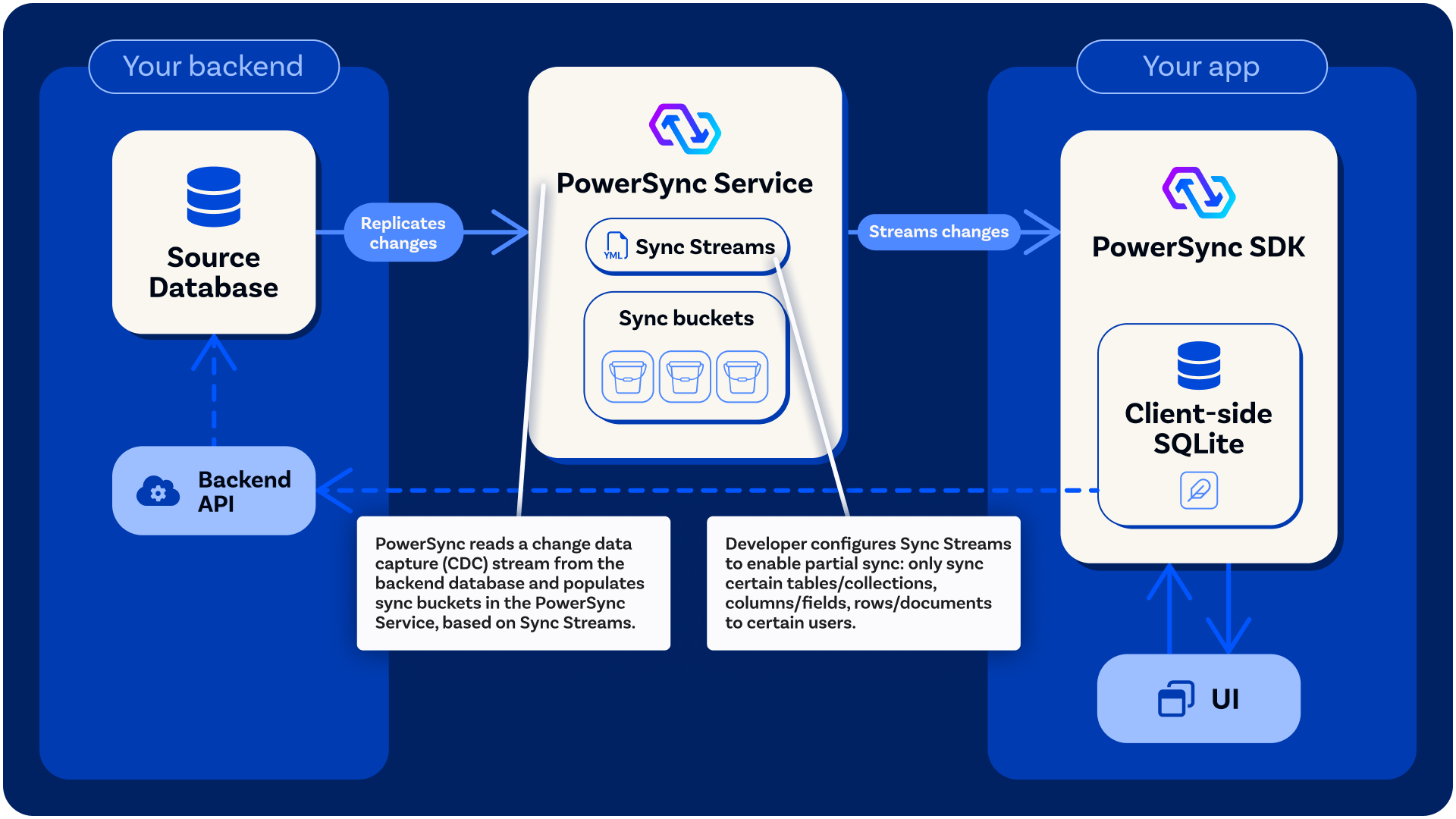
- Pre-processes the data according to your Sync Streams/Rules, splitting data into buckets (as explained above) and transforming the data if required.
- Persists each operation into the relevant buckets, ready to be streamed to clients.
Initial Replication vs. Incremental Replication
Whenever a new Sync Config is deployed, initial replication takes a snapshot of all tables or collections it references. With incremental reprocessing, a Sync Streams deployment only snapshots the streams that were added or changed. Clients continue using the current copy of the data until the new one is ready. After that, data is incrementally replicated using a change data capture stream. The specific mechanism depends on the source database type: Postgres logical replication, MongoDB change streams, the MySQL binlog, SQL Server Change Data Capture, or Convex document deltas.Convex: Mutations Are ACID Transactions
The PowerSync Service preserves source transaction boundaries when replicating. For Convex, mutations are ACID transactions. When a mutation writes multiple documents, Convex exposes those writes indocument_deltas with the same commit timestamp, and PowerSync replicates all writes from the same mutation together as one batch. Clients do not observe a partial result from a single Convex mutation.
Replication Batches
Replication is batched. The Service accumulates changes in memory and periodically flushes them to bucket storage. Each flush writes three different kinds of record:- Bucket operations: entries appended to the operation history of each affected bucket, as
PUTorREMOVEoperations. A single source row produces one operation per bucket it belongs to, so a row that is shared across many buckets produces many operations. - Parameter index entries: lookup entries that let the Service resolve which buckets a client should sync. These are written for rows that feed a stream’s parameters.
- Source records: one record per source row, holding the row along with the buckets and lookups it currently belongs to. The Service compares against this record to work out which bucket operations and parameter index entries to remove when the row later changes or is deleted.
Streaming Sync
As mentioned above, the other primary purpose of the PowerSync Service is streaming data to clients. The PowerSync Service authenticates clients/users using JWTs. Once a client/user is authenticated:- The PowerSync Service calculates a list of buckets for the user to sync based on their Sync Stream subscriptions (or Parameter Queries in legacy Sync Rules).
- The Service streams any operations added to those buckets since the last time the client/user connected.