

- Allowing client-side mutations to be uploaded and applied to the backend source database (Postgres, MongoDB, MySQL, SQL Server, or Convex). When you write to the client-side SQLite database provided by PowerSync, those mutations are also placed into an upload queue. The PowerSync Client SDK manages uploading of those mutations to your backend using the
uploadData()function that you define in your client-side backend connector implementation. YouruploadData()implementation should call your backend application API to apply the mutations to your source database. The reason why we designed PowerSync this way is to give you full control over things like server-side data validation and authorization of mutations, while PowerSync itself requires minimal permissions. - Authentication integration (optional): If you are implementing custom authentication (see below), your backend is responsible for securely generating the JWTs used by the PowerSync Client SDK to authenticate with the PowerSync Service.
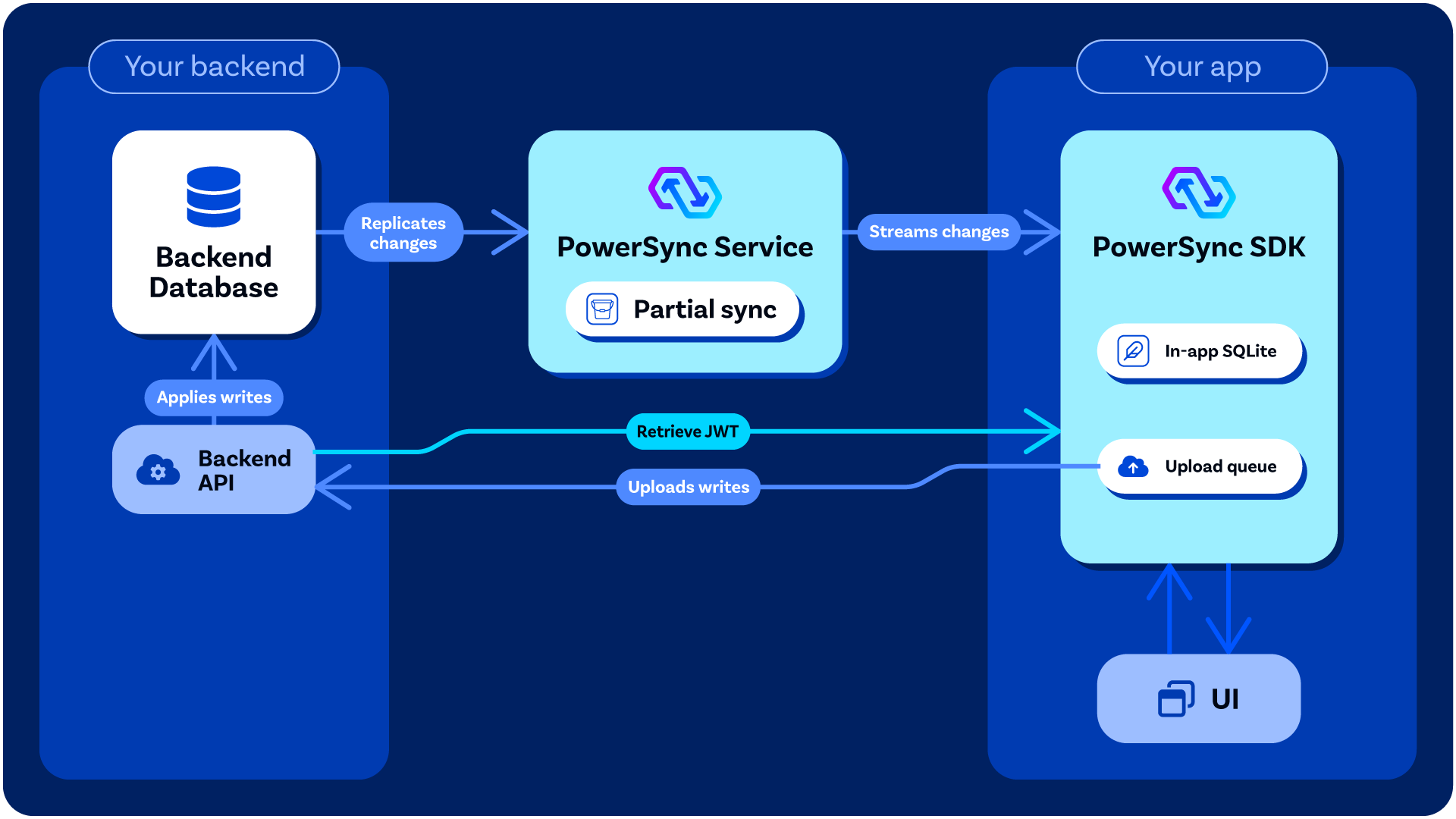
An overview of how PowerSync interacts with your backend application / API.
Processing Mutations From Clients
- Server-Side Implementation: Writing Client Changes provides guidance on how you can handle mutations in your backend application.
- Client-Side Implementation: See Client-Side Integration
Authentication (Optional)
Some authentication providers already generate JWTs for users which PowerSync can work with directly — see Authentication Setup. For others, some backend code/logic must be added to your backend application to generate the JWTs needed for PowerSync — see Custom Authentication. In your client-side backend connector implementation, you need to define thefetchCredentials() function so that it returns a JWT which can be used by PowerSync Client SDK to authenticate with the PowerSync Service.
Backend Options
If you already have some kind of backend application as part of your stack, it’s best to use that existing backend. Otherwise, there are several options for what you can use: (this is not an exhaustive list)Custom Backend
Our Example Projects page provides simple reference implementations of custom backends (e.g. Node.js, Django, Rails, .NET, etc.)Backend-as-a-Service / Developer Platforms
There are several backend-as-a-service developer platforms that work well with PowerSync, for example:- Supabase (for Postgres): Several of our demo apps demonstrate how to use Supabase as the Postgres-based backend. Supabase provides both an authentication service, PostgREST data APIs, and edge functions for more custom logic. See our integration guide.
- Neon (for Postgres): Similarly to Supabase, Neon provides PostgREST data APIs and an authentication service. See our integration guide.