

Create a PowerSync Instance
- Dashboard
- CLI
When creating a project in the PowerSync Dashboard, Development and Production instances of the PowerSync Service will be created by default. Select the instance you want to configure.If you need to create a new instance, follow the steps below.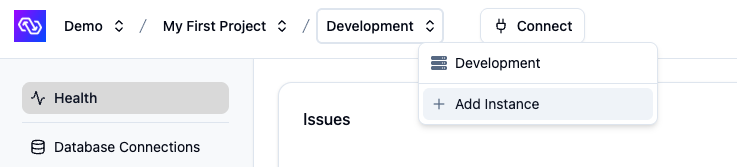
- In the dashboard, select your project and open the instance selection dropdown. Click Add Instance.
- Give your instance a name, such as “Production”.
- [Optional] You can change the default cloud region. Available regions are US, EU, JP (Japan), AU (Australia), BR (Brazil), and IN (India).
- Note: Additional cloud regions will be considered on request, especially for customers on our Enterprise plan. Please contact us if you need a different region.
- Click Create Instance.
Configure Your Instance
A new instance needs three things before clients can sync:- A connection to your source database. See Source Database Connection.
- Client authentication. See Authentication Setup. When getting started, you can use temporary development tokens instead of setting up a full auth provider.
- A sync configuration defining what data syncs to which clients, written as Sync Streams.
service.yaml and the sync configuration in sync-config.yaml; run powersync deploy to apply changes.
Other lower-level instance options, such as compacting buckets and deprovisioning, are available in the Dashboard under the instance’s Settings view. The CLI has corresponding commands for most of these operations.
For more information, see:
- PowerSync Dashboard documentation
- PowerSync CLI documentation