> ## Documentation Index
> Fetch the complete documentation index at: https://docs.powersync.com/llms.txt
> Use this file to discover all available pages before exploring further.

# Deploy PowerSync Service on Coolify

> Deploy the self-hosted PowerSync Service on Coolify with Docker Compose.

[Coolify](https://coolify.io/) is an open-source, self-hosted platform that simplifies the deployment and management of applications, databases, and services on your own infrastructure.
Think of it as a self-hosted alternative to platforms like Heroku or Netlify.

<Warning>
  Before following this guide, you should:

  * Read through the [Service Configuration](/configuration/powersync-service/self-hosted-instances)
    guide to understand the requirements and configuration options. This guide assumes you have already done so, and will only cover the Coolify specific setup.
  * Have Coolify installed and running.
</Warning>

## Background

For the PowerSync Service to function correctly, you will need:

* A database,
* Authentication service, and
* Data upload service.

The easiest way to get started is to use **Supabase** as it provides all three. However, you can also use a different database, and custom authentication and data upload services.

## Steps

<AccordionGroup>
  <Accordion title="Step 1: Create Docker Compose Empty resource">
    Add the [`Compose file`](#base-docker-compose-yaml-file) as a Docker Compose Empty resource to your project.

    <video controls className="w-full aspect-video" src="https://mintcdn.com/powersync/lquPOu2QW4XM9BQW/images/coolify/Add_resource.mp4?fit=max&auto=format&n=lquPOu2QW4XM9BQW&q=85&s=f0129439d520b8ab5b9ac470a7126479" data-path="images/coolify/Add_resource.mp4" />
  </Accordion>

  <Accordion title="Step 2: Update environment variables and config files">
    Update the environment variables and config files.

    <video controls className="w-full aspect-video" src="https://mintcdn.com/powersync/lquPOu2QW4XM9BQW/images/coolify/Update_config.mp4?fit=max&auto=format&n=lquPOu2QW4XM9BQW&q=85&s=b0506e271649e01845be34774f48a05c" data-path="images/coolify/Update_config.mp4" />

    Instructions for each can be found in the [Configuration options](#configuration-options) section.
  </Accordion>

  <Accordion title="Step 3: Deploy the PowerSync Service">
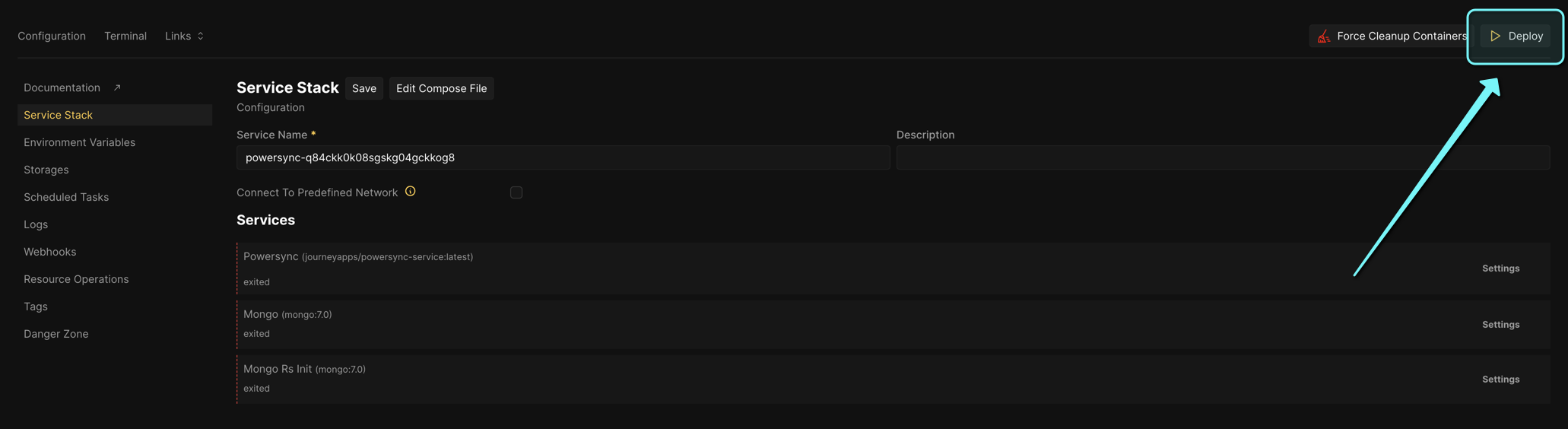
    Click on the `Deploy` button to deploy the PowerSync Service.

    <Frame>
      <img src="https://mintcdn.com/powersync/lquPOu2QW4XM9BQW/images/coolify/powersync_deploy.png?fit=max&auto=format&n=lquPOu2QW4XM9BQW&q=85&s=74d4c9256b738ced1ee7ced9ebf52333" width="2062" height="564" data-path="images/coolify/powersync_deploy.png" />
    </Frame>

    The PowerSync Service will now be available at

    * `http://localhost:8080` if default config was used, or
    * `http://{your_coolify_domain}:{PS_PORT}` if a custom domain or port was specified.

    To check the health of the PowerSync Service, see [Health Checks](/maintenance-ops/self-hosting/healthchecks).
  </Accordion>
</AccordionGroup>

## Configuration Options

The following configuration options should be updated:

* Environment variables
* `sync-config.yaml` file (according to your data requirements)
* `service.yaml` file

<AccordionGroup>
  <Accordion title="Supabase">
    <Tabs>
      <Tab title="Environment variables">
        <table>
          <thead>
            <tr>
              <th>Environment Variable</th>
              <th>Value</th>
            </tr>
          </thead>

          <tbody>
            <tr>
              <td><code>PS\_DATABASE\_TYPE</code></td>
              <td>postgresql</td>
            </tr>

            <tr>
              <td><code>PS\_DATABASE\_URI</code></td>
              <td>**Connection string obtained from Supabase** <br />See step 5 in [Connect PowerSync to Your Supabase](/integrations/supabase/guide#connect-powersync-to-your-supabase) </td>
            </tr>

            <tr>
              <td><code>PS\_PORT</code></td>
              <td>**Keep default value (8080)**</td>
            </tr>

            <tr>
              <td><code>PS\_MONGO\_URI</code></td>
              <td>mongodb://mongo:27017</td>
            </tr>

            <tr>
              <td><code>PS\_JWKS\_URL</code></td>
              <td>**Keep default value**</td>
            </tr>
          </tbody>
        </table>
      </Tab>

      <Tab title="PowerSync config">
        ```yaml {5} theme={null}
        ...
        # Client (application end user) authentication settings
        client_auth:
            # Enable this if using Supabase Auth
            supabase: true
        ...
        ```
      </Tab>
    </Tabs>
  </Accordion>

  <Accordion title="Custom">
    <Tabs>
      <Tab title="Environment variables">
        <table>
          <thead>
            <tr>
              <th>Environment Variable</th>
              <th>Value</th>
            </tr>
          </thead>

          <tbody>
            <tr>
              <td><code>PS\_DATABASE\_TYPE</code></td>
              <td>postgresql OR mongodb OR mysql OR SQL Server</td>
            </tr>

            <tr>
              <td><code>PS\_DATABASE\_URI</code></td>
              <td>The database connection URI (according to your database type) where your data is stored.</td>
            </tr>

            <tr>
              <td><code>PS\_PORT</code></td>
              <td>**Default value (8080)** You can change this if you want the PowerSync Service to be available on a different port.</td>
            </tr>

            <tr>
              <td><code>PS\_MONGO\_URI</code></td>
              <td>mongodb://mongo:27017</td>
            </tr>

            <tr>
              <td><code>PS\_JWKS\_URL</code></td>
              <td>The URL of the JWKS endpoint of your authentication service.</td>
            </tr>
          </tbody>
        </table>
      </Tab>

      <Tab title="PowerSync config">
        ```yaml {5, 11-15,18, 23} theme={null}
        ...
        # Client (application end user) authentication settings
        client_auth:
            # Enable this if using Supabase Auth
            supabase: false

            # JWKS URIs can be specified here
            jwks_uri: !env PS_JWKS_URL

            # Optional static collection of public keys for JWT verification
            jwks:
                keys:
                    - kty: 'oct'
                      k: 'use_a_better_token_in_production'
                      alg: 'HS256'

            # JWKS audience
            audience: ["powersync-dev", "powersync", "http://localhost:8080"]

        api:
            tokens:
                # These tokens are used for local admin API route authentication
                - use_a_better_token_in_production
        ```
      </Tab>
    </Tabs>
  </Accordion>
</AccordionGroup>

## Base `Compose` File

The following Compose file serves as a universal starting point for deploying the PowerSync Service on Coolify.

<Accordion title="Compose file">
  ```yaml theme={null}
  services:
  mongo:
      image: mongo:7.0
      command: --replSet rs0 --bind_ip_all --quiet
      restart: unless-stopped
      ports:
      - 27017:27017
      volumes:
      - mongo_storage:/data/db

  # Initializes the MongoDB replica set. This service will not usually be actively running
  mongo-rs-init:
      image: mongo:7.0
      depends_on:
      - mongo
      restart: on-failure
      entrypoint:
      - bash
      - -c
      - 'mongosh --host mongo:27017 --eval ''try{rs.status().ok && quit(0)} catch {} rs.initiate({_id: "rs0", version: 1, members: [{ _id: 0, host : "mongo:27017" }]})'''

  # PowerSync Service
  powersync:
      image: journeyapps/powersync-service:latest
      container_name: powersync
      depends_on:
      - mongo-rs-init
      command: [ "start", "-r", "unified"]
      restart: unless-stopped
      environment:
      - NODE_OPTIONS="--max-old-space-size=1000"
      - POWERSYNC_CONFIG_PATH=/home/config/service.yaml
      - PS_DATABASE_TYPE=${PS_DEMO_BACKEND_DATABASE_TYPE:-postgresql}
      - PS_DATABASE_URI=${PS_DATABASE_URI:-postgresql://postgres:postgres@localhost:5432/postgres}
      - PS_PORT=${PS_PORT:-8080}
      - PS_MONGO_URI=${PS_MONGO_URI:-mongodb://mongo:27017}
      - PS_SUPABASE_AUTH=${USE_SUPABASE_AUTH:-false}
      - PS_JWKS_URL=${PS_JWKS_URL:-http://localhost:6060/api/auth/keys}
      ports:
      - ${PS_PORT}:${PS_PORT}
      volumes:
      - ./volumes/config:/home/config
      - type: bind
          source: ./volumes/config/sync-config.yaml
          target: /home/config/sync-config.yaml
          content: |
          config:
              edition: 3
          streams:
              user_list_data:
              # Sync all lists and todos for the authenticated user
              auto_subscribe: true
              queries:
                  - SELECT * FROM lists WHERE owner_id = auth.user_id()
                  - SELECT * FROM todos WHERE list_id IN (SELECT id FROM lists WHERE owner_id = auth.user_id())
      - type: bind
          source: ./volumes/config/service.yaml
          target: /home/config/service.yaml
          content: |
          # yaml-language-server: $schema=../schema/schema.json
          # Note that this example uses YAML custom tags for environment variable substitution.
          # Using `!env [variable name]` will substitute the value of the environment variable named
          # [variable name].
          
          # migrations:
          #   # Migrations run automatically by default.
          #   # Setting this to true will skip automatic migrations.
          #   # Migrations can be triggered externally by altering the container `command`.
          #   disable_auto_migration: true
          
          # Settings for telemetry reporting
          # See https://docs.powersync.com/self-hosting/telemetry
          telemetry:
              # Opt out of reporting anonymized usage metrics to PowerSync telemetry service
              disable_telemetry_sharing: false
          
          # Settings for source database replication
          replication:
              # Specify database connection details
              # Note only 1 connection is currently supported
              # Multiple connection support is on the roadmap
              connections:
              - type: !env PS_DATABASE_TYPE
                  # The PowerSync server container can access the Postgres DB via the DB's service name.
                  # In this case the hostname is pg-db
          
                  # The connection URI or individual parameters can be specified.
                  # Individual params take precedence over URI params
                  uri: !env PS_BACKEND_DATABASE_URI
          
                  # Or use individual params
          
                  # hostname: pg-db # From the Docker Compose service name
                  # port: 5432
                  # database: postgres
                  # username: postgres
                  # password: mypassword
          
                  # SSL settings
                  sslmode: disable # 'verify-full' (default) or 'verify-ca' or 'disable'
                  # 'disable' is OK for local/private networks, not for public networks
          
                  # Required for verify-ca, optional for verify-full
                  # This should be the certificate(s) content in PEM format
                  # cacert: !env PS_PG_CA_CERT
          
                  # Include a certificate here for HTTPs
                  # This should be the certificate content in PEM format
                  # client_certificate: !env PS_PG_CLIENT_CERT
                  # This should be the key content in PEM format
                  # client_private_key: !env PS_PG_CLIENT_PRIVATE_KEY
          
          # This is valid if using the `mongo` service defined in `ps-mongo.yaml`
          
          # Connection settings for bucket storage
          storage:
              type: mongodb
              uri: !env PS_MONGO_URI
              # Use these if authentication is required. The user should have `readWrite` and `dbAdmin` roles
              # username: my-mongo-user
              # password: my-password
          
          # The port which the PowerSync API server will listen on
          port: !env PS_PORT
          
          # Specify Sync Streams (or legacy Sync Rules)
          sync_config:
              path: /home/config/sync-config.yaml
          
          # Client (application end user) authentication settings
          client_auth:
              # Enable this if using Supabase Auth
              supabase: true
          
              # JWKS URIs can be specified here
              jwks_uri: !env PS_JWKS_URL
          
              # Optional static collection of public keys for JWT verification
              # jwks:
              #   keys:
              #     - kty: 'RSA'
              #       n: !env PS_JWK_N
              #       e: !env PS_JWK_E
              #       alg: 'RS256'
              #       kid: !env PS_JWK_KID
          
              # JWKS audience
              audience: ["powersync-dev", "powersync"]
          
          api:
              tokens:
              # These tokens are used for local admin API route authentication
              - use_a_better_token_in_production
  ```
</Accordion>
