> ## Documentation Index
> Fetch the complete documentation index at: https://docs.powersync.com/llms.txt
> Use this file to discover all available pages before exploring further.
# PowerSync Cloud Instances
> Create and configure PowerSync Cloud instances with a database connection.
## Create a PowerSync Instance
When creating a project in the [PowerSync Dashboard](https://dashboard.powersync.com/), *Development* and *Production* instances of the PowerSync Service will be created by default. Select the instance you want to configure.
If you need to create a new instance, follow the steps below.
1. In the dashboard, select your project and open the instance selection dropdown. Click **Add Instance**.
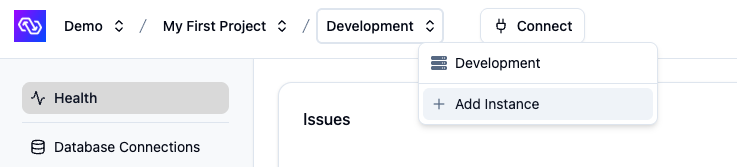 2. Give your instance a name, such as "Production".
3. \[Optional] You can change the default cloud region from US to EU, JP (Japan), AU (Australia) or BR (Brazil) if desired.
* Note: Additional cloud regions will be considered on request, especially for customers on our Enterprise plan. Please [contact us](/resources/contact-us) if you need a different region.
4. Click **Create Instance**.
## Instance Settings
After creating an instance, you can configure various settings through the [PowerSync Dashboard](https://dashboard.powersync.com/):
* **Database Connections**: Connect your instance to your source database. See [Source Database Connection](/configuration/source-db/connection) for details.
* **Client Auth**: Configure how clients authenticate. See [Authentication Setup](/configuration/auth/overview) for details.
* **Sync Streams / Sync Rules (legacy)**: Define what data to sync to clients. See [Sync Streams & Sync Rules Overview](/sync/overview) for details.
* **Settings**: Advanced instance-specific settings.
For more information about managing instances, see the [PowerSync Dashboard](/tools/powersync-dashboard) documentation.
2. Give your instance a name, such as "Production".
3. \[Optional] You can change the default cloud region from US to EU, JP (Japan), AU (Australia) or BR (Brazil) if desired.
* Note: Additional cloud regions will be considered on request, especially for customers on our Enterprise plan. Please [contact us](/resources/contact-us) if you need a different region.
4. Click **Create Instance**.
## Instance Settings
After creating an instance, you can configure various settings through the [PowerSync Dashboard](https://dashboard.powersync.com/):
* **Database Connections**: Connect your instance to your source database. See [Source Database Connection](/configuration/source-db/connection) for details.
* **Client Auth**: Configure how clients authenticate. See [Authentication Setup](/configuration/auth/overview) for details.
* **Sync Streams / Sync Rules (legacy)**: Define what data to sync to clients. See [Sync Streams & Sync Rules Overview](/sync/overview) for details.
* **Settings**: Advanced instance-specific settings.
For more information about managing instances, see the [PowerSync Dashboard](/tools/powersync-dashboard) documentation.