> ## Documentation Index
> Fetch the complete documentation index at: https://docs.powersync.com/llms.txt
> Use this file to discover all available pages before exploring further.
# Authentication Setup
> Set up JWT-based client authentication for PowerSync using development tokens, supported auth providers like Auth0 and Firebase, or custom JWTs.
## Client Authentication
PowerSync clients (i.e. apps used by your users that embed the PowerSync Client SDK) authenticate against the server-side [PowerSync Service](/architecture/powersync-service) using [JWTs](https://jwt.io/) (signed tokens).
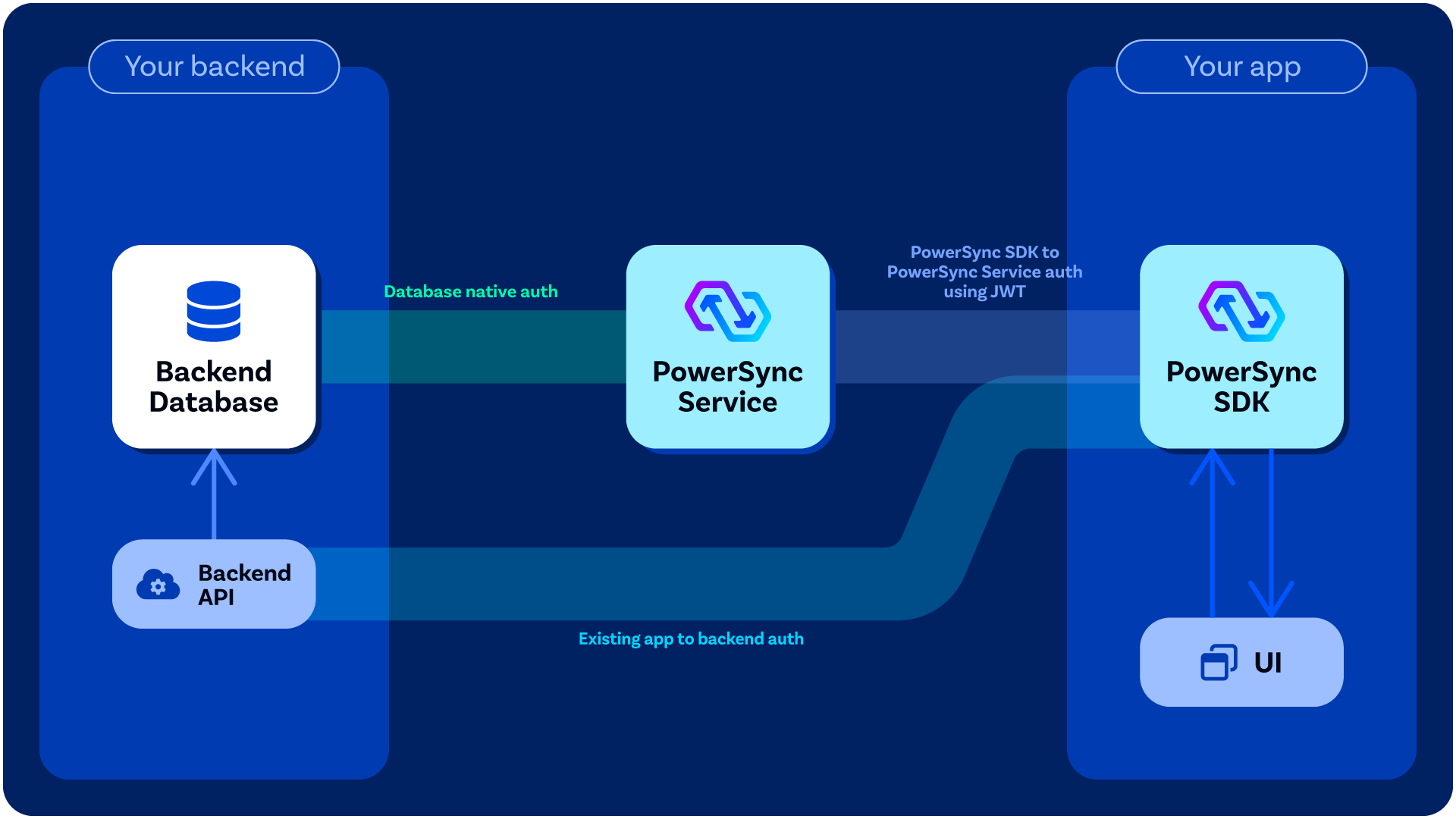 When you call [`connect()`](/intro/setup-guide#connect-to-powersync-service-instance) on the client-side [PowerSync database](/intro/setup-guide#instantiate-the-powersync-database), you pass a [*backend connector*](/configuration/app-backend/client-side-integration#‘backend-connector’) as an argument to it, in which you define a `fetchCredentials()` function that must return a JWT as well the endpoint URL for the PowerSync Service instance that the client will connect to. See [here](/configuration/app-backend/client-side-integration#example-implementation) for example implementations. Your `fetchCredentials()` function will automatically be called by the PowerSync Client SDK whenever it needs a fresh JWT - see [When `fetchCredentials()` is Called](/configuration/app-backend/client-side-integration#when-fetchcredentials-is-called) for details on the specific conditions and timing.
## Client Authentication Options
### Development & Testing
For a quick way to get up and running during development, you can generate [Development Tokens](/configuration/auth/development-tokens) directly from the [PowerSync Dashboard](https://dashboard.powersync.com/) (PowerSync Cloud) or [locally](/configuration/auth/development-tokens#self-hosted) with a self-hosted setup.
### Proper Authentication Integration (Needed for Production)
**Use Existing JWT from Auth Provider:** Some authentication providers already generate JWTs for users which PowerSync can verify directly — see [Common Authentication Providers](#common-authentication-providers) below. In this scenario, your [`fetchCredentials()` function](#client-authentication) can return the existing JWT from your client-side state.
**Custom Auth Integration: Generate JWTs:** For others, some backend code must be added to your application backend to generate the JWTs needed for PowerSync — see [Custom Authentication](/configuration/auth/custom). In this scenario, your `fetchCredentials()` function should make an API call to your [backend application](/configuration/app-backend/setup) to obtain a JWT.
## Common Authentication Providers
PowerSync supports JWT-based authentication from various providers. The table below shows commonly used authentication providers, their JWKS URLs, and any specific configuration requirements.
Scroll the table horizontally.
| Provider | Configuration Notes | Documentation | JWKS URL |
| ----------------------------------------- | ---------------------------------------- | ---------------------------------------------------------------------------------------------------------------------------------------------- | ------------------------------------------------------------------------------------------- |
| **Supabase** | Uses Supabase's **JWT Secret** | [Supabase Auth Setup](/configuration/auth/supabase-auth) | Direct integration available |
| **Firebase Auth / GCP Identity Platform** | JWT Audience: Firebase project ID | [Firebase Auth Setup](/configuration/auth/firebase-auth) | `https://www.googleapis.com/service_accounts/v1/jwk/securetoken@system.gserviceaccount.com` |
| **Auth0** | JWT Audience: PowerSync instance URL | [Auth0 Setup](/configuration/auth/auth0) | `https://{auth0-domain}/.well-known/jwks.json` |
| **Clerk** | Additional configuration may be required | [Clerk Documentation](https://clerk.com/docs/backend-requests/making/jwt-templates#create-a-jwt-template) | `https://{yourClerkDomain}/.well-known/jwks.json` |
| **Stytch** | Additional configuration may be required | [Stytch Documentation](https://stytch.com/docs/api/jwks-get) | `https://{live_or_test}.stytch.com/v1/sessions/jwks/{project-id}` |
| **Keycloak** | Additional configuration may be required | [Keycloak Documentation](https://documentation.cloud-iam.com/how-to-guides/configure-remote-jkws.html) | `https://{your-keycloak-domain}/auth/realms/{realm-name}/protocol/openid-connect/certs` |
| **Amazon Cognito** | Additional configuration may be required | [Cognito Documentation](https://docs.aws.amazon.com/cognito/latest/developerguide/amazon-cognito-user-pools-using-tokens-verifying-a-jwt.html) | `https://cognito-idp.{region}.amazonaws.com/{userPoolId}/.well-known/jwks.json` |
| **Azure AD** | Additional configuration may be required | [Azure AD Documentation](https://learn.microsoft.com/en-us/entra/identity-platform/access-tokens) | `https://login.microsoftonline.com/{tenantId}/discovery/v2.0/keys` |
| **Google Identity** | Additional configuration may be required | [Google Identity Documentation](https://developers.google.com/identity/openid-connect/openid-connect#discovery) | `https://www.googleapis.com/oauth2/v3/certs` |
| **SuperTokens** | Additional configuration may be required | [SuperTokens Documentation](https://supertokens.com/docs/quickstart/integrations/aws-lambda/session-verification/using-jwt-authorizer) | `https://{YOUR_SUPER_TOKENS_CORE_CONNECTION_URI}/.well-known/jwks.json` |
| **WorkOS** | Additional configuration may be required | [WorkOS Documentation](https://workos.com/docs/reference/user-management/session-tokens/jwks) | `https://api.workos.com/sso/jwks/{YOUR_CLIENT_ID}` |
| **Custom JWT** | See custom auth requirements | [Custom Auth Setup](/configuration/auth/custom) | Your own JWKS endpoint |
When you call [`connect()`](/intro/setup-guide#connect-to-powersync-service-instance) on the client-side [PowerSync database](/intro/setup-guide#instantiate-the-powersync-database), you pass a [*backend connector*](/configuration/app-backend/client-side-integration#‘backend-connector’) as an argument to it, in which you define a `fetchCredentials()` function that must return a JWT as well the endpoint URL for the PowerSync Service instance that the client will connect to. See [here](/configuration/app-backend/client-side-integration#example-implementation) for example implementations. Your `fetchCredentials()` function will automatically be called by the PowerSync Client SDK whenever it needs a fresh JWT - see [When `fetchCredentials()` is Called](/configuration/app-backend/client-side-integration#when-fetchcredentials-is-called) for details on the specific conditions and timing.
## Client Authentication Options
### Development & Testing
For a quick way to get up and running during development, you can generate [Development Tokens](/configuration/auth/development-tokens) directly from the [PowerSync Dashboard](https://dashboard.powersync.com/) (PowerSync Cloud) or [locally](/configuration/auth/development-tokens#self-hosted) with a self-hosted setup.
### Proper Authentication Integration (Needed for Production)
**Use Existing JWT from Auth Provider:** Some authentication providers already generate JWTs for users which PowerSync can verify directly — see [Common Authentication Providers](#common-authentication-providers) below. In this scenario, your [`fetchCredentials()` function](#client-authentication) can return the existing JWT from your client-side state.
**Custom Auth Integration: Generate JWTs:** For others, some backend code must be added to your application backend to generate the JWTs needed for PowerSync — see [Custom Authentication](/configuration/auth/custom). In this scenario, your `fetchCredentials()` function should make an API call to your [backend application](/configuration/app-backend/setup) to obtain a JWT.
## Common Authentication Providers
PowerSync supports JWT-based authentication from various providers. The table below shows commonly used authentication providers, their JWKS URLs, and any specific configuration requirements.
Scroll the table horizontally.
| Provider | Configuration Notes | Documentation | JWKS URL |
| ----------------------------------------- | ---------------------------------------- | ---------------------------------------------------------------------------------------------------------------------------------------------- | ------------------------------------------------------------------------------------------- |
| **Supabase** | Uses Supabase's **JWT Secret** | [Supabase Auth Setup](/configuration/auth/supabase-auth) | Direct integration available |
| **Firebase Auth / GCP Identity Platform** | JWT Audience: Firebase project ID | [Firebase Auth Setup](/configuration/auth/firebase-auth) | `https://www.googleapis.com/service_accounts/v1/jwk/securetoken@system.gserviceaccount.com` |
| **Auth0** | JWT Audience: PowerSync instance URL | [Auth0 Setup](/configuration/auth/auth0) | `https://{auth0-domain}/.well-known/jwks.json` |
| **Clerk** | Additional configuration may be required | [Clerk Documentation](https://clerk.com/docs/backend-requests/making/jwt-templates#create-a-jwt-template) | `https://{yourClerkDomain}/.well-known/jwks.json` |
| **Stytch** | Additional configuration may be required | [Stytch Documentation](https://stytch.com/docs/api/jwks-get) | `https://{live_or_test}.stytch.com/v1/sessions/jwks/{project-id}` |
| **Keycloak** | Additional configuration may be required | [Keycloak Documentation](https://documentation.cloud-iam.com/how-to-guides/configure-remote-jkws.html) | `https://{your-keycloak-domain}/auth/realms/{realm-name}/protocol/openid-connect/certs` |
| **Amazon Cognito** | Additional configuration may be required | [Cognito Documentation](https://docs.aws.amazon.com/cognito/latest/developerguide/amazon-cognito-user-pools-using-tokens-verifying-a-jwt.html) | `https://cognito-idp.{region}.amazonaws.com/{userPoolId}/.well-known/jwks.json` |
| **Azure AD** | Additional configuration may be required | [Azure AD Documentation](https://learn.microsoft.com/en-us/entra/identity-platform/access-tokens) | `https://login.microsoftonline.com/{tenantId}/discovery/v2.0/keys` |
| **Google Identity** | Additional configuration may be required | [Google Identity Documentation](https://developers.google.com/identity/openid-connect/openid-connect#discovery) | `https://www.googleapis.com/oauth2/v3/certs` |
| **SuperTokens** | Additional configuration may be required | [SuperTokens Documentation](https://supertokens.com/docs/quickstart/integrations/aws-lambda/session-verification/using-jwt-authorizer) | `https://{YOUR_SUPER_TOKENS_CORE_CONNECTION_URI}/.well-known/jwks.json` |
| **WorkOS** | Additional configuration may be required | [WorkOS Documentation](https://workos.com/docs/reference/user-management/session-tokens/jwks) | `https://api.workos.com/sso/jwks/{YOUR_CLIENT_ID}` |
| **Custom JWT** | See custom auth requirements | [Custom Auth Setup](/configuration/auth/custom) | Your own JWKS endpoint |