> ## Documentation Index
> Fetch the complete documentation index at: https://docs.powersync.com/llms.txt
> Use this file to discover all available pages before exploring further.
# App Backend Setup
> Configure your app backend to process client-side mutations from the PowerSync upload queue.
PowerSync generally assumes that you have some kind of "backend application" as part of your overall application architecture — whether it's a backend-as-a-service (e.g. Supabase), a custom backend (e.g. Node.js, Rails, Laravel, Django, ASP.NET), some kind of serverless cloud functions (e.g. Azure Functions, AWS Lambda, Google Cloud Functions, Cloudflare Workers, etc.), or any other equivalent system that allows you to run privileged logic securely.
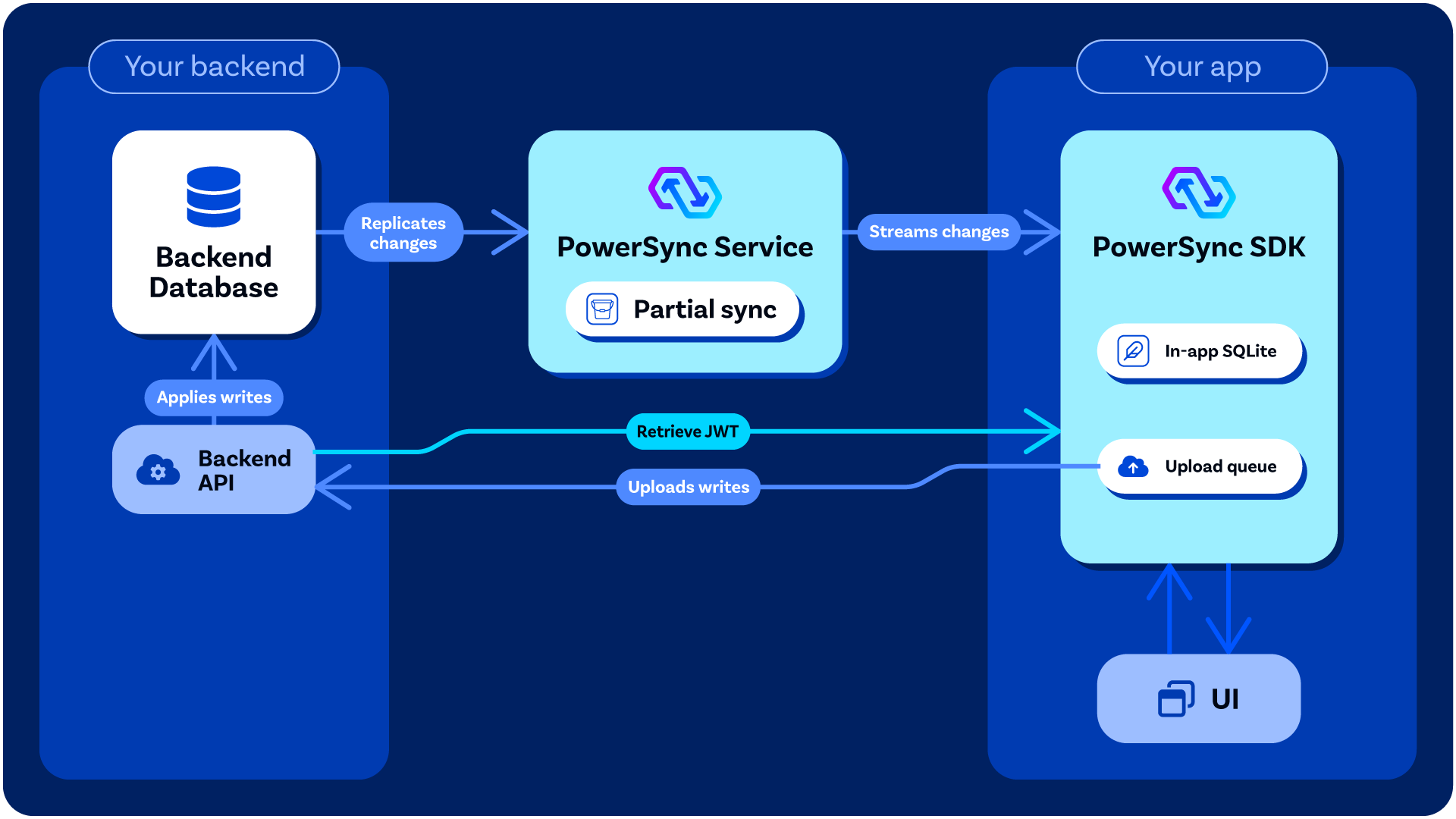
When you integrate PowerSync into your app project, PowerSync relies on that "backend application" for a few potential purposes:
1. **Allowing client-side mutations to be uploaded** and [applied](/handling-writes/writing-client-changes) to the backend source database (Postgres, MongoDB, MySQL, SQL Server, or Convex). When you write to the client-side SQLite database provided by PowerSync, those mutations are also placed into an [upload queue](/architecture/client-architecture#writing-data-via-sqlite-database-and-upload-queue). The PowerSync Client SDK manages uploading of those mutations to your backend using the `uploadData()` function that you define in your [client-side](/configuration/app-backend/client-side-integration) *backend connector* implementation. Your `uploadData()` implementation should call your backend application API to apply the mutations to your source database. The reason why we designed PowerSync this way is to give you full control over things like server-side data validation and authorization of mutations, while PowerSync itself requires minimal permissions.
2. **Authentication integration (optional):** *If* you are implementing custom authentication (see below), your backend is responsible for securely generating the [JWTs](/configuration/auth/overview) used by the PowerSync Client SDK to authenticate with the [PowerSync Service](/architecture/powersync-service).
If you will only use the backend for applying mutations and not for authentication, you can also use some kind of data API service or API platform (e.g. Hasura).
 ### Processing Mutations From Clients
* **Server-Side Implementation**: [Writing Client Changes](/handling-writes/writing-client-changes) provides guidance on how you can handle mutations in your backend application.
* **Client-Side Implementation**: See [Client-Side Integration](/configuration/app-backend/client-side-integration)
### Authentication (Optional)
Some authentication providers already generate JWTs for users which PowerSync can work with directly — see [Authentication Setup](/configuration/auth/overview).
For others, some backend code/logic must be added to your backend application to generate the JWTs needed for PowerSync — see [Custom Authentication](/configuration/auth/custom).
In your [client-side](/configuration/app-backend/client-side-integration) *backend connector* implementation, you need to define the `fetchCredentials()` function so that it returns a JWT which can be used by PowerSync Client SDK to authenticate with the [PowerSync Service](/architecture/powersync-service).
## Backend Options
If you already have some kind of backend application as part of your stack, it's best to use that existing backend. Otherwise, there are several options for what you can use: (this is not an exhaustive list)
### Custom Backend
Our [Example Projects](/intro/examples#backend-examples) page provides simple reference implementations of custom backends (e.g. Node.js, Django, Rails, .NET, etc.)
### Backend-as-a-Service / Developer Platforms
There are several backend-as-a-service developer platforms that work well with PowerSync, for example:
* **Supabase** (for Postgres): Several of our demo apps demonstrate how to use [Supabase](https://supabase.com/) as the Postgres-based backend. Supabase provides both an authentication service, PostgREST data APIs, and edge functions for more custom logic. See our [integration guide](/integrations/supabase/guide).
* **Neon** (for Postgres): Similarly to Supabase, [Neon](http://neon.tech/) provides PostgREST data APIs and an authentication service. See our [integration guide](/integrations/neon).
### Serverless Functions
You can use a serverless functions system like Azure Functions, AWS Lambda, Google Cloud Functions, Cloudflare Workers, Vercel Functions, Netlify Functions, Fastly Compute, Deno Deploy, etc.
### For MongoDB: PowerSync Hosted/Managed Option
For developers using MongoDB as a backend source database, an alternative option is to use CloudCode, a serverless cloud functions environment provided by a sibling product of PowerSync, that runs in the same cloud environment as PowerSync Cloud. We have a template that you can use as a turnkey starting point. See the [documentation](/configuration/app-backend/cloudcode).
### Processing Mutations From Clients
* **Server-Side Implementation**: [Writing Client Changes](/handling-writes/writing-client-changes) provides guidance on how you can handle mutations in your backend application.
* **Client-Side Implementation**: See [Client-Side Integration](/configuration/app-backend/client-side-integration)
### Authentication (Optional)
Some authentication providers already generate JWTs for users which PowerSync can work with directly — see [Authentication Setup](/configuration/auth/overview).
For others, some backend code/logic must be added to your backend application to generate the JWTs needed for PowerSync — see [Custom Authentication](/configuration/auth/custom).
In your [client-side](/configuration/app-backend/client-side-integration) *backend connector* implementation, you need to define the `fetchCredentials()` function so that it returns a JWT which can be used by PowerSync Client SDK to authenticate with the [PowerSync Service](/architecture/powersync-service).
## Backend Options
If you already have some kind of backend application as part of your stack, it's best to use that existing backend. Otherwise, there are several options for what you can use: (this is not an exhaustive list)
### Custom Backend
Our [Example Projects](/intro/examples#backend-examples) page provides simple reference implementations of custom backends (e.g. Node.js, Django, Rails, .NET, etc.)
### Backend-as-a-Service / Developer Platforms
There are several backend-as-a-service developer platforms that work well with PowerSync, for example:
* **Supabase** (for Postgres): Several of our demo apps demonstrate how to use [Supabase](https://supabase.com/) as the Postgres-based backend. Supabase provides both an authentication service, PostgREST data APIs, and edge functions for more custom logic. See our [integration guide](/integrations/supabase/guide).
* **Neon** (for Postgres): Similarly to Supabase, [Neon](http://neon.tech/) provides PostgREST data APIs and an authentication service. See our [integration guide](/integrations/neon).
### Serverless Functions
You can use a serverless functions system like Azure Functions, AWS Lambda, Google Cloud Functions, Cloudflare Workers, Vercel Functions, Netlify Functions, Fastly Compute, Deno Deploy, etc.
### For MongoDB: PowerSync Hosted/Managed Option
For developers using MongoDB as a backend source database, an alternative option is to use CloudCode, a serverless cloud functions environment provided by a sibling product of PowerSync, that runs in the same cloud environment as PowerSync Cloud. We have a template that you can use as a turnkey starting point. See the [documentation](/configuration/app-backend/cloudcode).