> ## Documentation Index
> Fetch the complete documentation index at: https://docs.powersync.com/llms.txt
> Use this file to discover all available pages before exploring further.
# SQLite Performance Optimization
> Optimize query performance in PowerSync client SDKs
PowerSync client SDKs use SQLite, and apply reasonable defaults to optimize performance:
1. For all native targets, [write-ahead logging](https://www.sqlite.org/wal.html) (WAL) is enabled to support concurrent reads and writes.
PowerSync also dispatches queries to multiple threads for parallelism.
With the JavaScript web SDK, a WAL-like option is [available on Chromium browsers](/client-sdks/reference/javascript-web#2-opfs-based-alternatives).
2. SDKs also configure connections for performance by enabling a large page cache of around 50MB and setting `pragma synchronous = normal` to avoid frequent fsync operations.
## Debugging Query Performance
Slow queries can have two causes:
1. The query itself is slow, e.g. because it reads a lot of rows or uses unoptimized joins not backed by an index.
The [Fixing Slow Queries](#fixing-slow-queries) section describes how these queries can be optimized.
2. The database is blocked. There can only be a single writer at a time, and the number of concurrent readers is bound
by an option set when opening the database. So a query that appears slow might actually be fast, having run
at an unfortunate time when the database was busy.
To understand the problem, having a trace of query runtimes available helps.
Enabling the `debugMode` flag in the [Web SDK](/client-sdks/reference/javascript-web) logs all SQL queries on the Performance timeline in Chrome's Developer Tools (after recording). This can help identify slow-running queries.
With the Dart SDK, queries are logged to the [Performance View in DevTools](https://docs.flutter.dev/tools/devtools/performance) by default outside of release builds.
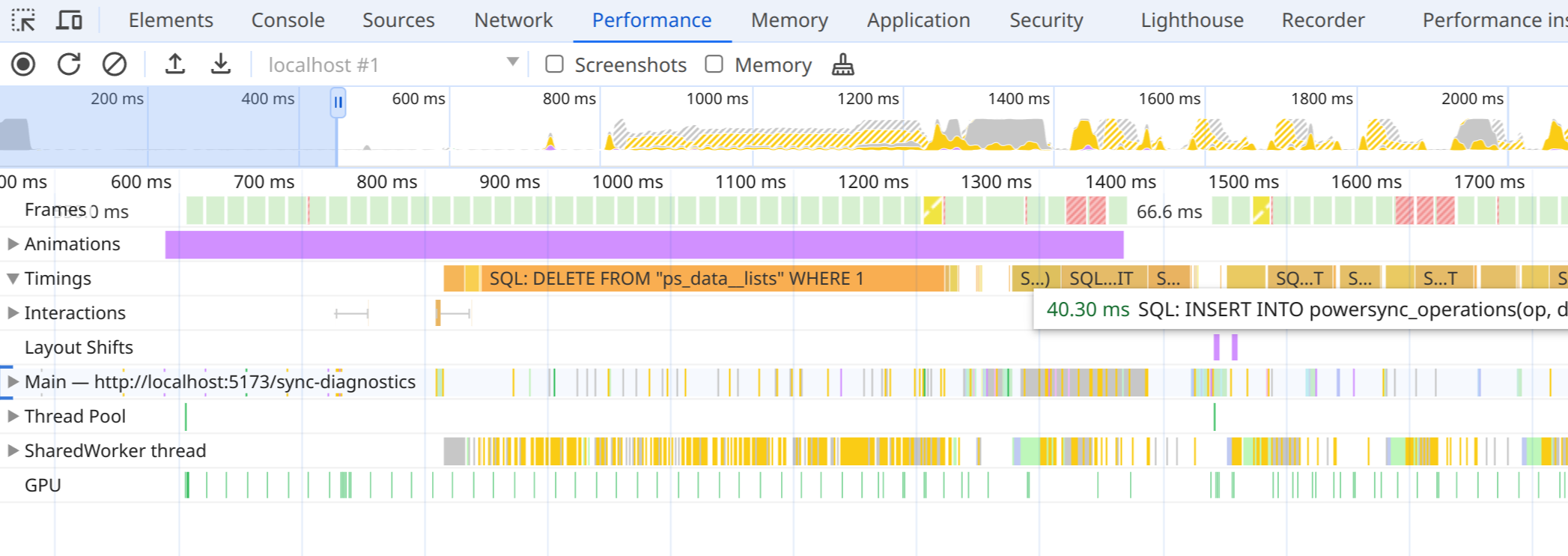 This includes:
* PowerSync queries from client code.
* Internal statements from PowerSync, including queries saving sync data, and begin/commit statements.
This excludes:
* The time spent waiting for the global transaction lock. It still includes all overhead in worker communication, so you generally won't see concurrent queries reflected in the trace.
* Internal statements from `powersync-sqlite-core`, used by the Sync client for Sync Stream bookkeeping.
Enable this mode when instantiating `PowerSyncDatabase`:
```js theme={null}
export const db = new PowerSyncDatabase({
schema: AppSchema,
database: {
dbFilename: 'powersync.db',
debugMode: true // Defaults to false. To enable in development builds, use
// debugMode: process.env.NODE_ENV !== 'production'
}
});
```
If this reveals it took too long for a read connection to become available, consider increasing the size of the connection pool
with the [maxReaders option](https://pub.dev/documentation/sqlite_async/latest/sqlite_async/SqliteOptions/maxReaders.html) (Dart),
[readWorkerCount](https://powersync-ja.github.io/powersync-js/node-sdk/globals) (Node.js) or
[additionalReaders](https://powersync-ja.github.io/powersync-js/web-sdk/globals#resolvedwebsqlopenoptions) (Web, only with `WASQLiteVFS.OPFSWriteAheadVFS`).
The Swift and Kotlin SDKs always use four read connections; React Native uses five.
For contention on the write connection, note that the PowerSync client processes changes from the PowerSync Service in a single write transaction
after they've been downloaded. Due to consistency requirements, this transaction cannot be split into multiple steps, and especially for a large initial
sync it can hold a write lock for several seconds.
## Fixing Slow Queries
If a query itself is expensive and takes a long time to run, several options can improve performance.
Some of these require a restructuring of your app's schema.
1. For auto-updating watched queries on frequently-changed tables, queries might run very often. Watched queries should
typically be cheap to run, as they otherwise risk blocking SQLite connections for too long. For more expensive queries
that still need to be watched, consider increasing their throttle to run them less often.
2. As an alternative to regular watched queries, use [High Performance Diffs](/client-sdks/high-performance-diffs),
which use triggers internally to only report changed rows back to your app.
3. Where possible, filter on the `id` column of tables to reduce the number of rows read, which makes queries more
efficient. When filtering on other columns of large tables, make sure these columns are covered by indexes declared
in your app's schema.
4. PowerSync tables are views over JSON data that extract columns by parsing from JSON each time a row is accessed.
While SQLite has a cache for parsed JSON, this can still be inefficient for queries computing on columns.
[Raw Tables](/client-sdks/advanced/raw-tables) let you use plain SQLite tables instead, which are faster to query
but require special consideration for migrations.
### Prepared Statement Cache
For cheap statements that run frequently, the cost of preparing a statement (making SQLite parse the SQL text and come up with a
query plan based on available indexes) can make up a substantial chunk of the total query runtime.
In the JavaScript Web and Dart SDKs, enable a cache of prepared statements when opening the database:
```typescript TypeScript theme={null}
const db = new PowerSyncDatabase({
schema,
database: {
dbFilename: 'my_database.db',
// Cache up to 64 prepared statements
preparedStatementsCache: 64,
},
});
```
```dart Dart theme={null}
final db = PowerSyncDatabase(
schema: Schema([...]),
path: 'my_database.db',
sqliteOptions: SqliteOptions(
// Cache up to 64 prepared statements
preparedStatementCacheSize: 64,
),
);
```
In both SDKs, each connection uses its own independent cache and the maximum size applies to those caches.
When the cache is full, the least-recently-used statement is evicted.
For more information, see the [documentation for JavaScript](https://powersync-ja.github.io/powersync-js/web-sdk/globals#preparedStatementsCache-1)
or [for Dart](https://pub.dev/documentation/powersync/latest/sqlite_async/SqliteOptions/preparedStatementCacheSize.html).
This includes:
* PowerSync queries from client code.
* Internal statements from PowerSync, including queries saving sync data, and begin/commit statements.
This excludes:
* The time spent waiting for the global transaction lock. It still includes all overhead in worker communication, so you generally won't see concurrent queries reflected in the trace.
* Internal statements from `powersync-sqlite-core`, used by the Sync client for Sync Stream bookkeeping.
Enable this mode when instantiating `PowerSyncDatabase`:
```js theme={null}
export const db = new PowerSyncDatabase({
schema: AppSchema,
database: {
dbFilename: 'powersync.db',
debugMode: true // Defaults to false. To enable in development builds, use
// debugMode: process.env.NODE_ENV !== 'production'
}
});
```
If this reveals it took too long for a read connection to become available, consider increasing the size of the connection pool
with the [maxReaders option](https://pub.dev/documentation/sqlite_async/latest/sqlite_async/SqliteOptions/maxReaders.html) (Dart),
[readWorkerCount](https://powersync-ja.github.io/powersync-js/node-sdk/globals) (Node.js) or
[additionalReaders](https://powersync-ja.github.io/powersync-js/web-sdk/globals#resolvedwebsqlopenoptions) (Web, only with `WASQLiteVFS.OPFSWriteAheadVFS`).
The Swift and Kotlin SDKs always use four read connections; React Native uses five.
For contention on the write connection, note that the PowerSync client processes changes from the PowerSync Service in a single write transaction
after they've been downloaded. Due to consistency requirements, this transaction cannot be split into multiple steps, and especially for a large initial
sync it can hold a write lock for several seconds.
## Fixing Slow Queries
If a query itself is expensive and takes a long time to run, several options can improve performance.
Some of these require a restructuring of your app's schema.
1. For auto-updating watched queries on frequently-changed tables, queries might run very often. Watched queries should
typically be cheap to run, as they otherwise risk blocking SQLite connections for too long. For more expensive queries
that still need to be watched, consider increasing their throttle to run them less often.
2. As an alternative to regular watched queries, use [High Performance Diffs](/client-sdks/high-performance-diffs),
which use triggers internally to only report changed rows back to your app.
3. Where possible, filter on the `id` column of tables to reduce the number of rows read, which makes queries more
efficient. When filtering on other columns of large tables, make sure these columns are covered by indexes declared
in your app's schema.
4. PowerSync tables are views over JSON data that extract columns by parsing from JSON each time a row is accessed.
While SQLite has a cache for parsed JSON, this can still be inefficient for queries computing on columns.
[Raw Tables](/client-sdks/advanced/raw-tables) let you use plain SQLite tables instead, which are faster to query
but require special consideration for migrations.
### Prepared Statement Cache
For cheap statements that run frequently, the cost of preparing a statement (making SQLite parse the SQL text and come up with a
query plan based on available indexes) can make up a substantial chunk of the total query runtime.
In the JavaScript Web and Dart SDKs, enable a cache of prepared statements when opening the database:
```typescript TypeScript theme={null}
const db = new PowerSyncDatabase({
schema,
database: {
dbFilename: 'my_database.db',
// Cache up to 64 prepared statements
preparedStatementsCache: 64,
},
});
```
```dart Dart theme={null}
final db = PowerSyncDatabase(
schema: Schema([...]),
path: 'my_database.db',
sqliteOptions: SqliteOptions(
// Cache up to 64 prepared statements
preparedStatementCacheSize: 64,
),
);
```
In both SDKs, each connection uses its own independent cache and the maximum size applies to those caches.
When the cache is full, the least-recently-used statement is evicted.
For more information, see the [documentation for JavaScript](https://powersync-ja.github.io/powersync-js/web-sdk/globals#preparedStatementsCache-1)
or [for Dart](https://pub.dev/documentation/powersync/latest/sqlite_async/SqliteOptions/preparedStatementCacheSize.html).